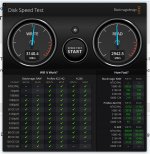
I recently purchased an Acasis TB4 NVME enclosure (the one with the fan and also supports various USB modes as well as Thunderbolt). My use case was quickly copying photos and videos from my TB5 equipped MacBook when away from home for transfer onto a desktop PC when I get home. It wasn’t worth an almost 3x premium for the TB5 model to save a few seconds on the initial copy.
As the maximum transfer speed at 40 Mbps is about 3500 MB/s, pretty much any Gen 4 SSD will be able to max out the link so look at the specs and reviews for ones that don’t get too hot in use ( I.e. don’t need a big heatsink) and the TBW (Terrabytes Written) rating. Some drives will allow you to write the full capacity of the drive every day for 5 years, whilst others have lower ratings.
One thing to watch out for with NVME drives is the sustained write speed. Most drives have a cache of faster nand which allows blisteringly fast write speeds, but only for short periods. Once this cache is full, the write speed of the drive will drop dramatically until the on board drive controller clears the cache after writing your data to the slower nand. I found this when copying memory cards onto my old laptop, when after about 20 seconds the copy speed would drop significantly (almost to zero), then stutter along at a much slower speed. I researched drives and found some that had a much higher sustained write speed after the initial cache was full, and swapped the original laptop drive for a Seagate Firecuda 520 drive which transformed the copy speeds onto the laptop as it barely seemed to slow down or stall. There were other WD and Samsung drives with similar performance, but these were (at the time) significantly more expensive for the same capacity. These days you can often get the “older” premium Gen 4 drives from WD and Samsung on sale for less than the Seagate drive I bought and which I’m now using in my Acasis TB4 enclosure. Not all SSD reviews will test the sustained write speed of a drive, an just report the peak figures, but if you are regularly copying tens of gigabytes or more of data it’s something you need to be aware of. Toms Hardware I found always tested the sustained write speeds.