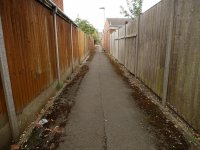
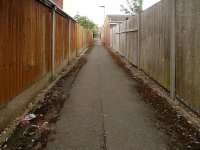
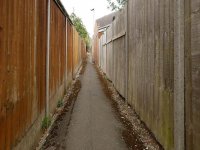
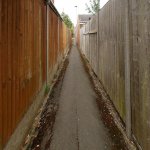
What looks better to you?

Crotal Bell

Suspended / Banned
Messages
3,470
Name
Keith
Edit My Images
Yes
I hear a lot of people suggesting to toggers to "try taking the photo from a lower angle" which I agree can be effective. On this occasion I much prefer the standing shot because my eye prefers the way the alleyway rises to the higher point in the top third.
I wanted to get the top of the first lamp post in both, and I would like to return and play with exposure and balance, plus when there is blue sky and a couple of clouds for the top of the picture.
Interested to know which of the two compositions people like most.

1 shot taken low down
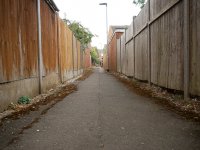
22 08 24 04.jpg

Standing shot which I prefer.
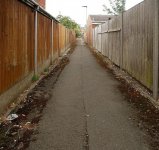
22 08 24 01.jpg
 
Definitely prefer the second,


Sloping verticals always look wrong to me, though I do appreciate that to many they add to the effect they want.

22 08 24 01b.jpg
 
Its the second one for me, sure some shots are better in a crouched position, but not this one.
 
Definitely the second. A greater sense of perspective but I prefer Sangoma's edit tbh
 
It depends why you took the shot. Last time I took a similar shot it was in order to add a young lady running and looking scared and a lower angle worked better.

Dave
 
Looks like you've just taken a subtle amount off the bottom to give the path a wider look at the base?
No, just the effect of straightening the post took it out of the frame, and of course that does make the bottom wider, especially only correcting at the bottom
 
No, just the effect of straightening the post took it out of the frame, and of course that does make the bottom wider, especially only correcting at the bottom
So you straighten the image and the fence on both sides?

My 12-60mm lens always seems to bend out with a little bit of wide angle or fisheye effect.

I guess that's probably common with a lot of lenses when you take this type of picture but I didn't know there was a way to straighten all the angles?

I only know how to tilt an image to straighten the horizon line, I didn't know you could pull an image straight on the left and right hand side, is that something in Lightroom?
 
So you straighten the image and the fence on both sides?

My 12-60mm lens always seems to bend out with a little bit of wide angle or fisheye effect.

I guess that's probably common with a lot of lenses when you take this type of picture but I didn't know there was a way to straighten all the angles?

I only know how to tilt an image to straighten the horizon line, I didn't know you could pull an image straight on the left and right hand side, is that something in Lightroom?


Yes, pull the bottom out on both sides, won't be exactly the same each side unless the camera was exactly in the centre.
The curvature from the lens I would correct first if needed.

Used affinity, takes a couple of seconds :)
 
Yes, pull the bottom out on both sides, won't be exactly the same each side unless the camera was exactly in the centre.
The curvature from the lens I would correct first if needed.

Used affinity, takes a couple of seconds :)
Cheers buddy.
 
I prefer the 2nd as the narrower passage gives a better sense of enclosure and claustrophobia from the solid fences
I'm really pleased you could see that, the second is a more realistic representation, the path is Indeed very narrow and claustrophobic.

Part of the reason why I like the second one the best is not only that the path rises higher in the image, but also that it is a true reflection of how the path looks and feels in real life.
 
In contrast to most, I preferred the top picture, because the bent verticals of the second are utterly ghastly to me. Sangomas edit is much better.
 
In contrast to most, I preferred the top picture, because the bent verticals of the second are utterly ghastly to me. Sangomas edit is much better.
Interesting and I can see what you're saying, and why you prefer it the edit of Pic2. Sangoma has taught me something there.

The only thing though is it makes the alleyway look wider than what it appears in real life and takes away some of the claustrophobic narrow element. I like the straightened fence but I also like my original for having more of a narrow claustrophobic feeling.

This has been such a good thread for me because it gets me thinking about composition and editing and the feedback is so useful.
 
I just thought I would try to narrow the image by cropping from the sides, using the one supplied by Sangoma. Trying to get the straight sides but get more of a claustrophobic narrow feel back into the alleyway.

What I immediately notice is I did not level up the picture properly and therefore the fence panels on either side are not pleasing on the eye because they don't draw down to the same place at the bottom of the picture. Hope that makes sense but I think there's a big learning curve here on checking the small details before you press the shutter?
01 Ally.jpg
 
I just thought I would try to narrow the image by cropping from the sides, using the one supplied by Sangoma. Trying to get the straight sides but get more of a claustrophobic narrow feel back into the alleyway.

What I immediately notice is I did not level up the picture properly and therefore the fence panels on either side are not pleasing on the eye because they don't draw down to the same place at the bottom of the picture. Hope that makes sense but I think there's a big learning curve here on checking the small details before you press the shutter?
View attachment 431860


I do think that how being at the scene and looking at the photo results in different interpretations to different people looking.

For this reason I think making adjustments is valid, I think this looks more claustrophobic, just by altering the perspective.

22 08 24 01d.jpg
 
I do think that how being at the scene and looking at the photo results in different interpretations to different people looking.

For this reason I think making adjustments is valid, I think this looks more claustrophobic, just by altering the perspective.

View attachment 431861
That's really taking it narrow :) Bit too much for me and don't like the effect on the lamp and roof.
Nevertheless it's a great example of what can be achieved when you want to create effects and images.
 
That's really taking it narrow :) Bit too much for me and don't like the effect on the lamp and roof.
Nevertheless it's a great example of what can be achieved when you want to create effects and images.
Yes, it is overcooked, but as you commented, just to show what can be done, and going back to the original image and less adjustment, would have given more natural results, and maybe changing to square format would help the effect.
 
Yes, it is overcooked, but as you commented, just to show what can be done, and going back to the original image and less adjustment, would have given more natural results, and maybe changing to square format would help the effect.
Learning lots from this thread, extremely useful.
 
Here is a square one, I think the far end is too high and needs to come down a bit, and you can see that the stones on the path are showing distortion, so the near half of the path would need to be replaced by the same section from the original image, straight forward enough just an extra layer.

However, the point is that with your original photo, and you knowing what you want, it is possible.
To me it is part of the process, and no less valid than tilting the lens on an old camera, or tilting the easel on the enlarger :)

22 08 24 01sq.jpg
 
Back
Top