

You are using an out of date browser. It may not display this or other websites correctly.
You should upgrade or use an alternative browser.
You should upgrade or use an alternative browser.
What is this?
- Thread starter Paul870
- Start date

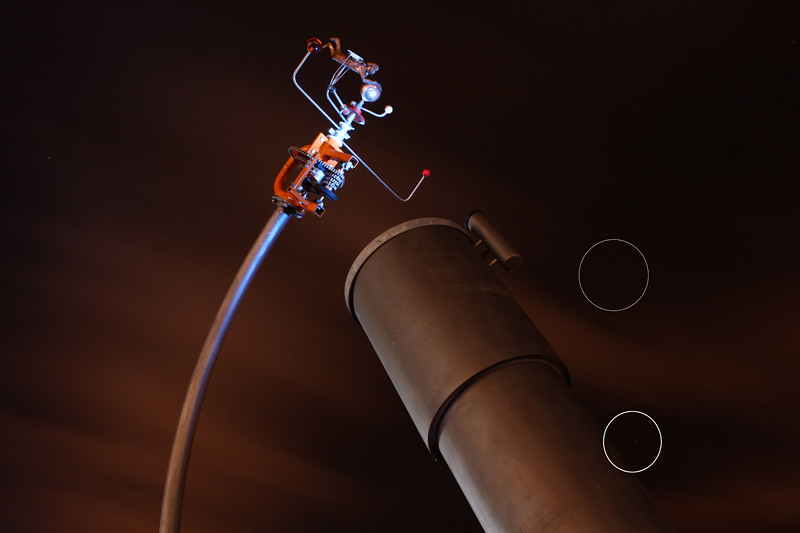


 my first night of shooting full manual!

- Messages
- 15,745
- Name
- Phil
- Edit My Images
- Yes
It's to do with the sensor and they may come and go depending on the factors mentioned above (Exp length, darkness, temperature, ISO)
When you're pushing these factors a lot of cameras will 'show' hot pixels yet not show them at other times.
If you're getting them under 'normal' conditions then I guess it could be a pain. Do you shoot RAW ?. I think the RAW conversion will wipe them out but I could be wrong.
When you're pushing these factors a lot of cameras will 'show' hot pixels yet not show them at other times.
If you're getting them under 'normal' conditions then I guess it could be a pain. Do you shoot RAW ?. I think the RAW conversion will wipe them out but I could be wrong.
Last edited:

I think it's quite common to have hot pixels with cameras, especially in lower lighting conditions where the darker image is more likely to show them and where the camera has to expose for a longer period. My camera has them and I removed them by putting the camera in manual cleaning mode with the camera cap attached for 30 seconds. This should map out the worst ones.

Scarecrow
Suspended / Banned
- Messages
- 1,662
- Name
- Derek
- Edit My Images
- Yes
Given that most cameras these days have sensors that contain more than 12 million pixels, even with the best quality control possible, it's not entirely unusual to have a couple of hot pixels on even a brand new camera.
As others have said they will usually only show up on certain types of pictures, or pictures taken under certain circumstances i.e. long exposures and/or dark areas in the image. One saving grace is that quite a few cameras have the ability to map these pixels out so that you don't have to do it manually in PP. Have a look through your camera manual to see if you can do this on yours.
As others have said they will usually only show up on certain types of pictures, or pictures taken under certain circumstances i.e. long exposures and/or dark areas in the image. One saving grace is that quite a few cameras have the ability to map these pixels out so that you don't have to do it manually in PP. Have a look through your camera manual to see if you can do this on yours.