

What causes this type of issue

  • Thread starter Thread starter A_S
  • Start date Start date

A_S

Suspended / Banned
Messages
864
Name
Andrew
Edit My Images
Yes
Hi,

I have noticed a lot of this blue outline, especially around trees lately:
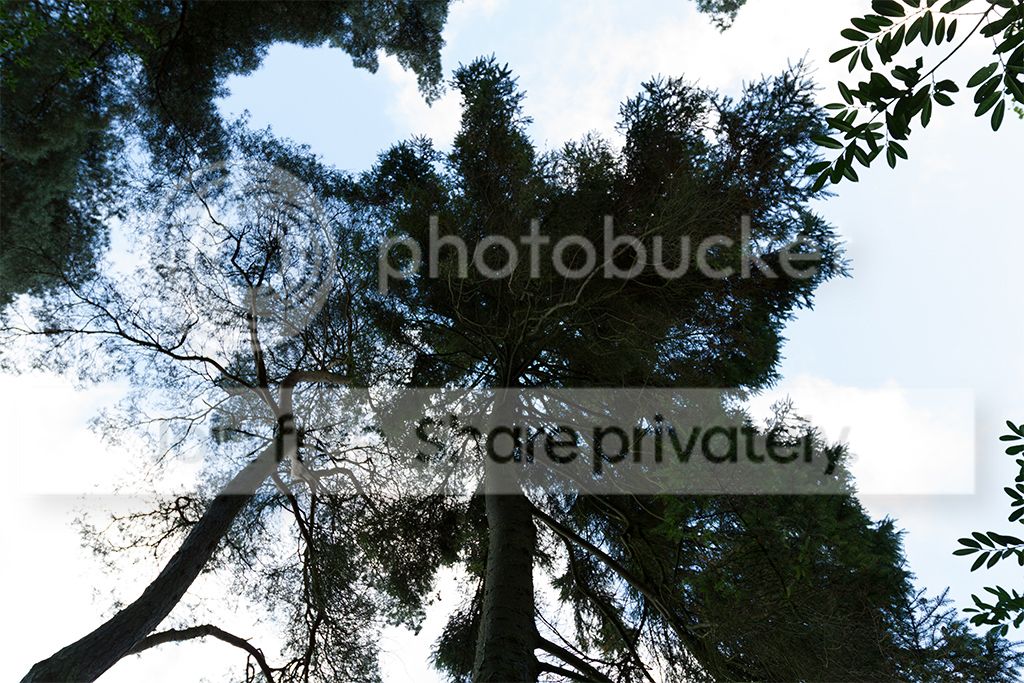
IMG_9852asSmartObject-1_zpse588a3d2.jpg


Not the best image I know and yes the skys are blown, but I took it in raw this morning to highlight the issue - I never remember getting it too much with my 20D (perhaps I did, but did not notice it) and i've only started noticing it on my 7D recently as I start taking more landscapes. I thought it might be related to the lens I am using, but in these I'm using a 16-35 F2.8L - a more than good enough lens.

I am just wondering if anyone could point me towards the cause, simply the light reflecting through the trees? is it simply the dynamic range? something to do with the 7D sensor?
 
It's CA. Pretty much all lenses can exhibit it. It's due to different wavelengths of light focusing at different distances. Most prominent on hard edges and at wider apertures.
 
Chromatic aberration (a.k.a color fringing) is often a nightmare for photographers. It is seen as a purple or green or cyan fringe around the edges of the photographs where there is strong backlight or high contrast region. It occurs when light breaks up into its primary components, thus, leaving aberrant colors in these high contrast regions. It is an inherent problem with some lenses and camera. There are plenty of techniques available to remove chromatic aberration such as lens correction tool in Photoshop/lightroom, plugins etc. However, those techniques hardly work on most photographs.
 
Ah thanks. I didnt think it would be CA as I associate that with being more green/purple and I had it on one photo taken in the woods where it was only prevalent on one tree (the same type as above). I didnt realise it could also be blue! A good explination of what it is too thanks guys.
 
CA comes in various flavours. The common one is lateral chromatic aberration, more prominent around the sides of the image, and usually red/green or yellow/mauve. Stopping down doesn't changed it much, but easy to remove in post processing.

There's also axial (or longitudinal) CA, the infamous purple fringing that can be anywhere in the frame at strong light/dark transitions, eg branches against bright sky. Harder to remove, but is reduced with higher f/numbers.
 
The shot seems to have been taken at f2,8. Now that you know what it is and that it's more likely at wider apertures maybe stop down a little for this type of shot or maybe for information shoot a series of images from wide open to smaller apertures and see at what point and in what conditions it's an issue.
 
yes, thanks, I will experiment. I usually shoot wide open to be honest but I will have a play and see what happens :)
 
Shooting wide open is fun but you should remember that most lenses probably aren't at their very best wide open and that you'll very possibly get better results when the lens is stopped down a bit.
 
With a 16-35 you would be better off shooting at F/11 for that shot, CA's are all too present at the wider end on that lens, although not as prominent on FF bodies. And don't expose for the sky too much next time, that will also help tremendously :)
 
Back
Top