

What causes light spots in a photo ?

BADGER.BRAD

Suspended / Banned
Messages
4,252
Edit My Images
Yes
O.k so I made the name up light spots ! I have had a number of rolls of black and white film (Kentmere 400 in date) back from processing from various test cameras and quite a few show what looks to be spots of light and and seem to have a lot of grain ( not sure if Kentmere 400 is grainy anyway) Is this likely to be a a film issue, processing or a scanning issue ?

The photo as I've had to reduce it's size to post does not show the light spots quite as well as in it's full size but here it is anyway , There is a light leak on this camera but the other cameras had the same results.
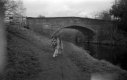
half dog.jpg
 
Last edited:
are your negs and scanner dust free
 
You're gonna have to put a ring round these light spots, all I can see is light leak/reflection and.......dust ?
 
Do you mean the white dots (like on the dogs front paw and tail)? Those are dust particles on the negatives picked up by the scanner, as is the bigger, hair-like mark in the upper right.

It’s very difficult to avoid any dust while home scanning, but you can minimise it a lot by dusting the scanner and surrounding area before you begin, and by using a clean cloth and rocket blower to remove dust from the scanner glass and the negs themselves.
 
Last edited:
Your right Fishyfish those are the marks I mean , The photos were sent off and not done by me (I have no scanner) But I suspect the processor was a home processor trying to make a few quid on ebay. Not really an issue as I was only trying to test the cameras really. This particular one a Praktica point and press has a light leak which doesn't surprise me as the back seemed rather a loose fit the others seem o.k apart from the dust marks.
 
you can minimise it a lot by dusting the scanner and surrounding area before you begin, and by using a clean cloth and rocket blower to remove dust from the scanner glass and the negs themselves.

That's right. But there will always be a few that will
sneak in and those can be easily healed out in PP. :)
 
I can see a few white spots in the sky, one in the tree top right, and a wavy white line also in the sky. I think these are dust and a hair of some description. They'll show up as black on the negative and therefore white on the positive. Get a rocket blower and blow the negatives before scanning...

EDIT: sorry, I left the computer a bit before replying to a much earlier post. I'd definitely change your lab! I processed and scanned one of my own rolls last week after getting several processed and scanned by Filmdev, and it was amazing how much dust mine picked up (the size of small rocks!) compared to the pristine scans from the lab!
 
Last edited:
Your right Fishyfish those are the marks I mean , The photos were sent off and not done by me (I have no scanner) But I suspect the processor was a home processor trying to make a few quid on ebay. Not really an issue as I was only trying to test the cameras really. This particular one a Praktica point and press has a light leak which doesn't surprise me as the back seemed rather a loose fit the others seem o.k apart from the dust marks.

Is it not difficult to test a camera if very few controls are in place? If you know nothing about the development or scanning process, you are leaving a lot of variables in play, so it's difficult to pin down any issues, I would argue.
 
Brad, are you saying you had the film processed via flea-bay if so then to would appear from the condition of the scans that it may well have been scanned on a home scanner as the amount of dust, I can count into double figures and

also hair is not acceptable from a professional lab.

If these are from a business lab then request a refund of get them to re-scan them.

My Negatives processed by AG and scanned on a V500 can be a good as a lab with care and patience.

I have used Kentmere 400 which I believe is an Ilford film and if it is under exposed will show lots of grain. The faster the B&W film with under exposure the more grain.
 
Back
Top