I’m looking for the simplest way to make 2 people the same height in a photo. I don’t have any experience with photoshop. Currently I just use youcam which I find really good. You can stretch and make taller. But both options doesn’t have a facility to separate two subjects in an image. Basically it’s two models and one is about 3 inches taller than other and it just looks bit silly.

and please use their services
You are using an out of date browser. It may not display this or other websites correctly.
You should upgrade or use an alternative browser.
You should upgrade or use an alternative browser.
Way to make 2 people same height
- Thread starter kulu400
- Start date

Faith The Healer
Suspended / Banned
- Messages
- 326
- Edit My Images
- No
Surgery? 
FTH
FTH

ancient_mariner
Moderator
- Messages
- 27,773
- Name
- Toni
- Edit My Images
- No
I’m looking for the simplest way to make 2 people the same height in a photo. I don’t have any experience with photoshop. Currently I just use youcam which I find really good. You can stretch and make taller. But both options doesn’t have a facility to separate two subjects in an image. Basically it’s two models and one is about 3 inches taller than other and it just looks bit silly.
How close are they? If some distance apart then you might use perspective correction. If you truly want to cut one out and alter her size then you'll need masking and layers in photoshop or a similar program (you could try GIMP - free). This is not going to be easy to do well.
If you knew this before shooting then you might have placed the shorter model nearer the camera.

DemiLion
Suspended / Banned
- Messages
- 13,016
- Name
- Mark
- Edit My Images
- No
I’m looking for the simplest way to make 2 people the same height in a photo. I don’t have any experience with photoshop. Currently I just use youcam which I find really good. You can stretch and make taller. But both options doesn’t have a facility to separate two subjects in an image. Basically it’s two models and one is about 3 inches taller than other and it just looks bit silly.
Take the shot properly in the first place rather than relying on touching up taken images.
There are multiple ways to make people appear the same height. Just look at Tom Cruise and Kelly McGillis in Top Gun.


TG.
Suspended / Banned
- Messages
- 6,905
- Name
- Tel
- Edit My Images
- No
Sorry Trevor, i need to apologise for some of the members on here, hopefully someone will come along with a more in depth answer.
Indeed, someone asks a question, and gets "you should of done it like this or that in the first place" we are all aware of how things should be done, but strange as it may seem to some, people make mistakes, for various reasons. I'm of the mind if you can't say something useful/helpful, don't bother saying anything !

- Messages
- 105,684
- Name
- The other Chris
- Edit My Images
- Yes
@kulu400 Welcome to TP and apologies for some of the responses above, most people on here are friendly and helpful. I'm no Photoshop expert but as @ancient_mariner said above one way of doing it would be to select one of the subjects and then use transform to alter the size of the selection. There are a lot of Photoshop how-to videos on Youtube
Ok thanks for the informative replies. As for “ you should have “. There were so many variables going on in this shoot. We were on location and the models were excellent and very expressive. There seemed endless possibilities on the dynamics of the poses, and I didn’t really want to break their follow by saying move an inch to the left. Tbh I’ve altered height quite easily on a single subject so thought it wouldn’t be a big issue. So in the moment I made the decision to just let the shoot flow. Obviously you live and learn.

swanseamale47
Suspended / Banned
- Messages
- 10,876
- Name
- wayne clarke
- Edit My Images
- Yes
As Toni saya, Photoshop or the free Gimp (a sort of older version of photoshop clone) will do it. I have never used Youcam so I cant help with that. With gimp cutting out the person to make bigger is probably going to be harder than with the new photoshop which has better selection tools (never done it with gimp) but depending on background and finished size it should be possible.
The learning curve is something you'll have to deal with.
Another option is to send the image to one of the many photo editing companies that exist and let them sort it. Some overseas ones are really cheap.
The learning curve is something you'll have to deal with.
Another option is to send the image to one of the many photo editing companies that exist and let them sort it. Some overseas ones are really cheap.

Garry Edwards
Moderator
- Messages
- 13,475
- Name
- Garry Edwards
- Edit My Images
- No
The negative comments are harsh, but they aren’t wrong. As photographers, we should recognise and deal with the problems at the time, not try to fix them later, which takes hours of avoidable work.
But, this takes a lot of experience and nobody, regardless of their talent, is born with that experience, and sometimes it isn't even possible because we can't control what happens.
The trick is a mixture of choreography and viewpoint. The camera height and distance are changed to suit the situation, and zooming with a lens instead of with our feet makes that a bigger challenge than it needs to be.
When Boris Johnson was PM, he was always “normal” size in photos, and Rishi Sunak was always small and unimportant, but when Sunak became PM he grew at least a foot, simply because he now called the shots and the photographers knew how he wanted to be portrayed.
So yes, you can do it in PP if you need to, it will be a sharp learning curve and the advice to watch YouTube videos is 100% right. Not often but sometimes, we need to put things right in PP, it’s rarely the best option but at least that option is there, and with suitable hardware and software there’s very little that can’t be done in PP.
Let us know how you get on – there are some real PP experts on here (I’m not one of them) who can help you with this journey, and the ethos on TP is to help people, that's what we're all about.
But, this takes a lot of experience and nobody, regardless of their talent, is born with that experience, and sometimes it isn't even possible because we can't control what happens.
The trick is a mixture of choreography and viewpoint. The camera height and distance are changed to suit the situation, and zooming with a lens instead of with our feet makes that a bigger challenge than it needs to be.
When Boris Johnson was PM, he was always “normal” size in photos, and Rishi Sunak was always small and unimportant, but when Sunak became PM he grew at least a foot, simply because he now called the shots and the photographers knew how he wanted to be portrayed.
So yes, you can do it in PP if you need to, it will be a sharp learning curve and the advice to watch YouTube videos is 100% right. Not often but sometimes, we need to put things right in PP, it’s rarely the best option but at least that option is there, and with suitable hardware and software there’s very little that can’t be done in PP.
Let us know how you get on – there are some real PP experts on here (I’m not one of them) who can help you with this journey, and the ethos on TP is to help people, that's what we're all about.


sk66
Suspended / Banned
- Messages
- 9,557
- Name
- Steven
- Edit My Images
- Yes
I agree with the others in regards to avoiding the issue in the first place; but we all make mistakes.
Depending on how intertwined the two are (and the background), this can be quite easy in Photoshop these days.
Use "select object" to select the person you want to change.
Cut and paste to a new layer.
Use generative fill to fill in the background hole created by previous step.
Use transform to resize the chosen person (I locked the aspect so she was made taller and wider).
Less than 5 minutes...
Original.
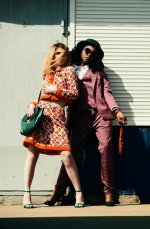
Transformed.
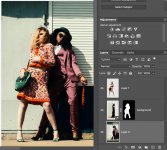
Note that making one larger is generally easier than making the other smaller; because the masking/background replacement is mostly hidden and much less critical.
Depending on how intertwined the two are (and the background), this can be quite easy in Photoshop these days.
Use "select object" to select the person you want to change.
Cut and paste to a new layer.
Use generative fill to fill in the background hole created by previous step.
Use transform to resize the chosen person (I locked the aspect so she was made taller and wider).
Less than 5 minutes...
Original.
Transformed.
Note that making one larger is generally easier than making the other smaller; because the masking/background replacement is mostly hidden and much less critical.
Last edited:

DemiLion
Suspended / Banned
- Messages
- 13,016
- Name
- Mark
- Edit My Images
- No
The negative comments are harsh, but they aren’t wrong. As photographers, we should recognise and deal with the problems at the time, not try to fix them later, which takes hours of avoidable work.
Exactly. There was no intention to imply a 'should have' comment.
Fixing stuff like this in post is a complete PITA and always better to take a bit extra time to shoot what you want rather than spend ten times as long on a computer.
Perspective, lifts (ie blocks), varied height seating and even bending at the knee can all provide a solution.