Viewing and culling RAW images (bulk)

GeordieStew

Suspended / Banned
Messages
859
Edit My Images
No
I have a fairly decent desktop PC (2700X with 32GB RAM). My laptop isn't terrible really. Both Windows.

I can sometimes take hundreds of images before downloading to PC. Then the process begins of filtering out the blurry or the poor composition images.

What do you use for viewing and culling RAW images? Seeing them in a decent resolution is important, being able to zoom in and check for focus etc.

I currently import into LRClassic and then delete from there. But it's a bit of a ballache. Anything easier/better before the import? Time is important to me (happy to spend time post processing the images that are of value though).

Cheers
 
The best free option I’ve found is faststone raw viewer. You can key through pretty quickly and use a shortcut key to ‘move’ images into a keeper folder. Works great for me.

Sometimes the files are just huge (think d810/a7iv/5dsr etc) and it will slow things down. But as it’s free no harm in trying
 
I find LR Classic ideal for this and also use short cut keys. To delete just hit "X" which marks for delete and you can select all those marked for delete and review again if any doubt or delete the lot from the disk as well. I do this before rating and keywording as there is little point giving any more attention to files that you might delete. LR has a number of aids to help decide. You can view a group of files in the Survey mode which is useful for viewing general composition from a set and the comparison mode allows you to compare two images which is very useful when trying to select the best focused shot and you can zoom in to both with a mouse click. When I import the files I create standard size previews which mean screen size previews are available instantly. What is difficult about this?

Dave
 
I find LR Classic ideal for this and also use short cut keys. To delete just hit "X" which marks for delete and you can select all those marked for delete and review again if any doubt or delete the lot from the disk as well. I do this before rating and keywording as there is little point giving any more attention to files that you might delete. LR has a number of aids to help decide. You can view a group of files in the Survey mode which is useful for viewing general composition from a set and the comparison mode allows you to compare two images which is very useful when trying to select the best focused shot and you can zoom in to both with a mouse click. When I import the files I create standard size previews which mean screen size previews are available instantly. What is difficult about this?

Dave
It's not difficult. It's not particularly fast to build previews etc (especially on laptop, even with USB 3 SSD). I wanted to know if there were any better alternatives.
 
FWIW

I still have LR v6.12 as my DAM and it is very slow program for culling and indeed keywording..................I am still considering my options for a DAM program.

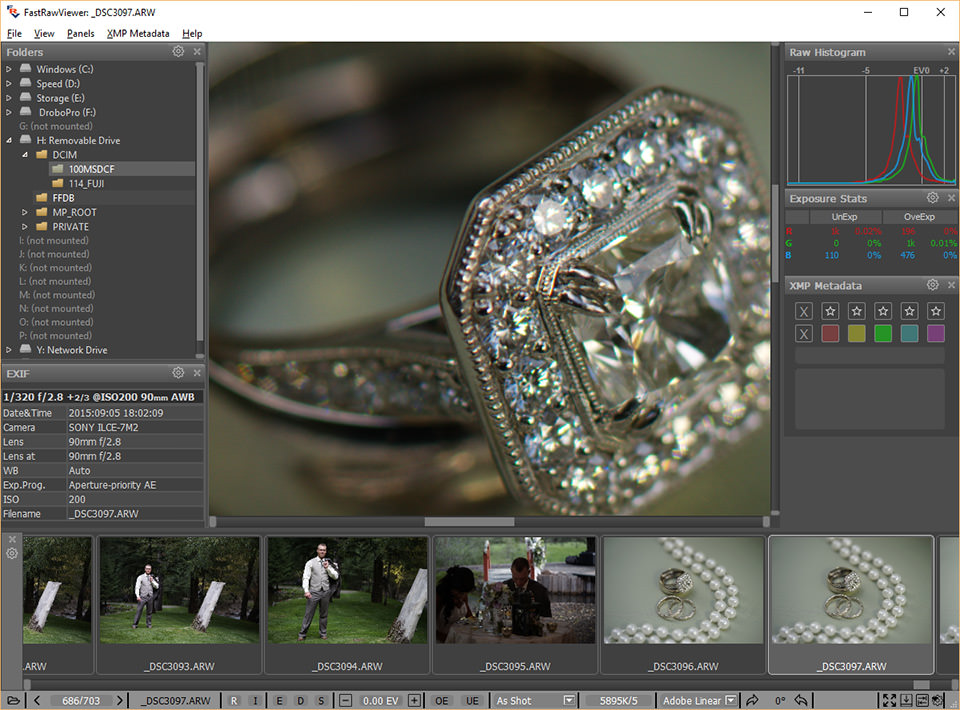
However, as @toohuge suggested, I had used Faststone raw Viewer for a while but found its limitations too much for me so trialled and bought FastRawViewer (I think it cost approx £15 ?) and now use that for my primary culling step before importing all the images worth greater attention and deleting the rest.
 
Last edited:
Fast Raw Viewer isn't free (£18), but it's designed around being used for fast culling. You really need to learn the keystrokes to get the most out of it. Has some useful tools for technical assessment e.g. it gives you the raw histogram. Some video tutorials on the web site.


I use Photo Mechanic, and it’s more versatile than Fast Raw Viewer (there is a database version) and is also very fast and ideal for captioning and keywording as well as an initial cull. Photo Mechanic is the industry standard for Sports photographers who need to rapidly cull images to meet deadline during sports events, and popular with wedding and wildlife photographers who might also have large numbers of files to wade through.

It has two issues, one is its very expensive ($140 or $230) and two, its speed largely comes from using the embedded Jpegs from the raw. This is fine with Nikon and Canon which embed full size jpegs, but Fuji, Olympus, Leica and Sony embed very low quality Jpegs and I find it difficult to critically assess focus with my Fuji and Olympus files. Others don't have a problem and feel the Jpeg quality is fine for assessing quality. There are a couple of solutions to this but they are a bit of a kludge.

Lots of tutorials on Youtube for PM, not just on rapid culling but also on keywording captioning etc mainly by sports, wedding and wildlife photographers, but also people who just use it for keywording and captioning.


Fast Raw Viewer has an advantage of being able to tweak exposure, contrast and sharpness (and generate B&W versions) to aid assessment. PM can't do this but with PM you can compare two images side by side.

I use both programs, primarily PM, but I often open a file from PM in FRV if I want a detailed check of some technical aspect. I find either or both, more capable of fast culling than LR or C1.
 
Last edited:
FastRawViewer user here. It's fast. ;)

The one weakness is that images can look worse as raws than they really are after basic LR import, and I have occasionally ditched perfectly acceptable images at first pass.
 
The one weakness is that images can look worse as raws than they really are after basic LR import, and I have occasionally ditched perfectly acceptable images at first pass.

Do you realise you can toggle between the raw and the embedded jpeg, which can be a useful alternative view if you are having this problem.
 
Do you realise you can toggle between the raw and the embedded jpeg, which can be a useful alternative view if you are having this problem.

It would certainly be a mistake to select/delete on the basis of the embedded JPEG. If you create standard pre-views when importing this will not happen as you will see the previews not the Jpeg.

FWIW

I still have LR v6.12 as my DAM and it is very slow program for culling and indeed keywording..................I am still considering my options for a DAM program.

I have used LR for this from v2 right up to the most recent LR Classic. The process is very similar. In what way is it slow?

Dave
 
It would certainly be a mistake to select/delete on the basis of the embedded JPEG. If you create standard pre-views when importing this will not happen as you will see the previews not the Jpeg.

But Toni was referring to making the decision in FRV, before importing the files into anything. The jpeg toggle just give a bit more information to help with the decision at this first level cull stage.

And as aside, Photo Mechanic which is arguably the industry standard for rapid culling, only uses the embedded preview to maximise speed.
 
Last edited:
But Toni was referring to making the decision in FRV, before importing the files into anything. The jpeg toggle just give a bit more information to help with the decision at this first level cull stage.

And as aside, Photo Mechanic which is arguably the industry standard for rapid culling, only uses the embedded preview to maximise speed.
Fine, if you want to do that but it is far better to make a judgement on the Raw file or it will be little better than using the back of the camera.

Dave
 
The camera is a Sony A7III - I've a feeling I tried this, but it wasn't helpful.
 
Fine, if you want to do that but it is far better to make a judgement on the Raw file or it will be little better than using the back of the camera.
Did you actually read what Toni said?

Toni was sometimes having an issue in Fast Raw Viewer because it is designed to give a rendering that matches, as close as is possible, the data as recorded in the raw file. This can give a flattish and sometimes dull image. While this is the best way to assess the technical quality of a file, it may not give a good representation of how the file might look after editing. Hence my suggestion that having a quick look at the Jpeg may give an alternative view that could be useful.

Being able to accurately assess the quality of the raw file is one of fundamental reasons for using Fast Raw Viewer. The only other program, I'm aware of, that allows you to properly assess the raw file is RawTherapee, and that isn't much use for rapid culling.
 
The camera is a Sony A7III - I've a feeling I tried this, but it wasn't helpful.
Ah well, it was worth a thought. I do my main culling in Photo Mechanic, but have a hot key to open a file in FRV if I feel I need to check the sharpness or shadow/highlight detail.

PM does have a histogram and clipping indicators, but they are working on the Jpeg, so, like Lightroom, it misrepresents the clipping.
 
FWIW

I still have LR v6.12 as my DAM and it is very slow program for culling and indeed keywording..................I am still considering my options for a DAM program.

However, as @toohuge suggested, I had used Faststone raw Viewer for a while but found its limitations too much for me so trialled and bought FastRawViewer (I think it cost approx £15 ?) and now use that for my primary culling step before importing all the images worth greater attention and deleting the rest.
that can be updated to 6.14,thats if you want to.
 
I've started using FastRawViewer and finding it fine.

Thanks all for the advice.

It's a great program.

As well as the videos on the FRV web site, there is also this, in case you haven't found it


Advice that the FRV people have given in forums, but I'm not sure if it's in the videos, is to read the files from the memory card and tag the keepers with FRV (this is done internally by FRV so it isn't writing anything to the card), then use FRV to copy only the tagged files across onto your computer for subsequent import into LR, or whatever you want to do with them. Then after the files have been backed up, format the memory card in the camera.

It's not something I do, but I can see how this could save time if you take photographs where there are large numbers of obvious rejects e.g. birds in flight. I'm also not sure if they actually "recommend" this workflow, as its' been in response to people wanting to delete unwanted files on the memory card before importing the remaining files to a computer, simply to save import time. something which is generally considered a high risk practice.
 
FWIW I re-checked toggling between jpg and raw (J key) and the jpg is not helpful.
 
FWIW I re-checked toggling between jpg and raw (J key) and the jpg is not helpful.
Thanks, I think I've only ever accidentally toggled into the jpeg. I only ever (well almost ever) for a purely technical assessments (checking clipping, sharpness and noise), and I don't think the view is a true representation of the raw even if the clipping info and histogram is based on the raw, so its probably not as big a difference as I thought it might be.

Thinking about it more, the rendering of a raw in FRV is a still a lot contrastier, and brighter than it is in RawTherapee (which is a genuine linear rendering) and the Capture One linear rendering (which is a pseudo linear rendering). Both are much duller, flatter and less sharp than the default Lightroom rendering options, and a lot duller and less sharp than the FRV rendering.

Out of interest which aspect of the FRV rendering do you find misleading?
 
My answer is to be more selective when shooting.... I am then absolutely ruthless with what to keep, only keep the best two of any particular subject is my mantra. Even that thunderstorm I shot over Sudbury Hall, I have only kept the best two, why keep lesser ones?
 
Another vote for photo mechanic, used with Sony a9 and Sony a1

Can speed through thousands of photos to narrow down my selection before importing into lightroom.

Far faster than using lightroom to do the same, and I’ve not had any problems with assessing focus through embedded jpgs.
 
Could someone explain why it is faster than LR. Given you had added at least two extra steps in the process (copy images to hard disc, review in third party software then import to LR). Where is the speed benefit?

Dave
 
Could someone explain why it is faster than LR. Given you had added at least two extra steps in the process (copy images to hard disc, review in third party software then import to LR). Where is the speed benefit?

Dave

User Interface speed mostly. Yeah, it's an extra step but with FastRawViewer there's no import process. It opens directly from the folder structure. Few key presses to Reject/Move/Copy the files. Then into LR to import into a collection and fiddle.
 
User Interface speed mostly. Yeah, it's an extra step but with FastRawViewer there's no import process. It opens directly from the folder structure. Few key presses to Reject/Move/Copy the files. Then into LR to import into a collection and fiddle.
This does not explain where the speed comes from. I import and copy the files from my camera into LR and it makes a copy on my NAS at the same time. The import process is also set to create standard previews which it stores in the catalogue. This means that when I view the images in LR for comparison/rating etc. I instantly get a full screen version (not a JPEG version). The LR tools include Survey mode, comparison, zooming in/out all with key clicks; how could this be any quicker? If you are intending to use LR later why these separate processes when you can copy/import in one action and have all the comparison tools you need in LR.

Dave
 
This does not explain where the speed comes from. I import and copy the files from my camera into LR and it makes a copy on my NAS at the same time. The import process is also set to create standard previews which it stores in the catalogue. This means that when I view the images in LR for comparison/rating etc. I instantly get a full screen version (not a JPEG version). The LR tools include Survey mode, comparison, zooming in/out all with key clicks; how could this be any quicker? If you are intending to use LR later why these separate processes when you can copy/import in one action and have all the comparison tools you need in LR.

Dave
Why not try it once or twice?
 
This does not explain where the speed comes from.
For me the speed benefits are largely, but not entirely, to do with the speed of image rendering, and speed of scrolling through thumbnails, I find it irritatingly slow with LR and pretty well instantaneous with FRV or PM.
 
For me the speed benefits are largely, but not entirely, to do with the speed of image rendering, and speed of scrolling through thumbnails, I find it irritatingly slow with LR and pretty well instantaneous with FRV or PM.
But is this because, when you import, you are not creating standard sized previews? I create standard sized previews (i.e. the size to fill the screen) so these open instantly. Of course if you do not, it will take time to open them. Scrolling through thumbnails is also instantaneous in LR.

Dave
 
But is this because, when you import, you are not creating standard sized previews? I create standard sized previews (i.e. the size to fill the screen) so these open instantly. Of course if you do not, it will take time to open them. Scrolling through thumbnails is also instantaneous in LR.

Dave

In my attempts to improve the usability of LR, over the years, I have tried all the options that people/blogs/websites etc have recommended, including using standard sized and 1:1 previews on import. Regardless I still have irritating delays in preview and thumbnail rendering.

Now my Mac isn't the newest in the world, but I can still compare the speed of Capture One, FRV and PM to LR. And although LR has seen massive improvements over the years (I've used it since the beta of V1 ), and you can now do clever things like using the embedded jpegs at import to start culling a bit quicker, it still doesn't really compete with FRV or PM for this specific use, and is still pretty poor compared to Capture One. With the latter still being well behind FRV or PM for rendering when rapidly scrolling through previews or thumbnails.

If you don't have a speed issue to solve, and don't see any advantage of using PM or FRV (but using them isn't just about speed) then that's great. No point in adding additional programs into your workflow if they don't solve a specific problem.
 
I find that Photomechanics Ingest system is far, far quicker than Lightroom and the speed it renders a JPG or RAW is noticably faster. When you are doing event photography with several thousand pictures to check, thoses wasted seconds soon add up to be a meaninful amount of time saved.

For many people that time isn't important, but for some people it is. Sometimes, I'm one of the latter.
 
Coming back from a running event with maybe 1000 images, I use my Loupedeck to sort through them. Set it up in such a way that I can work through them quite quickly. I Flag or Not Flag them. Work on the flagged ones and then check the not flagged ones later.
 
Outof interest which aspect of the FRV rendering do you find misleading?

Sharpness, with the images looking very soft in FRV but being absolutely fine with baseline sharpening in LR.
 
But is this because, when you import, you are not creating standard sized previews? I create standard sized previews (i.e. the size to fill the screen) so these open instantly. Of course if you do not, it will take time to open them. Scrolling through thumbnails is also instantaneous in LR.

Dave

I have never seen previews open instantly in LR, probably taking 5 sec for 100% in the develop module or 10 sec in library - FRV really does open very fast indeed. Files read from SSD.
 
Sharpness, with the images looking very soft in FRV but being absolutely fine with baseline sharpening in LR.
There are three levels of sharpness available in FRV, using custom unsharp masks.

One is the raw default (soft) and the other two are custom set in the dialog at:

Preferences | Image Display | Sharpening/other

You also need to make sure on screen sharpening is selected, in the same dialog box.

You toggle through all three setting with the USM button (lower tool bar) or the hot key "S".

I have my options set to 1 pixel at 100% and 2 pixels at 100%, Both are probably over sharpening, but I tend to just quickly toggle the sharpening on and off to get an idea of what the sharpened image might look like
 
I'm occassionally team lead on a running event / OCR event. May be approaching 20,000 runners. May be 5 photographers on course. Each photographer aims to get 2 photos of each runner, and those photos need to be online within 72 hours of the event. You want something fast...
 
Last edited:
Back
Top