

You are using an out of date browser. It may not display this or other websites correctly.
You should upgrade or use an alternative browser.
You should upgrade or use an alternative browser.
Velvia 50 advice
- Thread starter whit
- Start date

RaglanSurf
Suspended / Banned
- Messages
- 11,477
- Name
- Nick
- Edit My Images
- Yes
Nice camera, I picked up an F4 a little while ago and it's brilliant so much camera for not much money. One of the main things to remember is that slide film doesn't have the exposure latitude of print or b&w film so take extra care if you're using manual settings.
Thanks for the helpful comments, I am looking forward to playing and having to be more accurate with exposures rather than taking the attitude that it is close enough and I will sort it later.
Also looking forward to shooting b/w as I never seem to be able to be able to get the same tonal range with Lightroom.

Also looking forward to shooting b/w as I never seem to be able to be able to get the same tonal range with Lightroom.


raathistle
Suspended / Banned
- Messages
- 1,448
- Name
- Chris
- Edit My Images
- Yes
Remember to remember the subject brightness range of the scene you are shooting. If it's over about 4.5 stops with new Velvia you will have blown highlights or full shadows. You can choose which one normally, or you can carry grads, but it's worth noting.
Also remember to have fun and it's not the end of the world if it goes wrong, there's plenty more film around
Also remember to have fun and it's not the end of the world if it goes wrong, there's plenty more film around

Lensflare
Suspended / Banned
- Messages
- 3,156
- Name
- Simon Everett
- Edit My Images
- Yes
You need to be more careful of the highlights than the shadows.
Expose for the highlights and just let the shadows block up, rather than over exposing the highlights. Always works better.
Velvia is a little slow, you could rate it at 40 provided you then do as above. I used spot metering on the F5 more often than not. If you have a pretty evenly lit scene the matrix metering will be just about cock on. Landscapes will appreciate a bit of -ve comp, because the scene may be evenly lit, but generally darker shades.
Expose for the highlights and just let the shadows block up, rather than over exposing the highlights. Always works better.
Velvia is a little slow, you could rate it at 40 provided you then do as above. I used spot metering on the F5 more often than not. If you have a pretty evenly lit scene the matrix metering will be just about cock on. Landscapes will appreciate a bit of -ve comp, because the scene may be evenly lit, but generally darker shades.

ekimeno
Suspended / Banned
- Messages
- 2,659
- Name
- Mike
- Edit My Images
- Yes
You need to be more careful of the highlights than the shadows.
Expose for the highlights and just let the shadows block up, rather than over exposing the highlights. Always works better.
I've had big problems with this technique - shots tend to come out very dark. I always find the best way of shooting Velvia 50 and even Velvia 100 is to use a grad filter and expose for the shadows. This is my rule of thumb for landscape shots where there's big areas of contrast.
Of course if you're working in a more controlled lighting environment, exposing spot on becomes less of a problem

joxby
Suspended / Banned
- Messages
- 8,782
- Name
- John
- Edit My Images
- No
I have ruined a few 100f shots by exposing for the sky, when I say ruined I mean rendered them.....unscannable, and there in lies the monkey with the cheesy grin.
I'm sure they are perfectly acceptable projected on a wall or printed, its them there scanners man, they just don't cut the custard....
I'm sure they are perfectly acceptable projected on a wall or printed, its them there scanners man, they just don't cut the custard....


ekimeno
Suspended / Banned
- Messages
- 2,659
- Name
- Mike
- Edit My Images
- Yes
I've also tried over-exposing the slide when scanning, but you can see the results with that last scan of joxby's - noise city and very little in the way of detail. B&W and print retain a lot more details in the shadows.
Here's a shot I took of the Thames Barrier at sunset which would have been perfect if I'd used a grad filter, put the camera on a tripod and exposed for the dark rocky area on the bottom right. Instead I thought I'd play it cool and do some hand-held 35mm work 5-minutes before pitch black darkness with a roll of Velvia 50 Amateur hour indeed
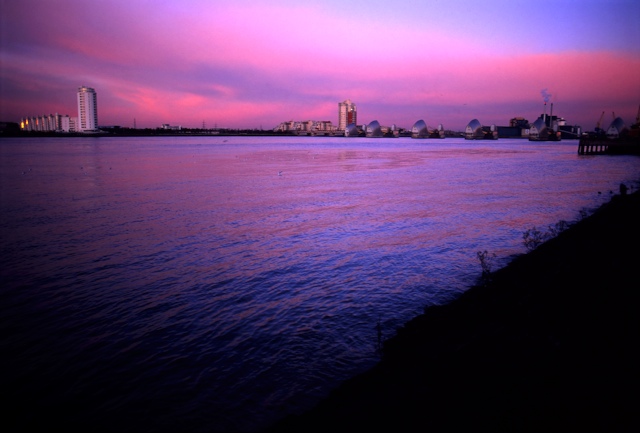
Here's a shot I took of the Thames Barrier at sunset which would have been perfect if I'd used a grad filter, put the camera on a tripod and exposed for the dark rocky area on the bottom right. Instead I thought I'd play it cool and do some hand-held 35mm work 5-minutes before pitch black darkness with a roll of Velvia 50
Amateur hour indeed
RaglanSurf
Suspended / Banned
- Messages
- 11,477
- Name
- Nick
- Edit My Images
- Yes
I know it sounds nuts but have you tried one of the slide carriers that goes in front of an dslr, then you can meter for the shadows and not have to worry about digital noise?
Do you mean something like this?
http://www.keene.co.uk/electronics/multi.php?mycode=SLIDE
I had something similar for my film camera in the 70's and wasn't that impressed, although that may have been the cr*p Truprint film I was trying to copy from.
I've not seen any results from the newer digital ones though.
joxby
Suspended / Banned
- Messages
- 8,782
- Name
- John
- Edit My Images
- No
Its slide copying, yep I've tried it and no its no better because we are using the same hardware...a digital sensor.
There isn't as much noise slide copying with a dslr, but the same problems with dynamic range still exist when slide copying, as shooting a real scape.
You can arse about in photoshop with layers/hdr if you want, but I'd rather stick pins in my eyes.
I just accept that we can't easily reproduce the contents of a slide accurately as a digital file, but they can still look the equal of digital images.
I should have used an ND grad, which means we would actually modify exposure when the frame is intended to be scanned....which is more than slightly poop if yer ask me, do we shoot for the print.....or a scan...
There isn't as much noise slide copying with a dslr, but the same problems with dynamic range still exist when slide copying, as shooting a real scape.
You can arse about in photoshop with layers/hdr if you want, but I'd rather stick pins in my eyes.
I just accept that we can't easily reproduce the contents of a slide accurately as a digital file, but they can still look the equal of digital images.
I should have used an ND grad, which means we would actually modify exposure when the frame is intended to be scanned....which is more than slightly poop if yer ask me, do we shoot for the print.....or a scan...


Kev M
Suspended / Banned
- Messages
- 4,347
- Name
- You can call me Sir.
- Edit My Images
- Yes
hmmmm If they looks good on the lightbox in theory they should look exactly the same digitally if you use a camera and do it manually
Negative Dave. When the slide is on the lightbox your eyes and brain are doing their own little HDR on it the same as when you're outside taking the pic. The camera/scanner sensor just can't cut it. Not in one sweep anyway, and I'm like Joxby when it comes to avoiding potatoshop if possible.