using light cube properly?

big pimp

Suspended / Banned
Messages
155
Name
Ross
Edit My Images
No
Hi guys,

I'm new to photography in general, and especially new to lighting.

I am using a 450D with standard 18-55 kit lens.

I have bought a simple light cube similar to this:
Round-Light-Tent-KRLT-.jpg


now I have set up my 450D on a tripod looking in at my product on the inside through the tent - i have it lit on both sides but dont know how to best take a photo!

do i set it to over expose, underexpose, what do I do?!

here is an example - i think it's too yellow, and not right for a website.
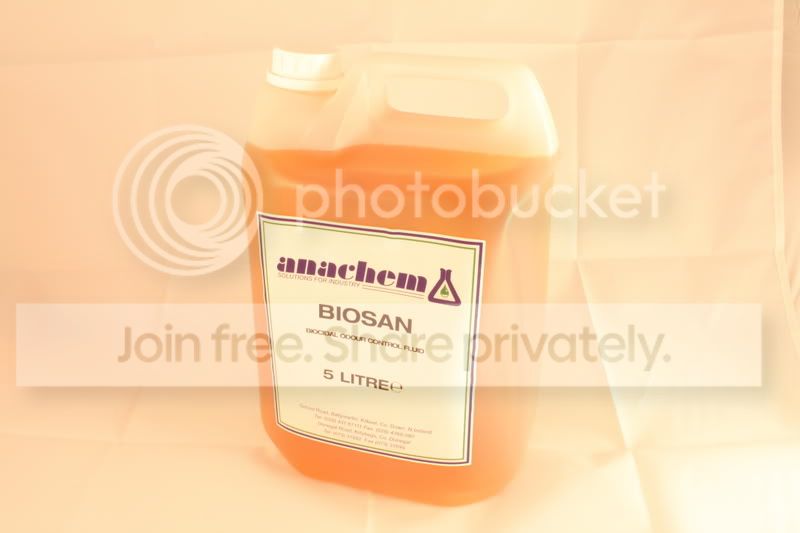
IMG_1627.jpg

this was shot @ f/22 with 1/2sec exposure @ ISO100

thanks in advance
 
White balance is out by the look of it , also I don't see why you shooting at 1/2 i'd be tempted to shoot atleast 1/20 if you can
 
did you take it as a RAW file or JPEG?
if RAW then you can adjust the White Balance after you have taken the pic, if not then adjust the WB setting on the camera(which you usually leave on auto in my experience), try the tungsten carbide setting, usually a light bulb pic, see how the different setting adjust the white colour in the background
cheers
marcus
 
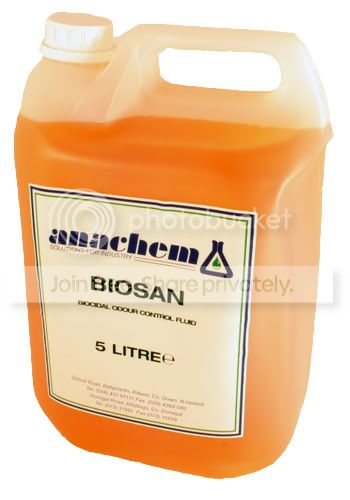
be aware that its just a draft but here is your real color photo:
anachem.jpg


as i said its a draft, its cos i didnt smooth the cutting, and didnt use the sharpen
 
thanks for the tips everyone - @ grumpbadger - that is the most important thing - but I was only playing about to see what the settings are.

@ Marcus - what about using custom white balance setting for light tent pics? would that help?


Thanks again everyone for such quick responses
 
Firstly, your white balance is way off. The orange cast would seem to be a combination of the reflection from the liquid in the bottle and the colour of the light itself. You can adjust that in post-processing but it would be easier to get it right in the first place by setting the appropriate WB option on your camera, or by setting a custom WB for this particular environment.

Secondly, you're shooting in Shutter Priority. No idea why you're doing this but you really need to be shooting in Av rather than Tv mode. Av will give you much more creative control over your depth-of-field and allow you to keep your subject matter in focus and throw the creased fabric background out of focus sufficiently for it to not detract from your subject matter.

And with the being such a large expanse of white in the frame, you'll probably find that you need to dial-in a spot of Exposure Compensation, unless you want to adjust this in post-processing instead. Personally I'd recommend doing it in-camera, starting at +1 and seeing how you go. And If you're aware of how to use it, check the Histogram display on your 450D to make sure you're not burning out any areas of the frame.

I'll go out on a limb here and say that a fair bit of what I've just written might mean nothing to you, so don't feel too worried about asking more specific questions, assuming I've managed to confuse you even further.
 
be aware that its just a draft but here is your real color photo:
anachem.jpg


as i said its a draft, its cos i didnt smooth the cutting, and didnt use the sharpen


thats nice - nearly exactly what I'm after - it's just for website content, so will be dramatically shrunk down in the end anyway - are you just using Photoshop for that?
 
yes

you can use the auto level, contrast and color to modify it. its s-i-m-p-l-e =)
 
Firstly, your white balance is way off. The orange cast would seem to be a combination of the reflection from the liquid in the bottle and the colour of the light itself. You can adjust that in post-processing but it would be easier to get it right in the first place by setting the appropriate WB option on your camera, or by setting a custom WB for this particular environment.

to set a custom WB should I set up the lighting, and take a photo of the 'white' background, and use it as custom WB?

Secondly, you're shooting in Shutter Priority. No idea why you're doing this but you really need to be shooting in Av rather than Tv mode. Av will give you much more creative control over your depth-of-field and allow you to keep your subject matter in focus and throw the creased fabric background out of focus sufficiently for it to not detract from your subject matter.
I have no idea why I was doing it myself - playing with different settings to try and get it as 'white' as I could!

And with the being such a large expanse of white in the frame, you'll probably find that you need to dial-in a spot of Exposure Compensation, unless you want to adjust this in post-processing instead. Personally I'd recommend doing it in-camera, starting at +1 and seeing how you go. And If you're aware of how to use it, check the Histogram display on your 450D to make sure you're not burning out any areas of the frame.
I'll keep an eye on the histogram, but to be honest, I really dont know what I'm looking for
I'll definitely try and up the exposure a bit - I dont think I knew what I was trying to do that first day with it!

I'll go out on a limb here and say that a fair bit of what I've just written might mean nothing to you, so don't feel too worried about asking more specific questions, assuming I've managed to confuse you even further.
You're not too far off the mark mate - I maybe understand little bits and pieces, but I really would love to know and understand more!

Thanks for all your help and advice btw! It is much appreciated!
 
To clean up a white background to pure white use the dodge tool set to highlight and 10% (ish) and paint over the white background. You have to be a bit careful around light objects as it'll lighten them too but for dark objects you can quite easily whiz around them :)
I learnt this trick by watching this video by Zack Arias http://www.zarias.com/?p=201

I'd get the white balance sorted first though :)
 
to set a custom WB should I set up the lighting, and take a photo of the 'white' background, and use it as custom WB?
Yes, that's exactly what I'd recommend. You should find that your light sources are of a consistent temperature and strength so you could keep the same custom WB for future use, assuming any ambient lighting is kept to a minimum and/or regulated.

I have no idea why I was doing it myself - playing with different settings to try and get it as 'white' as I could!
The easiest trick, and speaking from experience as I used to do a lot of this, is stick your camera on Av and play around with your aperture settings to get the right depth-of-field. If you're in the right metering setting (I'd recommend Evaluative for now but Partial is very good for this type of thing) and you've dialled in a little bit of overexposure with the Exposure Compensation setting, your whites will be whiter than white and you'll still retain those all-important highlights without blowing them out.

You might also want to try the Live View option before you make any final decisions. A very useful tool for product photography. Wish I had it on mine.

I'll keep an eye on the histogram, but to be honest, I really dont know what I'm looking for
Look at Page 131 onwards in your manual. The Histogram display and the all-important Highlight Alert are covered in some detail.

I'll definitely try and up the exposure a bit - I dont think I knew what I was trying to do that first day with it!
Check out Page 78 of your manual. It should explain more in there.

IYou're not too far off the mark mate - I maybe understand little bits and pieces, but I really would love to know and understand more!
Ah, it's a steep learning curve at first but you'll soon get to grips with it. As long as what's being explained is understandable to you and bogged down with too much jargon we'll have you up to speed in no time.

Thanks for all your help and advice btw! It is much appreciated!
You're most welcome. Happy to help.
 
Back
Top