
and the site receives a small commission
You are using an out of date browser. It may not display this or other websites correctly.
You should upgrade or use an alternative browser.
You should upgrade or use an alternative browser.
up to date football squad lists where?
- Thread starter KIPAX
- Start date
blue marlin
Suspended / Banned
- Messages
- 356
- Edit My Images
- No
football squards
copy and paste into exel etc
a bit long winded but it works
copy and paste into exel etc
a bit long winded but it works

Diamondsnapper
Suspended / Banned
- Messages
- 120
- Name
- Mal
- Edit My Images
- No
OP

- Messages
- 21,370
- Name
- KIPAX Lancashire UK
- Edit My Images
- No
cheers yeagh thats the one i found ta

got them now.. will double check wiht team sheet tonight... might be pushed for time as gonna get to game later than i like.. so getting stuff ready now..
i used to grab em off websites but there so poor now... no actual list...have bookmarked squadlist sight now ta


admirable
Suspended / Banned
- Messages
- 11,612
- Name
- Jim
- Edit My Images
- Yes
I use that but when I copy and paste I have to go through each player and delete DOB, former clubs etc just to be left with name, Must be easier way
Paste it into excel and delete the columns not required

snapzz
Suspended / Banned
- Messages
- 2,901
- Name
- Graham
- Edit My Images
- No
I have excel with a formula that gives both full name and team plus just name which is handy. Works on both my laptops but for some reason wont work on my desktop. Tried uninstalling ect but just adds the data in a single column and not replacing as it should. Anyone any idea why this has suddenly happened?
I have excel with a formula that gives both full name and team plus just name which is handy. Works on both my laptops but for some reason wont work on my desktop. Tried uninstalling ect but just adds the data in a single column and not replacing as it should. Anyone any idea why this has suddenly happened?
Not sure exactly what you mean but it may be down to the calculations not being set to automatic on your desktop excel?
if you go to the formulae option on the top menu bar in excel, select Calculation Options and make sure thats set to automatic
It may be set to manual by default
Worth a try?
Mark_Fletcher
Suspended / Banned
- Messages
- 110
- Name
- Mark
- Edit My Images
- Yes
I use either the BBC sport site or Wikipedia for squad lists and notepad to create the Photo mechanic code replacement files
snapzz
Suspended / Banned
- Messages
- 2,901
- Name
- Graham
- Edit My Images
- No
Not sure exactly what you mean but it may be down to the calculations not being set to automatic on your desktop excel?
if you go to the formulae option on the top menu bar in excel, select Calculation Options and make sure thats set to automatic
It may be set to manual by default
Worth a try?
Thanks but now sorted. I think it may be some office add on I downloaded as it worked on both my laptops with XP & Win7.
The way I have it setup up is it gives me the full name and team when typing in the code replacement (ie /ch3/ would say Chelsea's Ashley Cole) also if I put a coma it just gives the players name (ie /,ch3/ would just say Ashley Cole). Handy when you have a goal cele or group of playrs from same team.

dafphotographer
Suspended / Banned
- Messages
- 138
- Name
- David
- Edit My Images
- Yes
That footballsquads.co.uk website is the nuts!
Ditto on the ExCeL sheets. I found a brilliant one built by a US snapper for the NFL... contains dazzingly complex formulae for creating excellent code. I amended it to suit our football (proper football, of course), and now have a completed working sheet for Prem and other leagues as I cover them.
The finished code will give name, position, club and number - eg. Liverpool defender Glen Johnson (2).
And you get all that info copy/pasted from footballsquads.co.uk - brilliant!
If anyone wants this working sheet i'm more than happy to email it. I only amended someone else's brilliant work, after all. The guy is clearly a formula genius and I sent him an email to say so.
Ditto on the ExCeL sheets. I found a brilliant one built by a US snapper for the NFL... contains dazzingly complex formulae for creating excellent code. I amended it to suit our football (proper football, of course), and now have a completed working sheet for Prem and other leagues as I cover them.
The finished code will give name, position, club and number - eg. Liverpool defender Glen Johnson (2).
And you get all that info copy/pasted from footballsquads.co.uk - brilliant!
If anyone wants this working sheet i'm more than happy to email it. I only amended someone else's brilliant work, after all. The guy is clearly a formula genius and I sent him an email to say so.
dafphotographer
Suspended / Banned
- Messages
- 138
- Name
- David
- Edit My Images
- Yes
FYI I also reworked the same sheet to suit British Basketball, which i'm practising on ahead of the NBA visit in Jan.
This new code produced a new line including nationality, so e.g. London Lions American point guard Duane James (8).
I would use this for football except club names don't make it easy to squeeze in nationality also (you'd need apostrophes and all kinds of additional formulae that I don't understand!).
Again, happy to share if anyone would find this useful.
This new code produced a new line including nationality, so e.g. London Lions American point guard Duane James (8).
I would use this for football except club names don't make it easy to squeeze in nationality also (you'd need apostrophes and all kinds of additional formulae that I don't understand!).
Again, happy to share if anyone would find this useful.

nigpd
Suspended / Banned
- Messages
- 5,989
- Name
- Nigel
- Edit My Images
- Yes
If anyone wants this working sheet i'm more than happy to email it. I only amended someone else's brilliant work, after all. The guy is clearly a formula genius and I sent him an email to say so.
I'd like to take you up on your offer, David. Have sent you a PM with my email addy.
I'm trying to get my head round all the options that can be used as code replacements in Photo Mechanic in addition to the squad names. All this and its only non league football :bonk:

dafphotographer
Suspended / Banned
- Messages
- 138
- Name
- David
- Edit My Images
- Yes
I'd like to take you up on your offer, David. Have sent you a PM with my email addy.
I'm trying to get my head round all the options that can be used as code replacements in Photo Mechanic in addition to the squad names. All this and its only non league football :bonk:
Cheers Nige, I've shot you an email. Let me know what you make of the sheet.
And I think you're doing the right thing by using all the tools at your disposal, regardless of the level of sport. If anything, code replacement is even more useful with unknown players as you really only have the number to go on. Often with Prem i'll be working the other way around, as in I know who they are but have to glance at the teamsheet for their number before using code replacement!
nigpd
Suspended / Banned
- Messages
- 5,989
- Name
- Nigel
- Edit My Images
- Yes
Thanks for your email with the attached file, David. It's very kind of you to share and is much appreciated.
The file looks really good and will be extremely useful. I am now in the process of adapting it for non league football which will require some in advance typing as the squad details are not available like what they are on footballsquads.co.uk
I'm going to see if I can generate a code replacement sheet with familiar phrases like "given a yellow card", "tackled by" and "fouled by" etc, etc.
Dont know where to start but it should be fun/frustrating trying to do it and making it work :bonk:
The file looks really good and will be extremely useful. I am now in the process of adapting it for non league football which will require some in advance typing as the squad details are not available like what they are on footballsquads.co.uk
I'm going to see if I can generate a code replacement sheet with familiar phrases like "given a yellow card", "tackled by" and "fouled by" etc, etc.
Dont know where to start but it should be fun/frustrating trying to do it and making it work :bonk:
snapzz
Suspended / Banned
- Messages
- 2,901
- Name
- Graham
- Edit My Images
- No
Biggest plus with code replacements is the spelling of names! With so many overseas players in the game plus many UK born with foreign sounding names code replacements saves checking these are correct.
nigpd, I have a list of "phrases" such as "tackeled by", "battles with" "celebrates scoring the opening goal" etc. I also use to create a list of referees too as teamsheets often just list them as Mr with no first name.
nigpd, I have a list of "phrases" such as "tackeled by", "battles with" "celebrates scoring the opening goal" etc. I also use to create a list of referees too as teamsheets often just list them as Mr with no first name.
nigpd
Suspended / Banned
- Messages
- 5,989
- Name
- Nigel
- Edit My Images
- Yes
Biggest plus with code replacements is the spelling of names! With so many overseas players in the game plus many UK born with foreign sounding names code replacements saves checking these are correct.
nigpd, I have a list of "phrases" such as "tackeled by", "battles with" "celebrates scoring the opening goal" etc. I also use to create a list of referees too as teamsheets often just list them as Mr with no first name.
with my stuff being non league, I'll just have to double check that I type in the correct spelling of names in the first place.
Good to see that my thoughts about getting useful phrases is along the right lines. i just need to work through how to get that working.
Excellent point about the officials, Graham, I hadnt thought about that


tophatter
Suspended / Banned
- Messages
- 470
- Name
- Dave
- Edit My Images
- Yes
I also use the football squads website, take the squads into excel and create a file for importing into Text Expander, which I use for captioning in Lightroom. Then just check against the Team Sheet to make sure there are no changes before the game. This has saved me a lot of time captioning but I am finding that, as said before, when I get to teams where I know a lot of the players I find myself checking the team sheet to check the squad number for my shortcuts!

3mps
Suspended / Banned
- Messages
- 45
- Name
- Dan
- Edit My Images
- Yes
this is also a decent site - http://uk.soccerway.com/
dafphotographer
Suspended / Banned
- Messages
- 138
- Name
- David
- Edit My Images
- Yes
this is also a decent site - http://uk.soccerway.com/
Seems like it has good info but I dont see that its best presented for CR needs as discussed above. The squad tables(e.g. Arsenal here) don't give the full player name, nationality is represented with a flag graphic rather than text, and there's more columns to delete when copy/pasting.
Good find but I think i'll stick with footballsquads.co.uk!
dafphotographer
Suspended / Banned
- Messages
- 138
- Name
- David
- Edit My Images
- Yes
I also use the football squads website, take the squads into excel and create a file for importing into Text Expander, which I use for captioning in Lightroom. Then just check against the Team Sheet to make sure there are no changes before the game. This has saved me a lot of time captioning but I am finding that, as said before, when I get to teams where I know a lot of the players I find myself checking the team sheet to check the squad number for my shortcuts!
I too use LR and John Kirkpatrick's CR script. I've had a fair few emails from folks here wanting a copy of the ExCeL sheet containing voodoo formula for making the code replacements easy as pie. Drop me a line if you would like a copy of this. Honestly it works a treat.
Diamondsnapper
Suspended / Banned
- Messages
- 120
- Name
- Mal
- Edit My Images
- No
this is also a decent site - http://uk.soccerway.com/
Pity it does'nt show the players first names, but still useful as a squad list for the lower leagues.
I'm trialing something at the moment that a friend has designed and written that uses auto pick captions, resizing, saving and FTP etc straight away. It includes other things as well.
This is then added from a pre-match setup dialogue box into your active photoshop image once tweeked. Just a couple of clicks on the mouse/keypad rather than trying to remember all those codes. If you're sending a series of images then two clicks and they are captioned, saved and sent. Bish, bash, bosh.
He is still improving it at the moment and is looking to produce it for fellow football photographers. Can't say any more at the mo, but will keep you informed as to the progress.


dafphotographer
Suspended / Banned
- Messages
- 138
- Name
- David
- Edit My Images
- Yes
I'm trialing something at the moment that a friend has designed and written that uses auto pick captions, resizing, saving and FTP etc straight away. It includes other things as well.
This is then added from a pre-match setup dialogue box into your active photoshop image once tweeked. Just a couple of clicks on the mouse/keypad rather than trying to remember all those codes. If you're sending a series of images then two clicks and they are captioned, saved and sent. Bish, bash, bosh.
Sounds like black magic to me!
dafphotographer
Suspended / Banned
- Messages
- 138
- Name
- David
- Edit My Images
- Yes
Just to reiterate for those using Lightroom, code replacement is not native to LR and so you need a plugin. It has been mentioned here before but i'd like to give another recommendation for Tile Barn's plugin which you can get here. Its very simple to use, completely stable and worth every penny.
John at Tile Barn has also produced an auto-ingest script for LR so that your locked pictures can be imported to LR automatically.
Both of these products have greatly improved my workflow, together with the ExCeL sheet I have.
Still, I remain in a quiet minority of LR users amongst editorial shooters, but it works for me.
John at Tile Barn has also produced an auto-ingest script for LR so that your locked pictures can be imported to LR automatically.
Both of these products have greatly improved my workflow, together with the ExCeL sheet I have.
Still, I remain in a quiet minority of LR users amongst editorial shooters, but it works for me.
Last edited:
Diamondsnapper
Suspended / Banned
- Messages
- 120
- Name
- Mal
- Edit My Images
- No
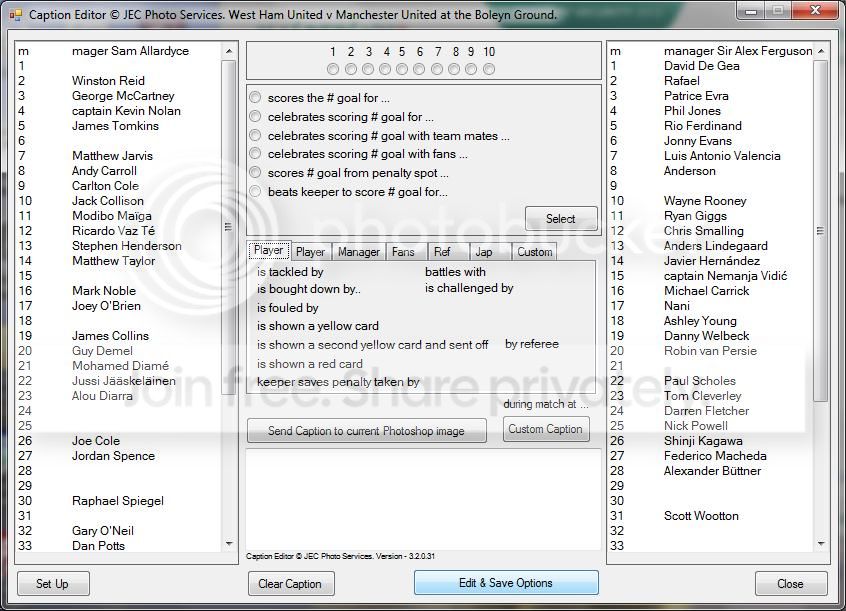
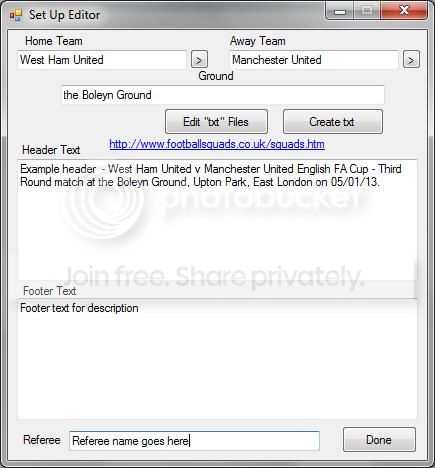
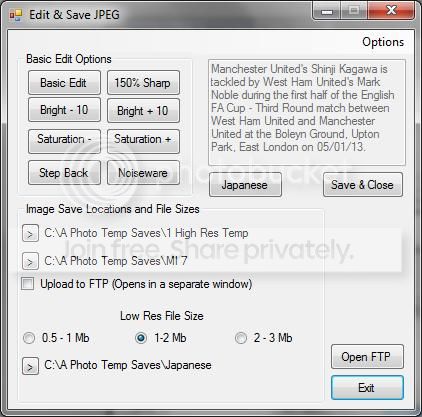
A few screen shots of John's caption editor to wet your appetite.
Diamondsnapper
Suspended / Banned
- Messages
- 120
- Name
- Mal
- Edit My Images
- No
There's the odd mistake in the text but it's only an idea of what he's building and what we are using. It can be fully tailored to your needs with all one click captions that you can set yourself or use the ones in the default
There's some odd bits he's added just for our specific use and they will probably be adjusted to suit or removed.
Once you've added the required caption, save and close and it will then automatically send to your designated FTP link and off to the picture desk (one click).
There's some odd bits he's added just for our specific use and they will probably be adjusted to suit or removed.
Once you've added the required caption, save and close and it will then automatically send to your designated FTP link and off to the picture desk (one click).
Last edited:
Diamondsnapper
Suspended / Banned
- Messages
- 120
- Name
- Mal
- Edit My Images
- No
I'm not sure exactly but he mentioned between £20 - £30 ish once finished
dafphotographer
Suspended / Banned
- Messages
- 138
- Name
- David
- Edit My Images
- Yes
Does it really take that long to type "is tackled by"?!
Since I batch caption and CR my frames in Lightroom, I don't think this app will be useful to me, but I can see some people getting a lot from this. Please keep us updated with how this develops. Its always impressive to see people working hard on some great developments in our line of work. Well done.
Since I batch caption and CR my frames in Lightroom, I don't think this app will be useful to me, but I can see some people getting a lot from this. Please keep us updated with how this develops. Its always impressive to see people working hard on some great developments in our line of work. Well done.
Diamondsnapper
Suspended / Banned
- Messages
- 120
- Name
- Mal
- Edit My Images
- No
I understand your point David, but to add a player and additional player action, say-
"West Ham United's James Collins scores the first goal for the Hammers during the match at Upton Park"
This is done with two clicks to do the caption and a final click to be saved as a high res image, a selectable resolution size for the papers and it automatically FTP's it as well. So three clicks and its finished, wired and gone. - Next image!!
Also it adds automatically all the IPTC data (match info that is in the header & footer) that already existed when you ingested the memory card and was pre-set as normal in photomechanic along with the rest of the pre-set xmp data.
It also has been setup to do some basic editing if needed from the same dialogue box.
John is trying to design something to help speed up the workflow a bit and not have to try and remember codes or have to adjust captions on the fly, however this can be done with this anyway, you just adjust to suit in the caption box and one click again and it's done.
Hope this gives you a little more info on the program.
"West Ham United's James Collins scores the first goal for the Hammers during the match at Upton Park"
This is done with two clicks to do the caption and a final click to be saved as a high res image, a selectable resolution size for the papers and it automatically FTP's it as well. So three clicks and its finished, wired and gone. - Next image!!
Also it adds automatically all the IPTC data (match info that is in the header & footer) that already existed when you ingested the memory card and was pre-set as normal in photomechanic along with the rest of the pre-set xmp data.
It also has been setup to do some basic editing if needed from the same dialogue box.
John is trying to design something to help speed up the workflow a bit and not have to try and remember codes or have to adjust captions on the fly, however this can be done with this anyway, you just adjust to suit in the caption box and one click again and it's done.
Hope this gives you a little more info on the program.
dafphotographer
Suspended / Banned
- Messages
- 138
- Name
- David
- Edit My Images
- Yes
Sounds great. Like I said, be sure to keep us updated.

- Messages
- 12,654
- Name
- Gary
- Edit My Images
- Yes
You guys have seriously over complicated what was once and still is for me a simple job

DemiLion
Suspended / Banned
- Messages
- 13,016
- Name
- Mark
- Edit My Images
- No
Gary Coyle said:You guys have seriously over complicated what was once and still is for me a simple job
That's because you only take about eight photos a match you lazy sod!