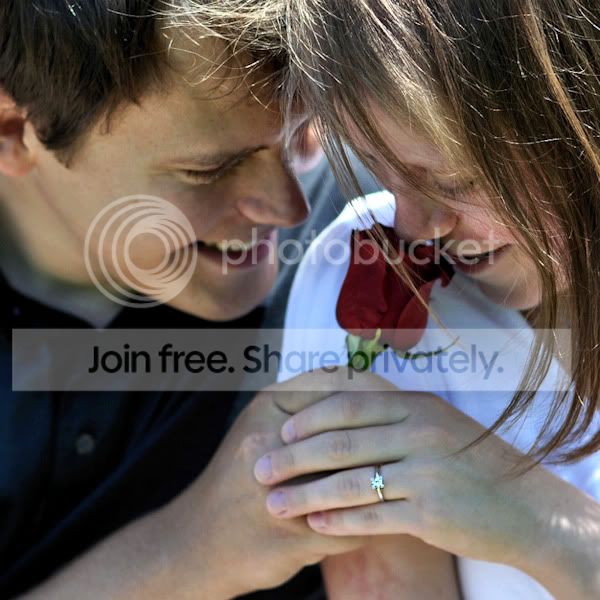
Trying to make her happy.

kmadd2004

Suspended / Banned
Messages
28
Name
Krista
Edit My Images
Yes
I have done some engagement photos for a friend of mine and his fiance. They turned out really well and the girl said she was hoping that I could reduce the redness on her face from a reaction she had to some medications. Even though this was the only concern she mentioned in the shoot, I noticed that she made a few comments that made her seem self conscious about her thinning hair. I have tried to make it look just a bit thicker in some places with the patch tool and the spot healing tool in PSCS4, but when I do it just seems too patchy afterward. Here is one of the poses from the shoot without editing to her hair....any suggestions? I was hoping to surprise her with a before and after photo....

http://i31.tinypic.com/28m1u8o.jpg

Staff Edit : Images changed to clickable links. Pictures must not exceed current forum limits as per the rules.
Please feel free to replace this with a fresh/resized image and remove this text :)
 
you'll need to reduce that to 800px wide for forum use but as it is the photo is pleasant but could do with some work on the contrast/colours :)
 
I'm no expert so take anything I say with a pinch of salt....

The hair seems to be the focus point in the photo, I think it would be better if the ring was in focus and the couple slightly blurred. Or the ring and the couple's faces in focus. (could be the screen on my Macbook though)

I would possibly clone out(or try to reduce) the white bits on the bottom of the man's shirt. There is also a spot on the man's arm right on the left hand edge of the frame (lens Flare maybe), maybe clone that out.

As Alexkidd said, contrast and colour need a boost.

I'm not a fan of the background either, it seems a bit too stark (if that's the right word for it) but that's probably personal preference.

I'll have a quick play with the jpeg, see if I can do anything with it (Don't expect miracles though :D )
 
OK, here's a quick edit.

In PS CS3. I did the following
Bit of healing on the woman's arm
Curves layer set to Medium Contrast
Levels layer set to Auto
Hue/Saturation - Changed the saturation on the green channel
Then Merged the layers
Did a Image --> Adjustments --> Shadow/Highlight, set Shadows to 50 and highlights to 0
Used a little Unsharp Mask (Not sure on what I changed though sorry).

I've not touched the man's shirt

There will probably be a lot more people on here who can do an awful lot better than my attempt.

And Here is the result

couple.jpg


I will remove it if you don't want it kept up!
 
Thanks! This edit is wonderful and all of the advice is very helpful. I will try some different things and when I get the chance I will post my finished result for opinions.....
 
The first thing to tackle really is the background and problem you had with the hair. If you can't re shoot (which would be a lot better all round) then I think the crop below works better.

I also cloned a few hairs from his cheek and nose, clarified the shot by 2, boosted the contrast by 5, sharpened, selectively sharpened the ring and resized to get ...

kmadd.jpg
 
I do like that edit Jo, and the crop works really well.
 
I agree, Jo. I am very pleased with this edit....I will include those techniques as well...thank you! :D
 
Back
Top