triptych

  • Thread starter Thread starter RKC
  • Start date Start date

RKC

Suspended / Banned
Messages
4,399
Name
Bob
Edit My Images
Yes
Hi
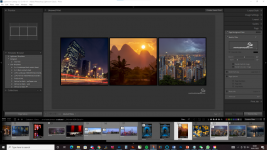
I created a triptych in lightroom, first time I done one.
What I cannot find the answer to how to remove one section and replace with another image, the only way I have found so far is to remove the image from the film strip which is not really useful as then I have to reload back into filmstrip if I want it another section
Hope that makes sense
Help appreciated
 
Hi Bob,

You should be able to have lots of images in the filmstrip (ie more than 3) and then select 3 (hold CTRL and click 3 images in the strip). These should then appear in the 3 cells you've drawn. Selecting a different 3 from the strip should see them replace the previous selection. That's how it works for me. I've exported a Triptych preset I've used in the past, however I can't attach it here (only image files are allowed). I can send it you via email though. It looks like this:-

1641790141832.png

Owen
 
Thank you Owen
Was speaking to someone the other day and they said exactly the same as you, just replace them over the top. Thank you for the offer of a preset, not wishing to sound ungrateful but like the idea of making my own as it is a way of learning
 
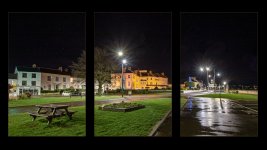
Here is my first attempt

black and yellow.jpg
 
I've done a couple like that and have basically (effectively) dropped a 3 window frame over the complete image so things like kerbs and roads run truer.

On the ones I've done with different images in each frame, I've C&P images behind the frame. However, for hanging, I use 3 separate prints in clip frames rather than 3 smaller prints in the one frame.
 
  • Like
Reactions: RKC
Thank you Owen
Was speaking to someone the other day and they said exactly the same as you, just replace them over the top. Thank you for the offer of a preset, not wishing to sound ungrateful but like the idea of making my own as it is a way of learning
No worries Bob - I just thought you might be able to compare yours to mine in case there was some sort of difference. Looks good (y)
 
Back
Top