Help! TP seen as a security risk any ideas ?

BADGER.BRAD

Suspended / Banned
Messages
4,252
Edit My Images
Yes
Hello all ,

I get this message when trying to log in any ideas ? I'm using a VPN and the Brave browser on Mint Linux
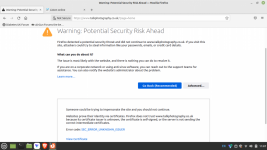
Screenshot from 2026-02-15 11-07-03.png
 
Yes my error, I had tried Firfox to see if the problem still existed !

Well don't use a VPN or Brave for that matter.

What else should I use then ? Not a helpfull answer !
 
Why use a VPN at all? I don't. I believe some VPNs allow you to add exclusions for certain sites.

Out of interest what do you think a VPN is doing for you?
 
  • Like
Reactions: Nod
Out of interest what do you think a VPN is doing for you?
Prevent my ISP seeing my meta data and others from seeing my IP address. It will also give me an element of protection when I'm using a public network, just lately I have been doing this a lot for various reasons.
 
Prevent my ISP seeing my meta data and others from seeing my IP address. It will also give me an element of protection when I'm using a public network, just lately I have been doing this a lot for various reasons.

For the very reasons you are using a VPN, they can be problematic. Flip the situation on it's head: want to spread malware, visit sites that are blocked, remotely access computers illegally, hack email accounts - use a VPN to cover your tracks. Sometimes the address used as a final point by the VPN is compromised by illegal users and becomes blacklisted and blocked by legitimate sites like TP. This may be an automated process as part of the security package provided with forum software.

So, not being difficult, but the VPN may well be causing you to be blocked here (and other places) even if you have a legitimate user ID and password.
 
The error says that the browser doesn't trust the site's certificate because the issuer is unknown but the site's certificate is valid so I'd check the configuration of the device.
 
I of course understand the logic in if someone is hiding them selves then they may be doing so in order to cover their ill intentions , but wondered if something had changed at TP as I had never seen this message before ,although I must admit I've not been a frequent visitor to TP lately . It's not really a problem as I can choose to ignore the warning, I have also changed the laptop to a new old machine and also changed the operating system from one Linux to another
 
I of course understand the logic in if someone is hiding them selves then they may be doing so in order to cover their ill intentions , but wondered if something had changed at TP as I had never seen this message before ,although I must admit I've not been a frequent visitor to TP lately . It's not really a problem as I can choose to ignore the warning, I have also changed the laptop to a new old machine and also changed the operating system from one Linux to another
As I mentioned in my post above, it's likely not a problem with the site but it's probably an issue with your device. You're getting the error because the browser doesn't think the certificate is valid and therefore the connection isn't secure, more specifically looking at the error your device doesn't trust the certificate issuer. I'm only going by the screenshot but it usually means you're missing a root certificate for that CA.

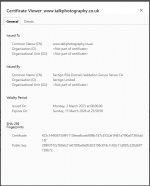
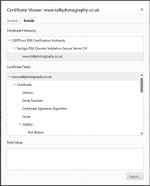
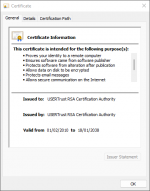
The certificate is issued by Sectigo and on my system the root CA is USERTrust RSA Certification Authority, if you click the option to view certificate on the screenshot you posted it may show where the issue is. I have also seen some security tools (like DNS filters)which can cause certificate errors so it may be something like that. I've attached screenshots showing the certificate is currently valid, the root CA it's using and the root CA certificate on my system for reference.

The problem with these insecure site messages is that they are technically correct but you need to check the certificate to work out where the problem actually is. Some sites do not have a certificate at all, some have one that's expired or there may be an error on your own device like a missing root certificate (these system certificates tell which standard certificates can be trusted) or even something like the date being wrong.
 

Attachments

  • TPCert1.png
    TPCert1.png
    35 KB · Views: 1
  • TPCert2.png
    TPCert2.png
    26.3 KB · Views: 1
  • TPCert3.png
    TPCert3.png
    21.2 KB · Views: 1
Last edited:
This site won't let me use my cell phone in the US unless I'm on wifi. Says my IP has been banned! No VPN.
 
This site won't let me use my cell phone in the US unless I'm on wifi. Says my IP has been banned! No VPN.
That's a different issue, it doesn't look like the OP's VPN address is being blocked because they're reaching the point they can connect to the site but they're getting the warning because their system doesn't think the certificate is valid. If the VPN address was being blocked (which is common these days as a security measure on internet facing systems) then they wouldn't be able to connect to the site at all and wouldn't be able to see the certificate.
 
I just thought I'd jump in as long as people were complaining.
 
Back
Top