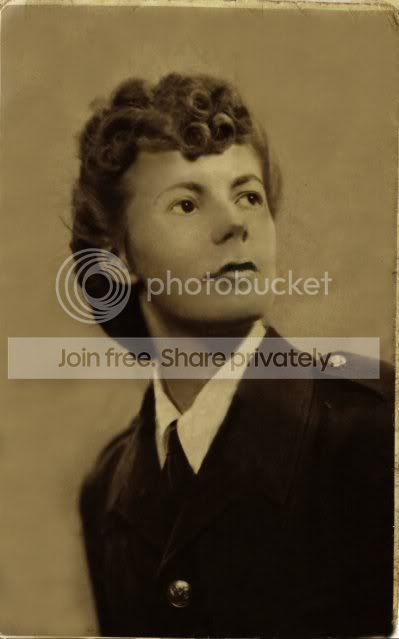
Touch up old WWII Pics.software ?

Dene

Suspended / Banned
Messages
93
Name
Chris
Edit My Images
Yes
Here is a pic of my parents during WWII i scanned it from our collection
i have a few

http://i41.tinypic.com/177eow.jpg

its B&W its damaged a lot could i touch it up to make it better with some software i have paint.net.picasa.PSP.7.Gimp.Etc

is any of these better than the other to touch this up
and would i need any addons brushes that are freely available for Gimp or psp7
to help do this.
Yes it wont be made good but it could be improved i presume

Thanks
Dene
 
I'm no expert, but out of the tools you have available I'd use a combination of PSP 7 and GIMP. The pic on the right is easy enough to do. To do a good job on the other one, you'd need experience and it would be a fairly involved process.
 
You are probably looking at a lot of cloning, darkening and highlighting to bring it out ok.

Lots of layers involved too.

Would you mind if I had a go tonight when I get home?

As said above the left one will be a lot harder too do, especially as you only have small amount of natural skin colour to work with. You are also going to have issues with her right eye, but you could always look at cloning her left eye over the top of it.
 
Had a quick play around with the photo's but i'm not really a 'photoshopper'.

By all means remove if you wish.

222.jpg


The right photo was pretty easy unlike the left, but as mentioned it was only a quick go to show you roughly how much you could recover them.
 
Please feel free to try i was going to have a go tomorrow after looking a few ideas up
if you manage to do anything with mum's pic that would be amazing and a big Thank You

for trying and giving your time up

and if we on here TalkP could see any result it would be much appreciated
Thanks for the reply's
Bobiscuit & Harvey Nikon.CBA100
 
I've only tried the one so far and I didn't want to play with the colouring, just remove creases, dirt etc:

177eow1.jpg


I don't know if images from that time were always that colour but I left it. The only colour I did play with was the odd tint on his jacket, the white/green speckle.
 
And the second one, there is a few things that I am unhappy with. The models right eye still isn't exactly the same shape as the original, needs tweaking and she also needs the highlights putting back on over her chin and under her neck. No idea how to do that yet :) Oh, and I had to B&W it due to the variation in colours on the original.

Here:

177eow2.jpg


Time for bed me thinks :D
 
I have third volume of http://www.digitalretouch.org/ which I find to be very good, all the examples in the book are available online to practice so you get a good idea of whats going on with the instructions given.
 
And the second one, there is a few things that I am unhappy with. The models right eye still isn't exactly the same shape as the original, needs tweaking and she also needs the highlights putting back on over her chin and under her neck. No idea how to do that yet :) Oh, and I had to B&W it due to the variation in colours on the original.

Here:

177eow2.jpg


Time for bed me thinks :D

9 out of 10 for this effort. :thumbs:
 
Oddly enough, I've just done one this week of my great grandfather using Elements.

Before:

Before1.jpg


After:

After3.jpg


However, that picture of the lady looks a real challenge due to the sellotape over it, there's some great efforts here. I'll have a play too if I get the time later.
 
Thank You very much for your reply's
Sonail,Seashaker,Deckard,Tiler65

Excellent work thank you very much.

very good to see the skills you have

I have a few more from the 40's i wont post any links to them
don't want to be seen as spamming
but if anyone wants to see them please reply if your interested
in the 40's subject and touching up there of my father these are our pictures
and feel free to use as you wish

i'm going to try and fix these my self the original pic was the worst

i just realised VE-Day it just round the corner too
Thanks
Dene
 
Back
Top