To light, or not to light?

joel222

Suspended / Banned
Messages
703
Name
Lee
Edit My Images
No
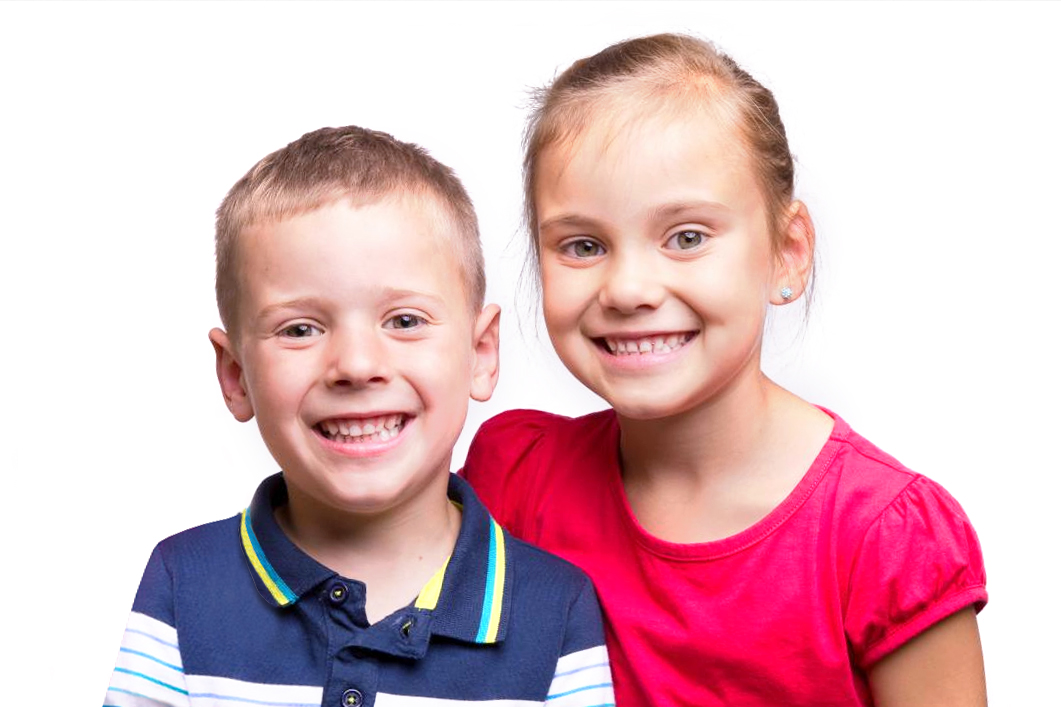
I thought I'd get the white paper background out again today for a mess around and have a go without lighting it. My reasaon for this is that my available space is only 4mx4m and I usually suffer from the usual problems that white bg's give(flare, loss of contrast etc). I used a 120cm octa to light the subject and a little bit of dodge in LR. What do you experts think of doing it this way? I've posted a couple of pics below with the results, as I'd like to know which is the best out of the two edited ones, as usually make the bg too bright.

This is an un-edited raw file converted to jpeg in LR


This one has been brightened a little


This one has been brightened the most


Which of the last two are the closest to the correct exposure?

I don't know why but my pics always look worse when I upload them on here?
 
Last edited:
I'm a million miles away from being an expert but I'd say the first one is the best.
 
Dodging the background is nothing but a PITA

You lose the fine hair as you can see in the last one

Answers on a post card as to make a better job in pp

H
 
I don't know about the lighting of the bg but the wb is all over the place.

I normally select the bg with the magic wand and lighten it as a layer (but I'm not a white background user of note, nor are my PP skills the best. I find it's a PITA .
 
I think this is the end of the white for me. I took a few similar ones using a mid grey paper bg and they are spot on, exposure and wb. It's typical that I have two rolls of white paper but hey, there's always the for sale section.
 
I think this is the end of the white for me. I took a few similar ones using a mid grey paper bg and they are spot on, exposure and wb. It's typical that I have two rolls of white paper but hey, there's always the for sale section.
In the light of this :eek::) there isn't really any point in saying this but that has never stopped me...

You need to decide where your priorities lie, and IMO they should lie with the subject. I feel that the unedited version is a pleasant enough photo of a couple of kids, they look natural and the detail is present.

Then, they look progressively worse as you edit to "improve" the background
 
I don't know why but my pics always look worse when I upload them on here?

Don't put them on photbucket, I've noticed it wrecks many a pic, why it's called bucket I guess, use flickr

H
 
Last edited:
I think this is the end of the white for me. I took a few similar ones using a mid grey paper bg and they are spot on, exposure and wb. It's typical that I have two rolls of white paper but hey, there's always the for sale section.

I'm only viewing this on my iPad, but I would say that there's nothing serious wrong with your exposure and white balance. You have edited the colour in the second and third shots and taken away from the natural colour in the you unedited shot.

If you're trying to get a perfect white background with only lights your subject, forget it, without overexposing your subjects it cannot happen. One way you could get closer is to use a standard reflector (say a seven inch spill kill) and use that at a few tenths over exposed on your subject with your subject close to the background. This will give you that Terry Richardson style of shot that is very popular at the moment.

Hope that helps a bit!
 
The background is white, so put the WB dropper on that. Won't be far out.

You need to get to get a good handle on the LR basic control panel. Faces are too shiny - use the whites and highlights sliders. Red channel looks blitzed - use the three Presence sliders. I'd maybe crop a little tighter, quite a lot actually, and add a light vignette, but the shape's awkward with the lad being too low.

The basics are there, but the post-processing is not getting the best out.
 
Quick edit in LR and PS with the small file :)

 
I really don't like the hand on his shoulder

I's good to know Tel is as bad as me with that edit ;)
 
good to know Tel is as bad as me with that edit ;)

We didn't see your edit Helen :p anyway it was just quickly done, i'm sure i would do it quite different with the RAW file ;)
 
We didn't see your edit Helen :p anyway it was just quickly done, i'm sure i would do it quite different with the RAW file ;)

Best I could do in 5 mins, did not get the fine hair..

Magic wand, fill, save as layer, flatten


edi1 by HS-uk, on Flickr
 
Last edited:
Best I could do in 5 mins, did not get the fine hair..

Magic wand, fill, save as layer, flatten

Looks pretty good to me for a quick edit, you managed to keep the fine hair too, i must admit i have to agree about the hand, it doesn't look quite right.
 
Hair is not right, I think there are a few vids on youtube that cover fine hair

The hand is a bit weird.

H
 
Making a mask from a single channel of the image is usually the best way to retain the fine details in hair etc..
 
not sure why you'd keep the fine hair in, it spoils the picture IMO
i'd edit it out

this is my edit, brightened it up, retouched out the hand and cropped it better
clarkjamesdigital2_o.jpg
 
Last edited:
not sure why you'd keep the fine hair in, it spoils the picture IMO
i'd edit it out

this is my edit, brightened it up, retouched out the hand and cropped it better

Much better without the hand

H
 
I prefer the first, unedited version. Although I know you want a lighter background, for me the darker/grey background works better and does not distract from the subject.
 
Back
Top