Timelapse photography and the lens-twist trick

StewartR

Suspended / Banned
Messages
11,513
Name
Stewart
Edit My Images
Yes
I know about the trick you can do with Canon cameras, half-disengaging the lens to avoid the flickering on timelapses which can be caused by variations in the aperture stop-down.

Is it known to work, or known to not work, on other models of SLR / SLT / CSC?
 
Yes it works for me. Since I found out about it I've always done it. I only ever tested it out on a 550D but I've used it on 60D, 5DMKIII and 1Dx since and don't get flicker.

The key is making sure you turn it enough to disengage the aperture contacts etc and preventing the lens error you get, Error 1 I think it is.

Of course the really important bit is remembering to lock it back in place before you start physically moving camera/tripod etc about again.
 
Last edited:
Or you could just set it to manual!

Sadly not as it's the aperture that causes the flicker, not focussing. What you can do is buy old manual lenses with an aperture ring that doesn't automatically stop down, but that has other drawbacks.

The other real alternative is to run some de flickering software over it in post, but still better to not have to if possible
 
Must admit that I've never thought about unscrewing the lens - I've done it while messing around with table top macro, but not time lapse.
A few questions please....

I'm guessing some lenses will hit the desired aperture more reliably than others and it is dependent on the selected aperture?

Unless you also lock off shutter speed and ISO then the auto exposure will produce an effect that looks like aperture flicker. I presume you are using manual everything.

For sunrise and sunset time lapses the camera exposure settings need to be varied dramatically during shooting. Even changing setting manually produces step changes in exposure that are visible in the end result. De-flickering software is the only solution?
 
Last edited:
For a day to night or sunset timelapse you end up needing to either do dramatic work in post or use some for of bulb ramping software which you set to incrementally increase exposure time. There used to be a little box of tricks available called the little bra per that you could use, but they are unavailable now. I'm not sure if magic lantern offers this, but there are a few software options but they require a laptop

When shooting timelapses I have everything locked down to either manual, or controlled by whatever I'm using, the camera doesn't get to choose anything
 
Wouldn't the aperture stay constant if you shot in aperture priority and fixed it to one at the beginning of the time lapse?
 
Wouldn't the aperture stay constant if you shot in aperture priority and fixed it to one at the beginning of the time lapse?

No because the aperture generally fully opens on each shot and only closes to the selected aperture when the shutter is pressed. It is the small inconsistencies between each shot that causes the flicker.
 
No because the aperture generally fully opens on each shot and only closes to the selected aperture when the shutter is pressed. It is the small inconsistencies between each shot that causes the flicker.

I see.... that's an annoying flaw.
 
It certainly is. I quite like shooting with some of the legacy nikon lenses with their fancy high tech aperture rings to get round it. I'll have to check out ML again and have a look at the bulb ramping
 
I use the Lens Twist method on my 7D and it works just fine. I also use GBTimelapse which is great for doing timelapse when the exposure will vary by up to 20 stops e.g Sunset to Stars.

Of equal interest is the fact that aperture values are not that accurate. That is what you set and what the lens stops down to may differ. GBTimelapse gives you a way to profile the lens and use the apertures actually obtained.

You can also use it to characterise ND Filters


Colin
 
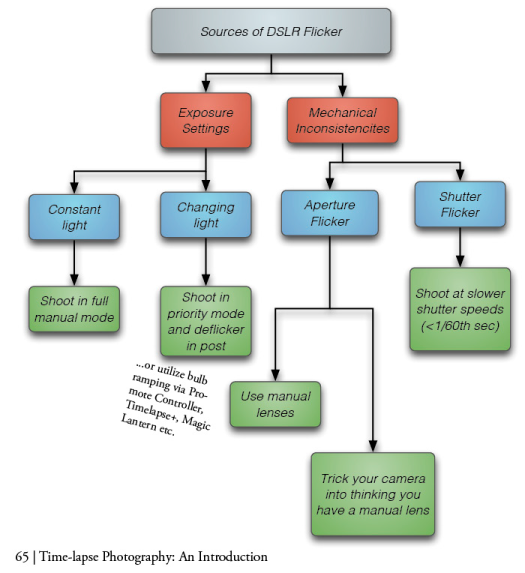
I've had good luck with the twist trick but usually do some kind of deflickering in post as well. We've got exposure and mechanical inconsistencies to consider:

Sources-of-flicker-flowchart.png


If you are new to the lens twist trick it's in this view here here:
http://www.youtube.com/watch?v=U_MG_29OrKc
as well as the other causes of flicker in DSLR cameras.

The video covers the main points but it's also the entire chapter 4 of the book:
http://www.learntimelapse.com/time-lapse-ebook/
 
I use the Lens Twist method on my 7D and it works just fine. I also use GBTimelapse which is great for doing timelapse when the exposure will vary by up to 20 stops e.g Sunset to Stars

Hi Colin, how do you find GBTimelapse? I keep looking at it, but the prospect of taking a laptop out in addition to the camera gear and DP dolly seems like a huge amount of gear to handle. Do you take external power and if so what do use?
 
I find GBTimelapse is very good at controlling the camera to produce evenly exposed frames without too much flicker, although there is a companion product called GBDeflicker to remove what remains, if any. There's a lot of thought gone into it.

You can download a trial version if you wish.

I run it on a small netbook. It doesn't appear to need much processing power.

The problem I have is that since I do this infrequently I find that the various control settings available take me some time to get familiar with again. However, you can save projects so once that's done it's easy to recall and just start.

I'd still say that the controls and definitions could do with a little more 'user friendlyness'. Mike Posehn in his videos makes it all look so easy but then he's the author so he should.

I've had some silly problems. Batteries dieing in camera part way through a sequence (even with a battery grip); and I once forgot to set the laptop power mode to always on and it cut out.

The other stupid mistake was shooting some dramatic weather through my windows. Started very well and then I got a reflection from the TV in the bottom corner :dummy:


Another product to consider is LRTimelapse. A plug in for Lightroom that acheives consistent exposure but after the event. I 've downloaded the demo but not tried it yet. I think I'd still prefer to control the camera and get it right there, first.

Colin

 
Back
Top