


theMusicMan
Suspended / Banned
- Messages
- 3,838
- Name
- John
- Edit My Images
- Yes
Hi All
I have seen a load of posts threads on here asking about Colour Space, sRGB, different colours on monitors than when printed etc, and I too am still experiencing some weird issues with colour space et al. So, I thought I'd try to post an example of what I am experiencing and try to get it sorted once and for all, but to also include screenshots and resolutions so that anyone else experiencing this can use this thread to sort their setup out too.
Here goes...
My setup: Mac, Photoshop CS2, Lightroom 1.2
My Process: Camera RAW > Import to Lightroom (external drive) > Process > then either (1) export as jpg and open in CS2 singly to play with, or (2) export all processes images to folder > then amend other image settings if required by opening that image in Photoshop CS2
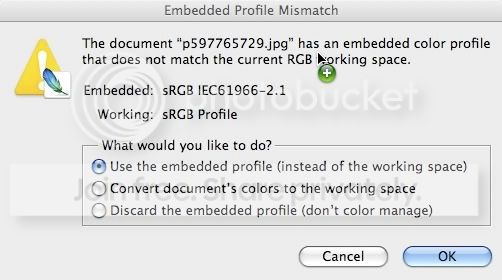
Now... here's the thing, I get a weird issue when I open any file in Photoshop that I have exported from Lightroom (fig 1)
fig 1
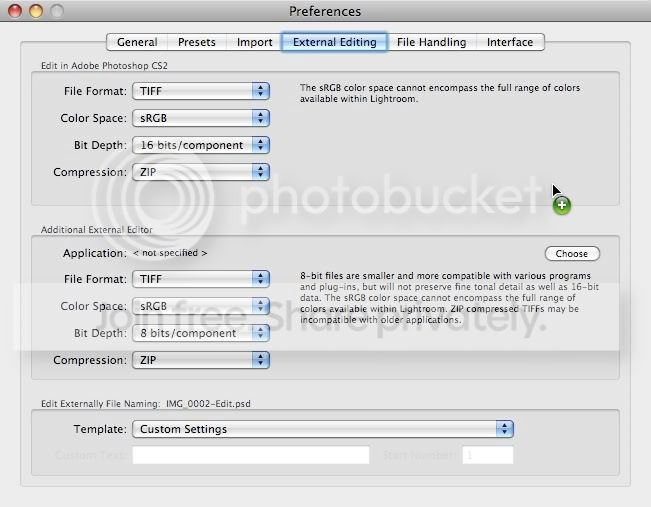
What I don't understand is why I see this at all because I have both Photoshop and Lightroom set up to use the sRGB colour space/profiles (fig 2 and fig 3)
fig 2: Photoshop Preferences
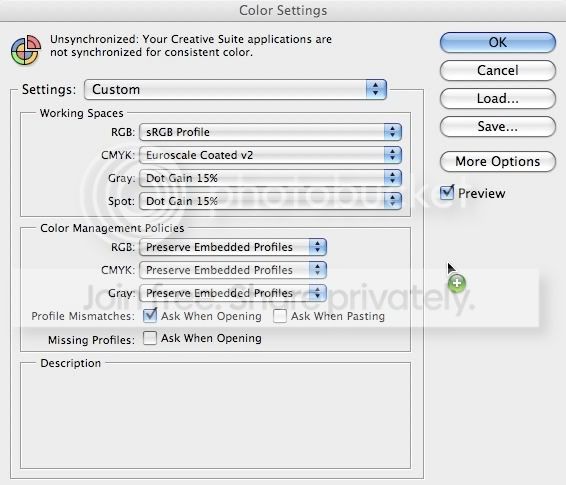
fig 3: Lightroom Preferences
Can anyone shed some light on this please so that when I open an image I don't see this message AND the images opens in the correct colour profile i.e. sRGB. I understand why I see the Photoshop popup in fig 1, but I don't understand why the embedded profile for the image I am trying to open is not sRGB because that is what I have it set to in Lightroom!!!
Ta
I have seen a load of posts threads on here asking about Colour Space, sRGB, different colours on monitors than when printed etc, and I too am still experiencing some weird issues with colour space et al. So, I thought I'd try to post an example of what I am experiencing and try to get it sorted once and for all, but to also include screenshots and resolutions so that anyone else experiencing this can use this thread to sort their setup out too.
Here goes...
My setup: Mac, Photoshop CS2, Lightroom 1.2
My Process: Camera RAW > Import to Lightroom (external drive) > Process > then either (1) export as jpg and open in CS2 singly to play with, or (2) export all processes images to folder > then amend other image settings if required by opening that image in Photoshop CS2
Now... here's the thing, I get a weird issue when I open any file in Photoshop that I have exported from Lightroom (fig 1)
fig 1
What I don't understand is why I see this at all because I have both Photoshop and Lightroom set up to use the sRGB colour space/profiles (fig 2 and fig 3)
fig 2: Photoshop Preferences
fig 3: Lightroom Preferences
Can anyone shed some light on this please so that when I open an image I don't see this message AND the images opens in the correct colour profile i.e. sRGB. I understand why I see the Photoshop popup in fig 1, but I don't understand why the embedded profile for the image I am trying to open is not sRGB because that is what I have it set to in Lightroom!!!
Ta

