Time to ditch my Canon 100s for a 300?

jonneymendoza

Suspended / Banned
Messages
8,530
Edit My Images
No
Hi. i have a canon 100s printer that i have had for years and recently i have not been happy with its output.


I am no sure what happened but there was a gap/time where i did not do any prints for a year and half or more. Upon trying to print stuff again, the colours are no match on my prints vs whats on my screen(i use a very expensive pro grade monitor for colour accuracy)


The list of things i have tried are:

  1. Deep clean inks
  2. Change inks to fresh one
  3. Manually cleaned the Print ink cartridge holder(dipped it in alchol plus water)
  4. Tried custom colour profiles.
  5. Tried all kinds of printing paper
  6. Tried different printing settings like adjusting colour intensity etc.

All of the above made little to no difference and so i think the printer itself is broken and wondering if i should grab a 300 series one?


What are the differences between teh 100s i have and the 300?


O and out of the above things i tried, what else can i try?

I tried all of this by printing via lightroom CC on my windows 11 pc
 
You may use an expensive monitor but is it recently calibrated properly?

As long as you get good nozzle check print it should be fine, and everything points the finger to your pc or settings
 
You may use an expensive monitor but is it recently calibrated properly?

As long as you get good nozzle check print it should be fine, and everything points the finger to your pc or settings
Yes it was recently calibrated.

I will try and print a picture SOOC ie not edited to see
 
I can only suggest using a test image - well probably two, one colour and one B&W. Do you have notes about all the settings you used back when everything worked?

There are so many settings which could have caused problems! It's quite a minefield. Lightroom Print module; the correct profile (I'm guessing since you say "tried" they weren't in use back in the day, perhaps the Canon profile back then); printer driver settings - Main > Matching > ICM if you want to use the profile.

Sorry, I certainly don't want to teach you to suck eggs, but you sound quite desperate.
 
Echoing all of the above.....

If a nozzle check is 100% ok then in principle there is nothing wrong 'there'.

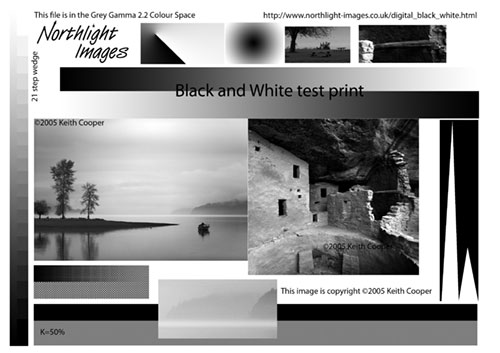
As mentioned above rather than 'your images' you should use known standard test images.

Here is a link to Keith Cooper's test images download page

Oh, to keep a baseline, stick to OEM inks and one paper for those initial tests.

PS what monitor do you have and by what method & calibration device was it 'calibrated'?

PPS possibly stating the obvious, are you sure that you are not 'double profiling'? By this I mean printing with both Photoshop, LR etc control the colour management and the printer also controlling colour management? You must only allow one or the other to do so!
 
Last edited:
Echoing all of the above.....

If a nozzle check is 100% ok then in principle there is nothing wrong 'there'.

As mentioned above rather than 'your images' you should use known standard test images.

Here is a link to Keith Cooper's test images download page

Oh, to keep a baseline, stick to OEM inks and one paper for those initial tests.

PS what monitor do you have and by what method & calibration device was it 'calibrated'?

PPS possibly stating the obvious, are you sure that you are not 'double profiling'? By this I mean printing with both Photoshop, LR etc control the colour management and the printer also controlling colour management? You must only allow one or the other to do so!
Update: So i manually disabled the canon printers colour management and it improved things but it is not quite there yet.


The paper i have been testing on is this: https://fotospeed.com/pf-lustre-duo-280.html


I have manually downloaded the lustre du 280 colour profile file from their website and applied it to the colour management on the Lightroom CC print module and selected my canon 100 printer and then selected Photo paper lustre pro as the paper type.

The prints are missing vibrants, contrasts and are maybe half a stop or more darker then what si intented.

Some colours like the greens and reds are not accurate but better than before
 
Update: So i manually disabled the canon printers colour management and it improved things but it is not quite there yet.


The paper i have been testing on is this: https://fotospeed.com/pf-lustre-duo-280.html


I have manually downloaded the lustre du 280 colour profile file from their website and applied it to the colour management on the Lightroom CC print module and selected my canon 100 printer and then selected Photo paper lustre pro as the paper type.

The prints are missing vibrants, contrasts and are maybe half a stop or more darker then what si intented.

Some colours like the greens and reds are not accurate but better than before
I can only reiterate what I said....

Please use a known standard test images and Epson paper. This should eliminate potential issues of non Epson papers and potentially erroneous custom profiles.
NB IIRC I have read a couple of times with non OEM papers and available profiles sometimes disappointing prints that might be resolved by getting a custom profile done for 'your' printer. Hence why I emphasised the, start with known images and papers.

Oh, you mentioned that you had calibrated your monitor but as you also spoke about the print being too dark, just how bright in cd/M2 is your monitor?
 
I can only reiterate what I said....

Please use a known standard test images and Epson paper. This should eliminate potential issues of non Epson papers and potentially erroneous custom profiles.
NB IIRC I have read a couple of times with non OEM papers and available profiles sometimes disappointing prints that might be resolved by getting a custom profile done for 'your' printer. Hence why I emphasised the, start with known images and papers.

Oh, you mentioned that you had calibrated your monitor but as you also spoke about the print being too dark, just how bright in cd/M2 is your monitor?
Why a epson paper? i have a canon.

And what epson paper should i need to use/purchase?

Ok i will use he standard image to print and test
 
Why a epson paper? i have a canon.

And what epson paper should i need to use/purchase?

Ok i will use he standard image to print and test
Sorry my bad ......yes, of course Canon not Epson paper ~ my distraction of thinking about more subjects than your request at the time ~ DOH!

PS I did ask above ~ what monitor do you have and by what method & calibration device was it 'calibrated'?
 
Last edited:
Ok i have just did atest print on my lustry paper with the profile for it as i mentioned above and it still does not come out as accurate as whats on my screen. It lacks vibrants and contrast


I know it's not accurate representation as I took it on my phone but you kinda get the idea


I know it's not accurate representation as I took it on my phone but you kinda get the idea
What about your calibration process and how bright is your monitor in cd/M2

Another thing struck me, what is the image profile i.e. sRGB, aRGB or other? etc???
 
Last edited:
What about your calibration process and how bright is your monitor in cd/M2

Another thing struck what is the image profile i.e. sRGB, aRGB or other? etc???
How can i check brightness value? from my monitor (Asus PA32U) the brightness is set to 41/100.

Do you mean the colour profile?

I downloaded the actual image from here -> https://www.northlight-images.co.uk/file-download-page-photography/ the coloured one.

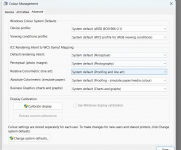
Here is the selected profile I used that has the same best result so far. I am using canon photo paper plus glossy 2 paper now


edit: the paper -> https://www.canon.co.uk/printers/inkjet/pixma/photo-paper/pp-201/
 
Last edited:
How can i check brightness value? from my monitor (Asus PA32U) the brightness is set to 41/100.
You have (I googled) a good monitor but you have not explained what device you used to calibrate it?

In my case I have BenQ SW270 and use an xRite Display Pro calibrator. As part of the calibration I select my target brightness of 80cd/m2.

If you are not using a calibrator and I surmise that is the case as you refer to brightness being set to 41/100......then if you are using the Windows tool to calibrate I think the screen is markedly too bright. This AFAIK is the commonest reason for "my prints are too dark".
Do you mean the colour profile?

I downloaded the actual image from here -> https://www.northlight-images.co.uk/file-download-page-photography/ the coloured one.

Here is the selected profile I used that has the same best result so far. I am using canon photo paper plus glossy 2 paper now


edit: the paper -> https://www.canon.co.uk/printers/inkjet/pixma/photo-paper/pp-201/
 
You have (I googled) a good monitor but you have not explained what device you used to calibrate it?

In my case I have BenQ SW270 and use an xRite Display Pro calibrator. As part of the calibration I select my target brightness of 80cd/m2.

If you are not using a calibrator and I surmise that is the case as you refer to brightness being set to 41/100......then if you are using the Windows tool to calibrate I think the screen is markedly too bright. This AFAIK is the commonest reason for "my prints are too dark".
You bet this will be wide gamut over default srgb with unknown brightness...... You either calibrate and follow the rules or you don't.....
 
You have (I googled) a good monitor but you have not explained what device you used to calibrate it?

In my case I have BenQ SW270 and use an xRite Display Pro calibrator. As part of the calibration I select my target brightness of 80cd/m2.

If you are not using a calibrator and I surmise that is the case as you refer to brightness being set to 41/100......then if you are using the Windows tool to calibrate I think the screen is markedly too bright. This AFAIK is the commonest reason for "my prints are too dark".

You bet this will be wide gamut over default srgb with unknown brightness...... You either calibrate and follow the rules or you don't.....
Hi. Why would the colour of my display affect my printing of a stock test image not edited by me and practically should have the colours and brightness nailed on?

Granted that if my monitor was too dark and i was editing my own pics and ignoring the histogram and trying to expose it correctly by eye, yes my pics would not be exposed correctly but that test photo should come out perfectly fine?


I know it's not accurate representation as I took it on my phone but you kinda get the idea

Although it is a very common comparison (and I should know, I do it too) I think to compare the screen image against the printed image is wrong. They are completely different things. A bit like comparing apples and limes - they're both green, but you do different things with them.

Unlike the picture I quote above, could you take a picture of the colour test image print, illuminated with daylight and, if required, a white balance adjustment made (NB I don't know the paper you are using, but let's assume it is a white base).

That will give us a much better idea of what you see when you look at the print.
 
Hi. Why would the colour of my display affect my printing of a stock test image not edited by me and practically should have the colours and brightness nailed on?

Granted that if my monitor was too dark and i was editing my own pics and ignoring the histogram and trying to expose it correctly by eye, yes my pics would not be exposed correctly but that test photo should come out perfectly fine?
Except you have absolutely no idea what test image should really look like
 
Sorry but why are you being passive aggressive to me all of a sudden?
I get you. Anything but actually trying to tame the problem the way it needs to be. I'm out.
 
Although it is a very common comparison (and I should know, I do it too) I think to compare the screen image against the printed image is wrong. They are completely different things. A bit like comparing apples and limes - they're both green, but you do different things with them.

Unlike the picture I quote above, could you take a picture of the colour test image print, illuminated with daylight and, if required, a white balance adjustment made (NB I don't know the paper you are using, but let's assume it is a white base).

That will give us a much better idea of what you see when you look at the print.
I am now using this paper to test > https://www.canon.co.uk/printers/inkjet/pixma/photo-paper/pp-201/


Before i was using this one https://fotospeed.com/pf-lustre-duo-280.html

I will check tomorrow and post a picture of a print next to a window .

Oh, one more thing. I found this step by step guide to be very helpful

It's quite old now, but the fundamentals haven't changed.

(No personal connection)

Cool thanks you have been very helpful! i will read that fully
 
@jonneymendoza LLP may have put it a bit bluntly, but his point was correct as I understand this - we often see discussions about screen settings needing to be calibrated before printing images you've edited (or even just stock images as you are using). You do need to know that what your screen is displaying is correct before you can judge the printed output. Some people do it as in the linked guide, others use something like a Datacolor Spider and other tools that combine hardware and software to help you find the right settings.
 
@jonneymendoza LLP may have put it a bit bluntly, but his point was correct as I understand this - we often see discussions about screen settings needing to be calibrated before printing images you've edited (or even just stock images as you are using). You do need to know that what your screen is displaying is correct before you can judge the printed output. Some people do it as in the linked guide, others use something like a Datacolor Spider and other tools that combine hardware and software to help you find the right settings.
Hi there.

Yes i have indeed calibrated my monitor. I just checked the item as i have not used it for over a year. It is a i1 display x-rite if that helps.

Regardless if LLP is correct or not. it is the overal tone that was not.

Others in here have been super helpful and have already helped me improved the output of my photo's

A person can be correct and kind in the same manner.

Regardless. My monitor was calibrated(during the day as it also checked for ambiant light on my calibrator) around a year ago when i reinstalled windows.

My question was that how can screen brightness affect a print that is exposed correctly(such as the image sample)

Fair enough, if my monitor was too bright and i was tweaking my own image by decreasing the exposure(as it would look too bright on my screen) then yes it would ideally print dark on a print.

I however tend to look at the histogram when tweaking exposure so i was only kindly asking a question about why a perfectly exposed image viewed on a monitor that is not calibrated correctly would affect the print output(as i chose just the standard canon photo paper plus glossy colour profile).

I asked it in a polite way, none aggressive and i get a very aggressive response from LLP which i am sure is not warranted
 
Last edited:
You are quite correct Jonny, his response could have been better put, but I'm glad to see that others have been more constructive and you are (hopefully) making progress solving the issue.
 
Hi there.

Yes i have indeed calibrated my monitor. I just checked the item as i have not used it for over a year. It is a i1 display x-rite if that helps.

Regardless if LLP is correct or not. it is the overal tone that was not.

Others in here have been super helpful and have already helped me improved the output of my photo's

A person can be correct and kind in the same manner.

Regardless. My monitor was calibrated(during the day as it also checked for ambiant light on my calibrator) around a year ago when i reinstalled windows.
FWIW my monitor can be and is hardware calibrated and as recommended (it reminds me) I do check/recalibrate every couple to three months.

Edit~ personally I calibrate in subdued lighting and have never used a function that compensates for the ambient light changes and IIRC that function is supposed to operate by leaving the calibrator connected 24/7.

It IMO and understanding calibration is not a "do once and forget it".
My question was that how can screen brightness affect a print that is exposed correctly(such as the image sample)

Fair enough, if my monitor was too bright and i was tweaking my own image by decreasing the exposure(as it would look too bright on my screen) then yes it would ideally print dark on a print.

I however tend to look at the histogram when tweaking exposure
Getting the histogram right in camera has no bearing IMO [*] on how well it will print. As you are working with a different set of parameters.

Though yes if at the calibrated brightness (in my case 80cd/m2) the print is as close a match as possible to the screen (please note I say 'as close as possible' not exactly) . NB please bear in mind that the screen is transmitted light and the print is viewed by reflected light. When I compare print to screen I use a 6500k (I calibrate to D65) lamp to illuminate the print held adjacent to the screen and flick my gaze from one to the other.

Then all ok but if the print is too dark then that IMO means you need to recalibrate reducing the brightness a little more to suit. NB IIRC I used the same test image as you and the B&W one too to aid me in calibration of my monitor.

AFAIK the "test" image has been created under controlled lighting conditions that makes it 'an ideal exposure/histogram' and other than the brightness of the monitor (and requires no changes in any post processing software). That is the key difference compared to the great majority of photographs i.e. even if you need slight changes in PP that will influence the exposure and tweak the histogram.

[*]I stand to be corrected as I don't do studio photography of any sort but surmise most imagery under studio lighting conditions will need some post processing.

All the best with resolving this to your satisfaction.
so i was only kindly asking a question about why a perfectly exposed image viewed on a monitor that is not calibrated correctly would affect the print output(as i chose just the standard canon photo paper plus glossy colour profile).

I asked it in a polite way, none aggressive and i get a very aggressive response from LLP which i am sure is not warranted
 
Last edited:
Back
Top