Time Lapse program ?

Lensflare

Suspended / Banned
Messages
3,156
Name
Simon Everett
Edit My Images
Yes
I only use Movie Maker for doing my video editing. I can find my way around it and it does WAY more than I will ever need for what i am doing. I had a go at doing a time lapse, but then realised that Movie maker looks at all the individual frames as imported stills (yes, they are), but it then gives each one a duration of 7 seconds...and the slowest you can cut it to is 1 second. So I hunted around in SHOTCUT, which I am assured is a very good video editing suite and several people have told me how good it is.. I am sure it is, but I can't even work out how to get a job into it to start on! I have watched and watched and watched the tutorials by several different folks - all geeks who don't know how to impart information. I just can't fathom it at all, Anyway, I used a cheapie program for my chainsawing time lapse (my first attempt) but the frame rate isn't given, it is just a slow to fast slider, and I don't know and I can't work out if I shoud speed the rate up or slow it down to give a better effect. It looks like a Benny Hill clip !

Is there a better time lapse program that is free and easy to use. I don't need to have 4k, in fact 1080 is way bigger than I need for facebook or anything. What can folks recommend that is easy for someone who finds downloading music or camera updates an impossibe task that is way beyond my capabilities.
 
I don't klnow movie maker but this seems strange. Usually in software, depending on the project settings, i.e. Pal 25 frames per sec etc then 25 frames become 1 sec. I've used my camera for one shot every 15 secs to timelapse record some equipment being installed, quite funny seeing hours of work over a few minutes.
 
Have a look at Lightworks. https://www.lwks.com/ There a quite a few YouTube videos showing how to create timelapse videos from a set of sequenced photos using Lightworks.

Also you need to open a project in whatever program and then set the frame rate required, i.e. 25fps.
 
Last edited:
For timelapses I use Lightroom and After Effects, and sometimes also LRTimelapse.
LRTimelapse is a serious software for timelapses, especially when light conditions vary a lot (day to night). It is sort of cheap, but not free.
The only good free software for video that I know is Davinci Resove (the basic version), but I have not tried with time lapses (I believe the free version doesn't do 4k). There are many YT video about time lapses with Davinci Resolve
 
Thanks, you guys are way more advanced than me. I don't have the understanding to work the frame rate out. Movie maker knows it is a series of photos, rather than a movie clip - so it thinks I am dropping in 1500 stills into a movie clip, giving them 7 seconds duration each....I can reduce that down to 1 sec, so to do 30 frames, instead of it being 1 secong, it lasts 30 seconds.....

Why do you do 25 frames? I thought the standard was 30 (29.97 or something)

I don't do any changes to the exposure or anythig - as it comes out of the camera and stick it together. For timelapse I am just wanting to do the same - I haven't the computer or program to do all that stuff. I have an old computer with 200GB main memory thing and I think it is 1GB RAM, it might be 256 ? I hve a big computer out the back, but that is on Windows 98 and has never been on the internet, so is still totallly perfect. I use it for doing my writing and stuff. This one is just a little travel computer and that is all I have to work my pictures on. I have Nikon Capture NX2 as my editing - hence why I use the free Movie Maker, it is dead easy for a dunce like me.

Does Davinci do timelapse? Does it need you to do preparing stuff in another program, because I know NX2 will do batch processing, but I have tried several times and I can't work out how you set it up. So I just do each picture individually by eye.Clumsy, I know, but it is all I have learned.
 
Oh, another thing. Do you speed the timelapse up, or slow it down, to make it smoother?

Here is the one I did yesterday (I learned I should have turned the camera off when spinning it on the tripod - but I don't know how to cut those bits out. I am still very much at the learning stage. There is no music because I don't know how to od that yet either!

View: https://www.youtube.com/watch?v=IAo3dY4lw7I
 
You used to be able to set Windows Movie maker to 0.1seconds per still - so 10fps.
My kid used to make stop motion films with that and her webcam.


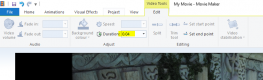
Capture.PNG

I've just checked on Windows 10 you just type a lower than 1 value e.g. 0.04 for 25fps or 0.03 for the closest you'll get to 30fps.

A shorter duration will make the motion smoother but the clip will be shorter.
 
Last edited:
You used to be able to set Windows Movie maker to 0.1seconds per still - so 10fps.
My kid used to make stop motion films with that and her webcam.


View attachment 119811

I've just checked on Windows 10 you just type a lower than 1 value e.g. 0.04 for 25fps or 0.03 for the closest you'll get to 30fps.

A shorter duration will make the motion smoother but the clip will be shorter.


Wow - I'll check that now. Thanks!
 
Depends where you are I guess. 30 Frames per sec is NTSCC (US etc) PAL is 25 frames per sec (UK)

Thanks - where did you learn that from? I've never heard of the names, just the frame rate (camera manual!!)
 
Thanks - where did you learn that from? I've never heard of the names, just the frame rate (camera manual!!)

I used to work for a company selling high end post production and editing equipment, the sort of stuff used by major TV studios and on all major films ;) and others...
There's all sorts of standards, frame rates, audio rates etc.
 
Back
Top