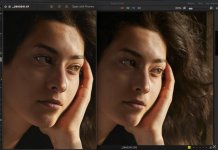
Tiff export is way more sharper and clearer than Capture One preview..

mrk123

Suspended / Banned
Messages
290
Name
kane
Edit My Images
No
See image below. Is there a reason for this?
I actually prefer the Tiff export, or at least I would prefer this amount of detail to play with in editing... Why am I not getting this level of detail during editing?
Tiff on the left, C1 preview on the right.
Even this jpg does not show the quality I am seeing i the tiff.
Screenshot 2024-10-27 at 21.46.15 7.jpg
 
check your preview image size in preferences, images. it could be the preview size working with your raw files is too low.
 
Thanks - I changed preview to max and didn't see any changes, but maybe i need ot restart C1.
 
Thanks - I changed preview to max and didn't see any changes, but maybe i need ot restart C1.
You need to rebuild the previews after you change the resolution. Select all the images and right click on them where you should get a regenerate previews option. It's also on the file menu. Restarting C1 may also trigger preview regeneration: I don't know.

Preview size should match the resolution of your monitor, but the slight fuzziness (minimal sharpening) is a deliberate choice of C1 to speed up editing changes, that is why you should only make some adjustments at 100%, e.g. sharpness clarity and structure. To check the output sharpness, you need to set up an appropriate export recipe and soft proof the image.

The fuzziness is better than it used to be, and at one time I used to do all my editing in soft proofing mode, or at least regularly switch into it.

With a full size TIFF, you are working with a 100% (sharpened) image all the time, So it looks better, but C1 takes longer to make adjustments.

Having said that, the level of fuzziness of C1 previews seems to vary with set up. For some people it's fine and for others it seems to be a problem. For me it's less of a problem than it used to be, but it's never as nice as working with a sharpened PSD or DNG (from DXO or Adobe deNoiseAI),

 
Thanks, that regen preview seemed to work. I seen the image suddenly pop a bit.
I am on a 2012 mac would you believe, SSD, 16GB RAM so it has been sped up some, handles fine, I would image the new M2 and M1 macs would have no issue with handling tiffs.?
 
Thanks, that regen preview seemed to work. I seen the image suddenly pop a bit.
I am on a 2012 mac would you believe, SSD, 16GB RAM so it has been sped up some, handles fine, I would image the new M2 and M1 macs would have no issue with handling tiffs.?
I'm on a M1 Mac with 32gb RAM, and I find it fast enough.

But you also need to think about the core customers of C1 ie event photographers rushing through hundreds or thousands of images or fashion/commercial photographers. The latter possibly with clients working alongside a digitech to check out images as the shoot progresses, where the concern will be things like lighting, initial colour grading, model expressions and gestures rather than sharpness, and even tiny delays in processing adjustments may hold up the progression of the shoot.

A lot of the changes C1 has been making over the last few years have been heavily focussed on speeding up all aspects of its workflow. 10+ years ago they put a lot of effort into seamless integration with photoshop, but since then it's been colour grading and workflow that seems to have been their focus.
 
Back
Top