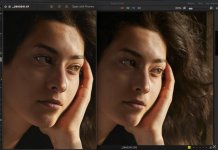
Thanks - I changed preview to max and didn't see any changes, but maybe i need ot restart C1.
You need to rebuild the previews after you change the resolution. Select all the images and right click on them where you should get a regenerate previews option. It's also on the file menu. Restarting C1 may also trigger preview regeneration: I don't know.
Preview size should match the resolution of your monitor, but the slight fuzziness (minimal sharpening) is a deliberate choice of C1 to speed up editing changes, that is why you should only make some adjustments at 100%, e.g. sharpness clarity and structure. To check the output sharpness, you need to set up an appropriate export recipe and soft proof the image.
The fuzziness is better than it used to be, and at one time I used to do all my editing in soft proofing mode, or at least regularly switch into it.
With a full size TIFF, you are working with a 100% (sharpened) image all the time, So it looks better, but C1 takes longer to make adjustments.
Having said that, the level of fuzziness of C1 previews seems to vary with set up. For some people it's fine and for others it seems to be a problem. For me it's less of a problem than it used to be, but it's never as nice as working with a sharpened PSD or DNG (from DXO or Adobe deNoiseAI),