Thoughts & Help please

Keltic Ice Man

Glossary King
Suspended / Banned
Messages
3,179
Name
Allan
Edit My Images
Yes
I mentioned recently that I wasn't 100% happy with the studio shots that I'm getting and wondered if someone could give me some pointer.

My setup is:

Cloth background,
2 lights (with shoot through white brolly) at an angle to the background (unfortunately they are not matched, one is a flash head, the other a cheap flash bulb). I try to meter them as f8 with only the 2 lamps on.
Subject about 8 feet from the background
Front flash head, with softbox camera left level with camera. Set to F8 with no other lights on.

Camera Canon 350D with Sigma 24 - 70mm

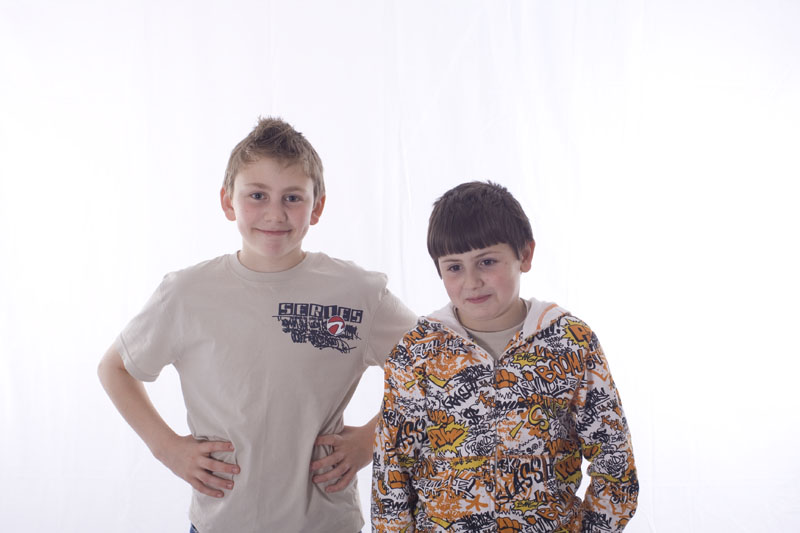
The shot below is a raw convert from the camera. I know (and do) tidy the pics up in CS3, and folks like them as they are buying pics, but I would like to get more right in the camera. (I know the pose is not right, this was taken of 2 of my kids when I was setting up the lights)
2462101008_4aedb3c819_o.jpg


One of my problems is getting rid of the creases in the background. (and I am thinking of going for paper but would love to get it right on cloth).

another of the other problems is I often get a blue tint around the head of the subject, I think from the brightness of the background

another problem is I feel the skin probably looks a bit too white.

Shot taken with F8 1/160th

Thanks

Allan
 
Your problem is with the lights on the background - don't use shoot through brollies for this because they scatter light everywhere. Use standard reflectors, softboxes or reflective umbrellas.

You can see the light spill on the sides of your victim's faces, and on the bare arm.
 
I have 2 reflective brollys. (I think, black one side, silver inside).

So I turn the background lights around and get the reflection to bounce on the background instead?

QUOTE]

Yes. Not sure about the blue fringe, it could simply be overexposure on the edges of your subject.
 
To lose the background creases altogether you need to overexpose it a couple of stops too. If you are shooting your subject at f8 you need the amount of light on the background to be f11.

I would be interesting to try that and see if you lose the blue fringes.
 
If you set the background to F8 with onlky the background lights on it.................then turn them off and light the subject at F8..........then when you turn them all on.. the background SHOULD be a stop or so over the subject.
 
I thought I set the background to F8, then the subject to F8 then I should get around F11 on the background? I wonder if i am getting F11:thinking:

Sorry Keltic. I had skim read your post and not read it thorougly enough. You should be getting a stop above.
Ali
 
Just to show how the pic comes out after post processing

2465356836_7a7ddb691d_o.jpg


But I wish I could get somewhere near it when I shoot.

(I'm also interested in anyone elses post process of the same pic).

Am I loosing skin tones because of the light scattering from the backlights? or am I doing something else wrong?

PS - as I mentioned above I know this isn't a good pose :) just the kids stading in while I did some setting up
 
Crank up the backlight and consider bouncing some extra light (perhaps with a coloured reflector...gold works well) at the front to fill the front of the face in a touch more than it currently is.

After PP, those are looking good and I think you're on the right track!

Cheers,
James
 
If the kids are really as patient as this then it would be worth trying some of that tethered shooting and gradually turn up the back lighting just to see what happens.

To be honest I don't think you are a million miles away, just need a little tweeking. Garry made a very good point about the spill from the backlights in your original pic, get them under control first and foremost.

Then have a play. Good luck with the kids, that will cost you! lol.
 
First of all, I haven't shot this kind of photos with DSLR, I have shot some with slide in good (bad?) old days. :D

From your first photo (before PP), I think your background lights (with translucent umbrella, if I didn't misunderstand) were strong enough because we can't count on the over-exposure on the white bg to achieve D-max (in DSLR) without side effects.
Since my English is bad, so I just tell you what I felt from your photo. I hope you can understand. :D

1. As I mentioned, your bg light is strong enough (just more or less) and you can't remove the crease with correct lighting. Please build a cyclorama if you need a white bg everyday. If not, just simply buy a bg paper. There will be only some waves on it with if the lighting is correct (or maybe disappear with DSLR).
2. The spill light or reflection from your translucent umbrella (especially bare bulb, without reflector) fogged your lens (most 135 and some 120 lenses will be fogged in this lighting setup, except 4X5 lenses, e.g. Schneidler). Usually pros/movie lighting men will use black flag to shield this kind of spills. I think this is the reason why you couldn't get your ideal skin tone.
3. I think the blue fringes should be came from your over-exposed bg. because the shoulder of the characteristic curve of DSLR is more straight than slide's. If shooting with slides, there should be only WHITE spills/rim lights around your kids, not blue fringes. However, sometimes it may be produced by nowadays DSLR zoom lens.

If I say something wrong, please don't mind. :)
 
how far out of the shot are your lights? looks like they could do with coming a bit closer in if you can to brighten the middle, help reduce the creases a bit.
 
Your problem has nothing to do with the distance of your lights to your subject, it has very little to do with your choice of background and Photoshop isn't the answer...

The answer is as I explained earlier, nothing more and nothing less.
 
Hi ya

I use pretty much the same set up as you, curtain at the back, my two lights for the background are mounted on the wall so they light the middle of the cloth - I rarely have to edit the background unless its not in between the lights, I have them turned up about half way (no idea what this is in terms of stops etc!), and then use one soft box flash for the front.

My problem is the floor. Have a look at my website to see the results - these are edited around the subject sometimes but hardly ever the white part behind.

Sure other people do it better than me though! Emma
 
Back
Top