
and help to keep the site free for all
You are using an out of date browser. It may not display this or other websites correctly.
You should upgrade or use an alternative browser.
You should upgrade or use an alternative browser.
Think I broke Affinity lol
- Thread starter Adamcski
- Start date

Sangoma
Suspended / Banned
- Messages
- 2,951
- Name
- Steve, Coventry, England
- Edit My Images
- Yes
Did you think it would load that in secondsJust trying out focus bracketing so decided to do a 140 raw image shot of some some gem stone things my son has. Loaded them as a new stack in Affinity V2 and well.....it's still loading 1 document LOL
 I would expect at least 30 minutes even if you computer had the memory etc it needs, but it sounds a bit excessive any way.
And the processing probably about an hour

Done.
I was only playing around as I haven't used this setting before so figured I would have a go. I knew 140 would be a lot but laptop managed it - took a little while and fans kicked in and CPU usage was 90% for a while. To be fair it was processing 4.67 GB of data lol.
It isn't perfect as I need to play around with focus points and lighting (hand holding some lights that could do with diffusion) but it's a start.
I was only playing around as I haven't used this setting before so figured I would have a go. I knew 140 would be a lot but laptop managed it - took a little while and fans kicked in and CPU usage was 90% for a while. To be fair it was processing 4.67 GB of data lol.
It isn't perfect as I need to play around with focus points and lighting (hand holding some lights that could do with diffusion) but it's a start.
Last edited:
Sangoma
Suspended / Banned
- Messages
- 2,951
- Name
- Steve, Coventry, England
- Edit My Images
- Yes
Impressive, another star for AffinityDone.
I was only playing around as I haven't used this setting before so figured I would have a go. I knew 140 would be a lot but laptop managed it - took a little while and fans kicked in and CPU usage was 90% for a while. To be fair it was processing 4.67 GB of data lol


Bristolian
Suspended / Banned
- Messages
- 4,428
- Name
- Steve
- Edit My Images
- Yes
I like the second one, it's quite inspiring. I've been meaning to give focus stacking a go but haven't got around to it. Maybe now is the time to try 
I've posted them in the macro forum as I did the first gem / stone again and it came out much better. I still prefer the amber coloured one.
 www.talkphotography.co.uk
Just playing around with the in camera bracketing - focus.
My son has a fair few stones like these so I will be playing stacking over the weekend. S5 with Sigma 105. Bracket - focus with 35 images and 4 step setting. Stacked in Affinity and finished in LR
www.talkphotography.co.uk

PhotoVanGogh
Suspended / Banned
- Messages
- 169
- Name
- Lewis
- Edit My Images
- Yes
That's incredible. Both good but the second is spot on. Knowing that 140 was excessive what do you think would be the max that you would go to do the job right?
Great images
Great images
I don't know to be honest @PhotoVanGogh.
I've got a pretty powerful laptop so it can handle the 140 files but looking at the images I added to the macro forum that were 35/40 I don't think there is a need. It's just a bit of trial and error.
I did the first one at 140 images, Step count of 1, F2.8 and ISO 100 in Ap mode.
Then I played around and took three sets for the second (amber) stone / mineral. I altered F stop to 5.6, the starting AF placement and then played with 30/35 images but altered the step from 2-4. It was the final set that I used for the stack in affinity (35/40 images at step 4).
It doesn't take long to actually take the images and my laptop spat these out quickly, couple of minutes, so worst case if it doesn't look right I can do it again and increase the image count.
Plan to play around more today and I think the number of objects and distance between front object and rear object will come into play...further away, the more images you'll need (or steps between them) I'm guessing.
But, it's genuinely all new to me. This was the first time I've done this using the camera focus Bracketing. I've done stacking before (typically stacked Exposure bracketed shots) but not this.
To be honest I only stumbled on this setting after watching a YT video lol
I've got a pretty powerful laptop so it can handle the 140 files but looking at the images I added to the macro forum that were 35/40 I don't think there is a need. It's just a bit of trial and error.
I did the first one at 140 images, Step count of 1, F2.8 and ISO 100 in Ap mode.
Then I played around and took three sets for the second (amber) stone / mineral. I altered F stop to 5.6, the starting AF placement and then played with 30/35 images but altered the step from 2-4. It was the final set that I used for the stack in affinity (35/40 images at step 4).
It doesn't take long to actually take the images and my laptop spat these out quickly, couple of minutes, so worst case if it doesn't look right I can do it again and increase the image count.
Plan to play around more today and I think the number of objects and distance between front object and rear object will come into play...further away, the more images you'll need (or steps between them) I'm guessing.
But, it's genuinely all new to me. This was the first time I've done this using the camera focus Bracketing. I've done stacking before (typically stacked Exposure bracketed shots) but not this.
To be honest I only stumbled on this setting after watching a YT video lol

Gav.
Suspended / Banned
- Messages
- 9,390
- Name
- Gav
- Edit My Images
- No
@Adamcski could this be of interest?
 www.pointsinfocus.com
Focus Stack Calculator • Points in Focus Photography
Calculates the number of images needed in a focus stack.
www.pointsinfocus.com
I don't know @Gav. But I will certainly have a look at it.@Adamcski could this be of interest?
Focus Stack Calculator • Points in Focus Photography
Calculates the number of images needed in a focus stack.
Thanks for sharing, didn't even know these things existed lol
I think you have the same or similar Asus laptop to me @Gav. The 140 image stack was the first time the fans have gone all out on mine lol
Last edited:
Gav.
Suspended / Banned
- Messages
- 9,390
- Name
- Gav
- Edit My Images
- No
I don't stack at minute, but had seen it and thought it may be of use.I don't know @Gav. But I will certainly have a look at it.
Thanks for sharing, didn't even know these things existed lol
I think you have the same or similar Asus laptop to me @Gav. The 140 image stack was the first time the fans have gone all out on mine lol
The fans do amuse me, they have a life of their own, nice for warming the hands at this time of year

Gav.
Suspended / Banned
- Messages
- 9,390
- Name
- Gav
- Edit My Images
- No
Have you looked at Affinity Performance settings? Your laptop can handle a fair bit and the GPU has some punch too. I've lifted some levels, nothings crashed yet.
I've seen some YT videos where people have used dead wasps or a fly and then stuck them to a tooth pick and stacked images of them that way. I wouldn't go out my way to kill anything but would be keen to try if I found a dead wasp or similar out the back.
No, again didn't even know they existed.Have you looked at Affinity Performance settings? Your laptop can handle a fair bit and the GPU has some punch too. I've lifted some levels, nothings crashed yet.
To be honest the 140 image stack was almost 5GB data and didn't take too long 15-20 minutes I guess. CPU usage was 90% plus and showing as red and the fans were above 4k. But it's still did it, not sure my old HP one would have. Not sure I'll need to push it to those limits again however. These 30-40 stacks were done in a matter of minutes and CPU usage was not high, fans were not loud, I had affinity, Google, LR and PS all open when playing around. It was just the 140 image one that took a while longer.
I've got the 12th gen i9 14 core processor with 32 GB ram and the Rtx 3070ti 6gb model.
Last edited:
I shoot only RAW now (look at me all pro like lol) so may I ask why do you convert and what advantage does that provide? I have no idea what the difference is you see, I just shoot raw and edit them and then export as JPEGs.focus stacking works really well in Affinity photo 2 (and did in ver 1)
great images especially the second one
I always convert Raws to tiffs first with DXO then do Affinity stacking

LCPete
Suspended / Banned
- Messages
- 9,785
- Edit My Images
- Yes
I shoot only RAW now (look at me all pro like lol) so may I ask why do you convert and what advantage does that provide? I have no idea what the difference is you see, I just shoot raw and edit them and then export as JPEGs.
I just prefer the DXO raw conversion to the Affinity photo one it has more advanced features although the Affinity conversion is better than it used to be
(I shoot in raw convert with DXO to Tiff then do the stack using the tiffs in Affinity)
Gav.
Suspended / Banned
- Messages
- 9,390
- Name
- Gav
- Edit My Images
- No
From my understanding, yes, Tiff is one to keep along with a Raw copy, Jpeg for uploads to web etc..
Do as much editing as possible with the Raw, export as Tiff, then do what ever you edits couldn't with the Tiff, then export as Jpeg.
Everyone has their own feelings and uses.
Do what works for you.
Downside Tiff files use more memory.
Do as much editing as possible with the Raw, export as Tiff, then do what ever you edits couldn't with the Tiff, then export as Jpeg.
Everyone has their own feelings and uses.
Do what works for you.
Downside Tiff files use more memory.
Gav.
Suspended / Banned
- Messages
- 9,390
- Name
- Gav
- Edit My Images
- No
Storing a Tiff saves re-edit should you lose one, but it's your call.Ah I only store the RAWS really
I figure, as my editing skills improve I can always go back and re-edit the RAW files. Bar Flickr, I don't post my images anywhere really. I don't do Facebook (have an account but don't use it) and not sure what else to do with them..luckily I don't have a massive catalogue of images yet, but something to consider perhaps moving forwards
PhotoVanGogh
Suspended / Banned
- Messages
- 169
- Name
- Lewis
- Edit My Images
- Yes
@Adamcski thanks for the explanation. I'm in the middle of 2 classes and working through 2 books right now. But I'm going to put this on my list of things to do this year. I'm trying to keep a study flow of things to study and learn. I'm fascinated with the process and results, I'll keep toned in to see what you doing
PhotoVanGogh
Suspended / Banned
- Messages
- 169
- Name
- Lewis
- Edit My Images
- Yes
@Gav. & @Adamcski I just looked at that focus stack app above. I gave it some hypothetical measurements and was shocked at the number of images it suggested. I played with the settings just to see what they would do and how it would affect the results. So, I'm wondering if there was an advantage to shooting with the shallower DoF f2.8 rather than stopping down say to f11 or even f16? Was it just a place to start?
The first image I did that didn't come out too well (140 image one) was at F2.8 but that's because I'd forgotten to alter it. I've done all the other images since at F5.6 which seems to be a decent place to start.
As I am stacking there isn't the need to stop down too far, as I'm capturing a section of the overall image each time. If I do single macro shots I'll typically stop down to increase depth of field. I'll also add in flash typically.
I did a little blue stone thing (no idea what it is, my son has a bowl of these things). This one was 35 images, F5.6 with step set to 4 again.
And as someone interested in self development...what ya studying?
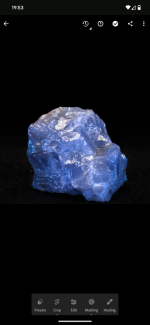
As I am stacking there isn't the need to stop down too far, as I'm capturing a section of the overall image each time. If I do single macro shots I'll typically stop down to increase depth of field. I'll also add in flash typically.
I did a little blue stone thing (no idea what it is, my son has a bowl of these things). This one was 35 images, F5.6 with step set to 4 again.
And as someone interested in self development...what ya studying?
Last edited:
Gav.
Suspended / Banned
- Messages
- 9,390
- Name
- Gav
- Edit My Images
- No
I don't stack, but I think stacking at around f2.8 allows natural light to be used, where f11 would call for flash and flash recycle times would slow everything down.
I think it's also because lenses are sharper near wide open too.
I think it's also because lenses are sharper near wide open too.
What I love about this whole process is the self learning, trial and error. Then, when you do get a good crisp image you are very happy. It's a journey as they say and as long as you are happy with the outcome, that's all that matters.
I'm going to Asda tomorrow for some flowers and I plan to split the image into 9 sections using the grid on the camera display. I'm then going to use the cameras hi-resolution mode (creates 96 mp image) and take an image from each of these sections. I'll then try and stack them together and see what happens. Might work, might not..but that to me is part of the fun
I'm going to Asda tomorrow for some flowers and I plan to split the image into 9 sections using the grid on the camera display. I'm then going to use the cameras hi-resolution mode (creates 96 mp image) and take an image from each of these sections. I'll then try and stack them together and see what happens. Might work, might not..but that to me is part of the fun
Gav.
Suspended / Banned
- Messages
- 9,390
- Name
- Gav
- Edit My Images
- No

Can't as the Hi-res mode take something like 8 individual images and stacks them in camera to produce the 96mp final image...don't think flash will work. I will have to read up of flash works with Lumix hi-res.
But it's just for fun anyway, to see if I can stitch / stack 9 x 96 mp images and what the outcome is
But it's just for fun anyway, to see if I can stitch / stack 9 x 96 mp images and what the outcome is
Last edited:
Gav.
Suspended / Banned
- Messages
- 9,390
- Name
- Gav
- Edit My Images
- No
Sorry, was just mucking about, it all seems like extra work sometimesCan't as the Hi-res mode take something like 8 individual images and stacks them in camera to produce the 96mp final image...don't think flash will work.


Gav.
Suspended / Banned
- Messages
- 9,390
- Name
- Gav
- Edit My Images
- No
It'll get you brownie points bringing flowers home tooProbably is but the weather is supposed to be rubbish tomorrow and I've nothing else to do lol