
Stretching part of a photo

Northstar100

Suspended / Banned
Messages
602
Name
Baz
Edit My Images
Yes
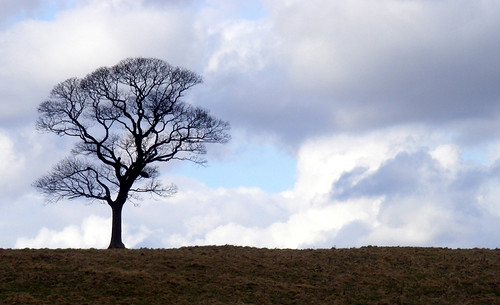
Hello all, I am in the middle of setting up a freeby website, on the home page there is space for a long image 960px x 314px, I want to show my photo of the tree below. I stretched it to the above size in photoshop but the tree doesn't look right. What I'd like is the sky to the right of the tree stretched but the tree still in proportion, any help on how I can do this would be appreciated.
3323168404_8beff20ac0.jpg
 
dont quote me on this, but I seem to recall that if you select that area to the right with the crop tool, but instead of pulling the markers in to make it smaller, pull the right one out to make it bigger, that will stretch that area. However, even if this technique is the correct one, it may well still look odd with stretched clouds, I suppose it will depend on how much stretching is needed to get the ratio you want. :shrug:
 
Something like this? I agree with YV, in that I'm not sure if the clouds look right tbh... :thinking:

Tree12.jpg


I used the "Content Aware Scaling" tool in CS4 btw. :) It's also only 800 px to comply with TP rules. ;)
 
Could you go back and get the image with a shorter lens or from further back?
 
I am using Photoshop 6 (9 years old). YV I think you are right stretching the clouds doesn't look quite right but thanks for trying irw1. I could go back and reshoot but the tree will have leaves on now :lol:. Chaz has done a great job though and I have nabbed that photo, resized and it's fitted perfectly. Thanks for all the help chaps, much appreciated :clap:
 
ye i agree cs4 scaling will work but the best way to do it, is to duplicate your layer, then flicp it horizontal and slide into place then clone by hand
 
Back
Top