SSD life span?

Box Brownie

Suspended / Banned
Messages
17,645
Edit My Images
No
I use a Hardware monitor as needed that includes in its reporting SSD life percentage figures.

Now for my OS drive started in April 2023 I see that it is showing as 92% life

Is there a point in its lifespan when as a precaution it should be cloned and retired?

Any insights for my future reference would be welcome. :)
 
Look at endurance ratings and MTBF numbers. Higher the better for both.
 
Is there a point in its lifespan when as a precaution it should be cloned and retired?
Think more of "how often should I back up this particular data"

It could fail at any time within it's projected lifetime, it's all a matter of how likely it is to do so.

In the immortal words of Inspector Harry Callaghan "do you feel lucky punk?"
 
My understanding is that with SSDs the flash memory cells "wear out", i.e. fail to hold charge and this is what determines life span. They can fail catastrophically but it is more likely that the number of bad blocks reaches a point where the drive controller can't reallocate space and the drive runs out of capacity. So the end of life is likely to be graceful and you will have warning
 
Going back a few years, there was a controller in the ssd which would suddenly die, I can't remember the make but it was not Samsung, which is what I use.
 
Think more of "how often should I back up this particular data"
As Jason wrote above.

I consider having copies of each file on three physically independent drives to be the minimum, for any data that is important to you. Storage devices will fail - the only question is when ?
 
Am not an expert but with my PC I cloned the SSD maindrive as a backup , Samsung have a program to do this
Haven’t done that on my MacBook as the drive isn’t replaceable but its cloned using Time Machine
I did read that SSD drives fail suddenly when they do go
 
Wow I have a Crucial drive installed in my Micro Server that has got 26,000 hours on it so 3 years and it hasn't dropped a single bit

Current Firmware: P2CR033

Supported drives list interpreted SMART data. This data can be useful for debugging drive issues and gaining insight into drive performance." style="box-sizing: border-box; border-collapse: collapse; border-spacing: 0px; max-width: 100%; background-color: rgb(255, 255, 255); width: 822px; margin-bottom: 20px; border: 1px solid rgb(221, 221, 221);">
DescriptionAttribute DataUnits
Critical Warning0No critical warning indicated
Device Temperature46Celsius
Available Spare Blocks100Percent
Available Spare Threshold5Percent
Percentage Lifetime Used5Percent
Endurance Group Critical Warning Summary0No critical warning indicated
Data Units Read2280958191000-512byte Sectors
Data Units Written1162393561000-512byte Sectors
Host Read Commands782574215Completed
Host Write Commands1067541685Completed
Controller Busy Time11266Minutes
Power Cycle Count51Power Cycles
Power on Hours Count26190Hours
 
Hi guys

Thanks for the replies & insights.

Yes, the old adage of there are only two types of drives "those that have failed and those will fail" applies.

I am a tad tardy re: OS drive backups and as noted should do so so more frequently as the appropriate solution against failure.

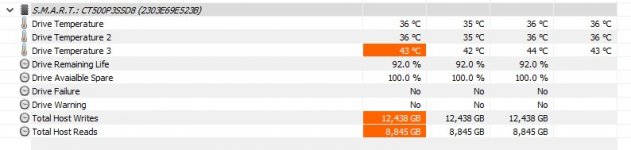
I use HWInfo v7.62 to monitor my system on an Ad Hoc basis and this is what it tells me about my OS drive as at just now.

HWinfo screengrab.jpg

Is there any other such application worth using?
 
@Box Brownie I think you are over thinking it , having the data available is just data , it beats having old drives which just failed randomly.
I would just use the SSD like me until it starts giving warnings worth considering, i think 10 years is reasonable, the drive is just being honest.
 
Hi guys

Thanks for the replies & insights.

Yes, the old adage of there are only two types of drives "those that have failed and those will fail" applies.

I am a tad tardy re: OS drive backups and as noted should do so so more frequently as the appropriate solution against failure.

I use HWInfo v7.62 to monitor my system on an Ad Hoc basis and this is what it tells me about my OS drive as at just now.

View attachment 466207

Is there any other such application worth using?
The manufacturer usually have their own software. But don't worry about those health readings they are just generic. If your drive is rated to 100,000TB and you write 50,000TB to it, it would have a remaining life of 50%. Get youself a simple NAS and use that for data you care about, your OS drive doesnt matter then.
 
Back
Top