

Sony A6000 SD card problem ?

BADGER.BRAD

Suspended / Banned
Messages
4,252
Edit My Images
Yes
Hello All,

My Sony A6000 is now partially broke in the exactly the way I knew it would. Because Sony use a different communication protocol to everything else I have always had to take the SD card out to transfer photos.When I realized this I took one look and thought either the SD card door or the SD card mechanism it's self would break, The later is the case. I now have to stuff some paper behind the door and force it shut this of coarse will break the door at some point! I found this out when I transferred these photos. Has anyone else had this problem ? Is it an expensive fix ?
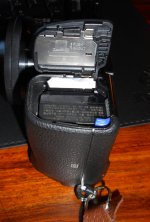
bosted.JPG
 
Hello All,

My Sony A6000 is now partially broke in the exactly the way I knew it would. Because Sony use a different communication protocol to everything else I have always had to take the SD card out to transfer photos.
Not sure what you mean by 'different communication protocol'?
There are basically 3 ways to get images off an A6000
1) remove the SD card, and read the card via a card reader
2) Use a USB cable to connect the camera to you PC / Phone, etc.
3) Use Sony Imaging Edge app to transfer wirelessly to phone BUT this is for jpeg only, not raw.

When I realized this I took one look and thought either the SD card door or the SD card mechanism it's self would break, The later is the case. I now have to stuff some paper behind the door and force it shut this of coarse will break the door at some point! I found this out when I transferred these photos. Has anyone else had this problem ? Is it an expensive fix ?

I have had my A6000 for over 7 years, always removed the SD card to transfer images, and never had an issue.
Simply press lightly on the top of the SD card, remove finger, and the card pops up ready to be removed.

If it's this 'pop up' mechanism that's failed, then parts wise it should be cheap - but no idea how much it will be once you add the cost for someone to disassemble and reassemble.

I'd advise getting a quote and fixing is sooner rather than later - as damage to the door mechanism will just make the repair more costly.
 
Hello Johnathan,

I should have been a bit clearer , I'm a Linux user and because of this cannot use the Sony Software. Until I brought the Sony ( and I'm not knocking it as it's a very good camera) I hadn't realized this as previously every camera I have had just plugged in and charged from USB allowing you to transfer this way, I discussed this problem on here some time ago and those using Linux had exactly the same issue because as the Sony Comms protocol was different from the norm and as I remember there were thoughts that this would happen. The problem I have is the SD card will not latch into the camera, this results in it saying no card midway through a photo. I've tried a different card just in case it was the latch point on the card ( I couldn't see any problem) but the problem still existed.

Has anyone any recommendations of someone to get a quote from ?
 
Thanks Johnathan I'll have a look .
 
O.k good and bad , I've fixed it but the reason it wasn't working was there was a chip of black plastic stuck in the mech not allowing the SD card to go all the way in ,in order to latch. This isn't from the SD card and I cannot see anywhere it's come from inside the camera. Hopefully I won't have issues later on !
 
I tend to pull the SD card from my Sony cameras as it's quicker to read, but for future ref. The A6000 can connect to a computer in a number of modes - it's in the menus. In "USB mass storage" a linux box will auto mount it under /media/<username>/<something>

gphoto2 will also connect if the camera is in "control" or "MTP" mode. Try "gphoto2 --auto-detect".
 
Thanks Beth it now works ! When I first had the camera I posted up about this problem ( I think it was in my case the wifi comm) and there were a few complaints from others about the same thing including USB comms, This led as I remember to a bit of an argument between two people. I just took it at this point that it must be the case as others had the same problem.

It's a shame we didn't know it was such a simple solution !

Thanks again.
 
Back
Top