Sony A57 and Studio Flash

DavidP

Suspended / Banned
Messages
8
Name
David Perrin
Edit My Images
Yes
Hello everyone and compliments of the season.
I have a Sony A57 camera and over a period of time have bought 3 studio flash units to set up a home studio. It has been just over a year since I tried the setup for the first time with a degree of success........and a lot of cursing!!!!!
I want to set it up again but I cannot remember what settings the camera should have.....assuming that I had them correct last time.
The problem that I have is that using a hotshoe and pc cord the primary unit will not flash unless the camera's popup flash is up and works which is destroying the side illumination. I have been through all of the settings and tried every one with no real improvement. The sequence is as follows. On pressing the button the pop up starts to flash presumably allowing the camera to focus prior to firing it. As soon as the button is depressed slightly the studio unit will fire. What appears to be happening is that the studio unit is firing before the popup fires fully this giving a dark or non-existent image. I'm guessing here but I presume the ttl metering needs to be disabled somehow but can't see how to do it. I'm thinking about purchasing a Hahnel wireless flash unit with the Sony fit and wonder if this will cure the problem. Can anyone give me any guidance on the settings required or what is needed to sync the outfit?
Thanks very much.
DavidP, Bridgend
 
Hello, thanks for your quick reply.
"Sounds like pre-flash on the built-in flash" The only menu items under 'Flash Control' are Pre-flash TTL and ADI flash. Have selected both with no change. Pre-flash TTL was the original setting.
The above is the only mention of the word 'FLASH' that I can find in all of the setting choices.
Have tried all P,A,S, and M in every variation that I can think of.
I have a recollection from the previous occasion of selecting something with the word 'LOCK' but I cannot find anything that resembles it now. I had an earlier Sony Alpha camera but that was before I tried the studio set-up. Everything seems to be 'on' or 'off'. No hair left to tear out!!!!!!!!
Thanks
DavidP
 
Further to the link that you posted;
Turning the camera flash off prevents a signal being sent by the pc cord to the flash unit so no wiser there. One of the people appears to mention that his off-camera flash is triggered by the pop-up flash. Is this possible as I would have thought that the sensing flashes from the pop-up would have triggered the remote flash as is happening with me. I have tried to cover the pop-up but have had inconsistent results. One shot might give a viewable image and the next one might be too dark.
I'm wondering whether I also have a fault in the hotshoe. I have taken it apart to repair a broken wire but now it seems that occasionally only a very small turning movement of the pc plug is sufficient to fire the flash unit. At the moment I do not have any other means of connecting the camera to the flash unit.
Thanks
DavidP
 
Theres a setting for wireless flash, have you tried selecting that?
What shutter speed are you selecting?
Which studio lights are you using?
 
Last edited:
Why is the pop up flash up?
 
I have to say I've tried the manual and the Sony flash functions are a good enough reason to never go near one.
 
Hi both, thanks for further replies. Yes, have tried wireless setting but again no difference. Wasn't sure whether this was specifically for wireless connection or would work with the hotshoe.
I'm aiming for around 1/125 @f8 but dont really enough consistency to establish this yet.
The flash units are Chinese-made of course, and do not have a specific name but are marked '300DI'. I believe that they are of respectable quality and output for my needs.
Phil- hope you are not correct in your observation but I'm beginning to think that you might be.
Flash unit will not work with pop-up down.
Get the impression from the manual that Sony have not given any thought to the fact that users might want to hook up to a studio set-up.
DavidP
 
Do your studio lights have a slave facility?
Can you show a picture of the connections etc..
I've used pop up flashes to fire my studio flashes but was able to turn the power of pop up flash down so it had no effect. My flash didn't do the pre flash thing though. Some flashes use pre-flash to determine exposure and some to aid focus.
Looks like yours is to aid focus.
Try using manual focus and see if that turns it off.
Are you using an adaptor like this on the camera?

1323171096_765444.jpg

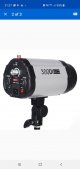
Is this the light?

Screenshot_20191230-212701_eBay.jpg
 
Last edited:
When you say that with the pop up covered the first shot is ok and the second dark, are you allowing enough time for the flash to cycle and recharge ( from bitter experience...)?
 
You might be able to put a piece of insulating tape over the pop up flash to prevent it adding light to the scene while still triggering the hotshoe. Not that it helps you very much, but the A57 was Sony's entry level SLT, so irritating as it might be, they probably never expected it to be used in a serious studio setting.

My A58 allows selection of pre-flash or ADI only, however if I work in aperture priority or manual then I believe the flash will fire OK without the popup being up.
 
The A57 doesn't have a PC-sync socket, and has the older Minolta / Sony iISO hot-shoe.
How are you connecting the PC-Sync cable to the A57 - I assume it's some form of hot-shoe mounted adapter?
A further assumption is that you have the PC-Sync connected to one of the studio flash, with the other two set to 'Slave' so they fire when triggered by the flash of the first studio strobe.
Settings wise on the A57 you will want to be in Manual (M on the top dial) - ISO 100, Shutter 1/160 and Aperture f/8 is a reasonable starting point (once you've got the strobes firing you can tinker to get the exposure you want).
The Flash should be set to 'Fill' - NOT wireless, which is to get the pop-up flash to trigger remote Sony brand flashes using an optical control system.
You also need to check that red-eye reduction is off (this is probably deep in the menus, It's something I set once then never touch again).
The pop up flash should be down if you have something mounted on the hot-shoe

You could also use the pop up flash to trigger all 3 studio strobes in slave mode. You still want the flash set to fill, but you will also want to find the flash exposure compensation setting, and set it to -3 - this will mean the pop up flash will fire at very low power, and have minimise the effect on the actual lighting.
 
Hello everyone, thanks for all your replies and info. Looks like exactly the answers I'm looking for. Will read thoroughly tomorrow and put suggestions into practice. The picture of the flash unit is the correct one.
Goodnight and thanks again.
 
Checked my A58 this morning - flash fires OK in aperture priority or manual with the popup down.
 
Hello again,
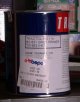
Well, I'm happy to report that I have some progress. The biggest improvement was down to switching off the Red-eye reduction. This stopped the pop-up from pre-flashing. Unfortunately I have been unable to get the flash unit to fire with the pop-up down and attachment via the hot-shoe and pc cable. Going along with the pop-up up and disconnecting the hot-shoe and pc cable I found that I was able by placing my hand just in front of the pop-up and allowing light to go sideways to reach the slave sensor on the flash unit that it would fire in sync with the shutter. Initial settings were burnt out but by playing with the settings and reaching 1/160 at f22. ISO 100. I achieved the attached result. OK, yes there is a lot wrong with it. Very close and only one flash unit. DSC07337.JPG The flash unit was set up loosely below the level of the paint tin and had a mesh sheet over it to cut down the light a little, the camera was hand-held and all done from my office chair!!!! But I think that I now have the basics for more experimentation to take me in the right direction. The pop-up will require a cover with a clear port on either side to allow light to reach, and trigger the slaves whilst being opaque towards the subject.
Any further thoughts of yours will be very welcome with the above in mind.
Thanks again for your help.
DavidP
 
Hello again,
Well, I'm happy to report that I have some progress. The biggest improvement was down to switching off the Red-eye reduction. This stopped the pop-up from pre-flashing. Unfortunately I have been unable to get the flash unit to fire with the pop-up down and attachment via the hot-shoe and pc cable. Going along with the pop-up up and disconnecting the hot-shoe and pc cable I found that I was able by placing my hand just in front of the pop-up and allowing light to go sideways to reach the slave sensor on the flash unit that it would fire in sync with the shutter. Initial settings were burnt out but by playing with the settings and reaching 1/160 at f22. ISO 100. I achieved the attached result. OK, yes there is a lot wrong with it. Very close and only one flash unit. View attachment 264450 The flash unit was set up loosely below the level of the paint tin and had a mesh sheet over it to cut down the light a little, the camera was hand-held and all done from my office chair!!!! But I think that I now have the basics for more experimentation to take me in the right direction. The pop-up will require a cover with a clear port on either side to allow light to reach, and trigger the slaves whilst being opaque towards the subject.
Any further thoughts of yours will be very welcome with the above in mind.
Thanks again for your help.
DavidP
You're getting there....
Was the light on full power?
Put black tape over the flash, leaving a small corner exposed. Should still trigger the light with negligible effect on the subject.
 
Hello, the flash unit was about 4' away and on min setting so I hope plenty of light left to fire into an umbrella and bounce light back to the victim....errr subject. Most of my photo work is journalism for a tractor magazine so studio flash is a new aspect of photography for me. It's also interesting to be on the other side of the 'counter' as well. I'm one of about 5 unofficial 'advisors' on the American based site 'Yesterdays Tractors' on Massey Ferguson tractor problems so I 'm only too aware how valuable it is to be able to turn to someone for help in times of need.
Happy New Year
DavidP
 
My best guess is that the hot shoe to PC adaptor is not communicating to the camera that there is something mounted in the hotshoe... therefor it won't trigger/fire the flash unless the pop-up is raised. I think you will have better luck with wireless TTL triggers for the minolta mount (phottix odin).

Alternatively, I would attach a bounce card in front of the popup to direct it's light to the ceiling; run the studio heads in optical slave mode, and use camera/strobe settings that overpower the popup (if desired).
 
Hmmm, thanks. Good idea to produce some 'free' light from above.
DavidP
 
Back
Top