

Some Scanner Profiling Experiments

abbandon

Suspended / Banned
Messages
367
Edit My Images
Yes
Well experiments is a bit grand
4048451572_f815716e30_z.jpg


Flickr lightbox

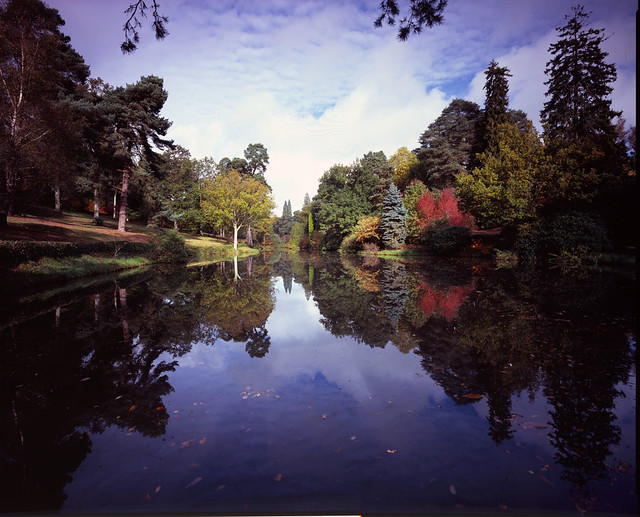
The above is from an Epson V750 with no attempt at colour managment

Never been happy with it the Newton Rings for one don't help
8557245272_1d096c5ba6_z.jpg


Flickr lightbox

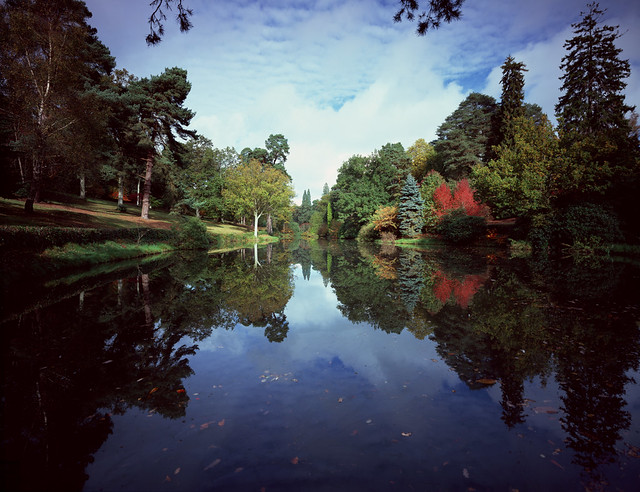
Scanned on a Screen DT-S1045AI on auto sttings, pretty much happy with it.


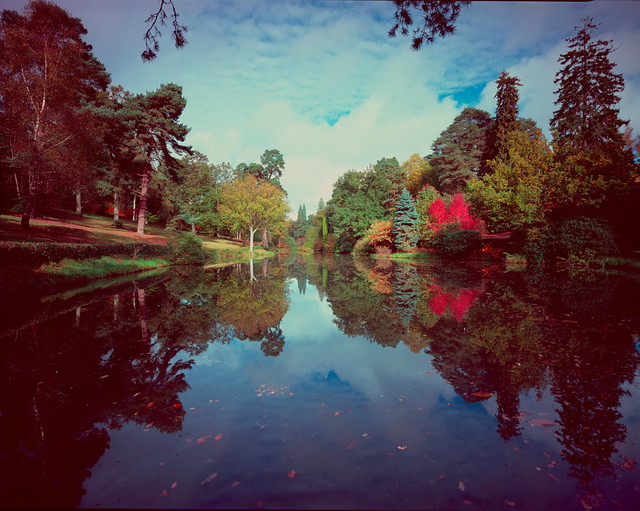
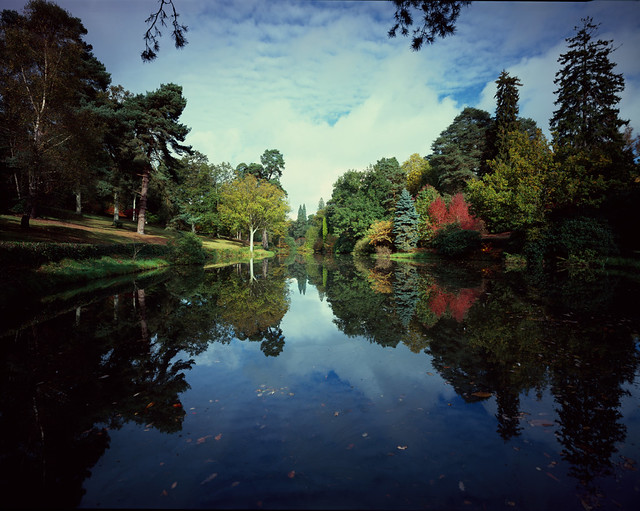
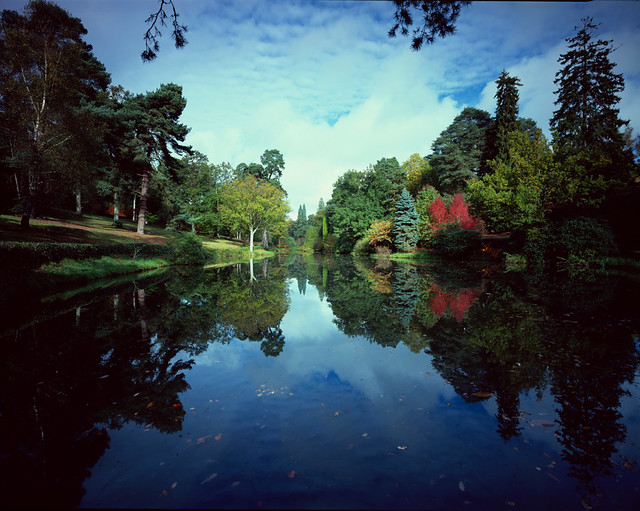
At some point last year I scanned an IT8 target I have from the epson V750 and later in the year I forked out the £514 for A Hutchcolor HCT so here are a few more versions all based on the same wide open scan, profile assigned and then converted to sRGB
12885180084_26eaae43cc_z.jpg


Flickr Lightbox

The above is with no colour managment.
12884863003_4b26db98e0_z.jpg


Flickr Lightbox

The above is with a profile from a IT8 target assigned.
12884871123_d727a425cb_z.jpg


Flickr Lightbox

The above is with the profile created using the HCT target .


Clearly the profiled versions are an improvement over the non colour managed version but for me its a toss up between the scanner on auto and the HCT. I actually found the ligtbox view better for getting an overal comparrison.

When I get organised some when I'll create a HCT profile for the V750 and a V700 I have lurking about which I'll make available to anyone interested.
 
Well just a first impression is that I prefer the first pic with a little less blue (or is it purple)
 
I've never used profiles on either my V500 or the drum scanner, I've always been able to get the results I wanted by manual adjustment and with careful scanning those adjustments are always minimal. If I were printing I'd use the profile for that printer but I've never felt the need when scanning, especially when I see the price of some and the results they give compared to the results I get manually!
 
Well my more expensive monitor (Dell) supposed to be calibrated at the factory..my 2nd Dell (which I'm using now) gives the same picture but with just a bit more contrast..........anyway I have posted a selection of shots (on another forum) for their views and had no complaints about what they were seeing. So I would say for me (or anybody) if no one criticizes your shots for say colour casts or poor colours etc then my (or anybody's) monitor is ok.
 
Having a calibrated monitor is an attempt at least to all be talking from the same page.

I have a spare EyeOne Display2 would you like to borrow it Brian ? it was immediately obvious to me from your comments that it was highly unlikely your monitor was calibrated.
 
Having a calibrated monitor is an attempt at least to all be talking from the same page.

I have a spare EyeOne Display2 would you like to borrow it Brian ? it was immediately obvious to me from your comments that it was highly unlikely your monitor was calibrated.

Thank you that is kind of you, but I think both of my monitors are quite accurate and maybe in judging what I see in your pics might not be the truth but what I like.....Maybe you should have used a colour test chart for your test, as for scenery everyone have their different views (pun not intended ;) ) Anyway I did play with the last pic in Photoshop and changed the pic to what I liked.
 
Abbandon...just to add:- your picture in "help me to shoot slide film" is what I like i.e. for colours etc...so if you are happy with that shot on your monitor? then our monitors agree?
 
Abbandon...just to add:- your picture in "help me to shoot slide film" is what I like i.e. for colours etc...so if you are happy with that shot on your monitor? then our monitors agree?

No not really

Not really, the vast majority of my colour correction is done without even looking at the image so what difference does the monitor being calibrated make?

Not really something I would ever expect to see said on a photography forum.

A bit about the HCT in case anyone is interested


Hutchcolor scanning guide quite technical but worth a read
 
I've profiling my scanner for about the last year and half, and it does make a massive difference especially in the reds/greens. For the price you can pay (~£20 from Wolf Faust for instance) you can get some fantastic results which drastically reduces the time you have to spend editing images, and after applying the profile all I find I have to do now is set the levels to get scans which look almost exactly like the originals usually. At first I used just the basic profiling in Vuescan, but was a bit unsatisfied with it (plus its near impossible to get the target straight enough for it!) and moved onto using Scarse, which did a much better job, but I now use LProf which gives even better results (and the profile checker is really useful as it gives an indication of how close the profile is to the colour patches).

I calibrate my monitor probably every 2-3 weeks, and Looking at your scans I would say its a toss up between the IT8 and the HCT ones. The non-colour managed V750 scan looks way too magenta (especially in the sky along the top and in the reflection) and under-saturated; the Screen DT-S1045AI on auto looks O.K (but again perhaps a bit under-saturated?) and the 3rd one down looks way over the top saturated. Both the IT8 and HCT ones look good though, and I think I would be fairly happy with either of them (possibly leaning slightly towards the IT8 one though?).
 
Last edited:
Not really something I would ever expect to see said on a photography forum.

Alright, I'm going to be honest and blunt here (that time has come). I get so monumentally sick and tired of these nonsense technical discussions that imply there's only one way of doing something 'correctly'. Look through my images on Flickr or any other site, do you see significant colour casts on them? No, you don't. Why? Because my method of colour correction works and it works damned well. It might not work for you or anyone else but it works for me and I'm happy with that. I don't really care what you would or wouldn't expect to hear on a photography forum, if something works and achieves the results you want then nothing else matters.

On the subject of colour correction I often see significant blue casts and underexposure on your images so despite your seemingly technically precise approach flaws still get through. Perhaps you should reevaluate your technique, it doesn't seem to work all that consistently (unlike mine which gives me incredibly consistent results regardless of whether I'm using my 5Dmk2, RB67, iPhone or anything else that takes photos that end up as a digital file).

I know I'm being very blunt but to be honest I find your slightly patronising mannerisms here really quite out of order, especially as what you're preaching isn't at all reflected in your results.
 
Last edited:
@PMN Perhaps there may be a little bit of a mis-understanding here (I'm entirely neutral regarding this O.K - I find IT8 profiling useful, but that doesn't mean you have to). IT8 profiling is not supposed be a method of colour correction in the sense that I get your implying, the idea is not to correct for the original image, but to calibrate the scanner to give an output similar to the original transparency. If for instance I have one which has a massive blue cast then after scanning and applying the profile then the scan should also have a massive blue cast, but nothing says that I can't correct that using the usual digital tools afterwards.

Of course nothing says that IT8 profiling is the only or correct way to do this, but it gives a consistent starting point, and in my experience it saves a lot of time editing afterwards to try to get the scan looking somewhere like the original which is why I profile my scanner. Its not an exact science (especially initially) though as different programs will create profiles in different ways, you need to fine tune and then lock down any scanning settings etc and it can take quite a while to work out how to get the profiling done 'best'. I've been profiling for 2 years and was never quite satisfied with it until I started doing it a new way lately, and I feel personally that my scans are now of much better quality than before.
 
@s162216, Yep I understand that but the end goal is essentially the same - accurate colour. My main problems are the patronising tone of Abbandon's single line replies and the inconsistency of his results - results which seem to indicate the methods he's advocating don't work with any degree of consistency. At least not the way he's applying them.

I'm a great believer in not fixing things that aren't broken, results speak much more to me than anything else.
 
Thats fine I got it wasn't directed at me!

I've only just realised my first ranty comment immediately followed a reply from you so it may have appeared as though it was directed at you. My apologies if it did appear like that, it wasn't my intention at all!
 
I'm colour-blind so none of this means anything to me.....:D Sometimes my colour images have a colour cast, I don't really care, if they look ok in my eyes I'm happy. Sometimes people say 'hey, you, there's a colour cast in your image, too much magenta...." I don't know what magenta is, could be a type of cheese, I say "thanks for that I'll have a look at it later" I never do, cos I can't see it.
So, basically what I'm saying is that everyone sees things differently and thats ok. If you have a problem just shoot black and white ;)

Andy
 
  • Like
Reactions: PMN
Well accurate colour might be ok if sending shots to say Vogue magazine or for a garden brochure, but surely the end result is how a person likes to see their shots and if their shots on screen give a lovely print............................................................
 
Last edited:
  • Like
Reactions: PMN
Sometimes my colour images have a colour cast, I don't really care, if they look ok in my eyes I'm happy.

surely the end result is how a person likes to see their shots and if their shots on screen give a lovely print

Exactly that. If it works for you then it works for you, it doesn't matter how you arrive at the end result as long as it's what you want!
 
TBH Paul, my thoughts were also that people have different priorities as well, Abbandon loves the technical aspects and the detail, nowt wrong with that, others are more concerned with the end result no matter what the journey involves, all good as well. Me....I just love a good piccie.
 
  • Like
Reactions: PMN
Which all reminds me of colour print I did the old way with chemicals...it was a portraiture of my wife, well on scanning it also looked nice with a slight yellow cast or slight pink cast and couldn't make up my mind what to settle for...but anything other than green or blue.
 
Lazy git:rolleyes::D
 
  • Like
Reactions: PMN
I'm colour-blind so none of this means anything to me.....:D Sometimes my colour images have a colour cast, I don't really care, if they look ok in my eyes I'm happy. Sometimes people say 'hey, you, there's a colour cast in your image, too much magenta...." I don't know what magenta is, could be a type of cheese, I say "thanks for that I'll have a look at it later" I never do, cos I can't see it.
So, basically what I'm saying is that everyone sees things differently and thats ok. If you have a problem just shoot black and white ;)

Andy
^^^WHS^^^ I'm colour blind too but don't tell any of the people that employ me or I'd never get any more work :lol:
 
Back
Top