[SOLVED!] Sharing from Flickr borked on Safari browser

garryknight

Suspended / Banned
Messages
12,452
Name
Garry
Edit My Images
No
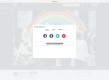
This is what I see if I click the Share icon on a photo page on Flickr while using the Safari browser on my MacBook. It doesn't happen with any other browser. Is any one else seeing this, or just me?

SN6p9GO.jpg
 
Last edited:
This is on Safari on my iMac.

Thanks, Dave, but I'm talking about what I see when I click the Share icon. It usually has four tabs: Share, Embed, Email, and BBCode, from which you can select URLs in a different format for each type. Mine, as you can see in my screenshot, just has a title and a close icon. It works fine in Safari on my iPad and iPhone, just not on the Mac.
 
Thanks, Dave, but I'm talking about what I see when I click the Share icon. It usually has four tabs: Share, Embed, Email, and BBCode, from which you can select URLs in a different format for each type. Mine, as you can see in my screenshot, just has a title and a close icon. It works fine in Safari on my iPad and iPhone, just not on the Mac.
Works ok for me. 2010 iMac running High Sierra, using Safari 13.1.2.

View attachment 305995


Got you now, mine was just like Carl's too.
 
Works ok for me. 2010 iMac running High Sierra, using Safari 13.1.2.

I'm on Big Sur and 14.02, so thanks for that. I'm not going to downgrade, so I'll try uninstalling and reinstalling. That should trigger off a bunch of nightmares... :D

Edit: Ha! Can't uninstall Safari, can only reset it. And lose not only all cookies, but also all of my bookmarks, saved passwords, etc, etc. Back to the drawing board...
 
Last edited:
SOLVED IT!

I went in to Safari's Preferences, then to Websites, Content Blockers, and found that there was an entry for Flickr and it was set to On. I set it to Off and sharing now works as it should.

It seems that content blocking defaults to On for all websites. Why this should affect photo sharing on Flickr, I've no idea. Hopefully this post will help someone else in future.
 
SOLVED IT!

I went in to Safari's Preferences, then to Websites, Content Blockers, and found that there was an entry for Flickr and it was set to On. I set it to Off and sharing now works as it should.

It seems that content blocking defaults to On for all websites. Why this should affect photo sharing on Flickr, I've no idea. Hopefully this post will help someone else in future.


Glad you sorted it.
 
Back
Top