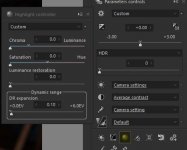
Silkypix highlights and shadow tab

jonbeeza

Suspended / Banned
Messages
9,388
Name
Jon
Edit My Images
Yes
pic.JPG

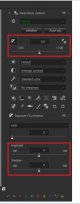
New fuji camera so using Silkypix again after a few years. I just can't find the Highlights and Shadow tab. I have looked on the Silkypix help page, but all it says there is.

"The Highlight/Shadow slider is located in the Exposure bias tab"

With image above showing the location of the tab, but I just can't figure how to get to the tab. Would anybody have any idea how to get it to show?

Thanks.
 
I will look in the morning when I turn the pc on
From memory I think its via clicking on the exp comp symbol top left in the red rectangle
 
Last edited:
Just checked and that was correct, left click on the +/- box on the left in the red rectangle.
 
Just checked and that was correct, left click on the +/- box on the left in the red rectangle.


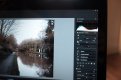
DSCF0806.JPG

Been clicking on the box but nothing, been trying all along the panel, and still nothing. It is Silkypix 3.0 that I am using.:thinking:
 
View attachment 305656

Been clicking on the box but nothing, been trying all along the panel, and still nothing. It is Silkypix 3.0 that I am using.:thinking:

If its not that box I don't know, have you left and right clicked it?
I'm using Silkypix Studio Pro 9 so its possibly different, but the instructions you pasted agree with me.
 
If its not that box I don't know, have you left and right clicked it?
I'm using Silkypix Studio Pro 9 so its possibly different, but the instructions you pasted agree with me.

Yes, I have right and left clicked, but nothing. The instructions that I posted was from the online help manual, not from the software I have. So possibly different, given it is the free download version.

But thanks for taking the time to look.

PS

I will keep trying to see if it there, as it is the highlight function that I am really wanting. If I figure out where and how to get it to show, I will update.
 
Yes, I have right and left clicked, but nothing. The instructions that I posted was from the online help manual, not from the software I have. So possibly different, given it is the free download version.

But thanks for taking the time to look.

PS

I will keep trying to see if it there, as it is the highlight function that I am really wanting. If I figure out where and how to get it to show, I will update.

Good luck, maybe there is a newer version specifically for Fuji you could download
 
I got fed up using Silkypix as I could not seem to get it to do what I wanted, so I just left my XF10 in Jpeg mode. but, I have just recently taken a batch of photos in RAW, as the lighting conditions were all over the place. Just downloaded the latest version of Silkypix 8.1.10.0 , but again I still can't find the shadow and highlights tab.

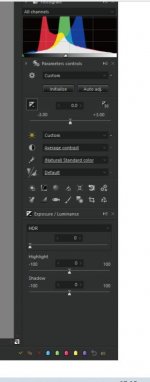
theirs.JPG

Above, the Highlight and Shadow tab is showing on the screen grab on the silkypix site: https://silkypix.isl.co.jp/en/how-to/function/high-key-photos/


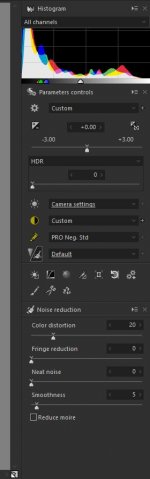
mine.JPG

Above, my display and no sign of the Highlight and shadow tab. Been clicking all the icons that I can see, but I just can't get it to show.


If anybody can figure out where it is, I would be very grateful. :)
 
snipp.JPG

I have managed to tone down the blown out highlights just a little bit, by using the Dynamic range tab. I was not able to tone the highlights by as much as I wanted, so I will keep trying to work out how to get the Shadow and Highlight tab to show, for more range.
 
Back
Top