Shooting Black Dogs

Bullysrus

Suspended / Banned
Messages
1,948
Name
Tony
Edit My Images
No
Need some advice.

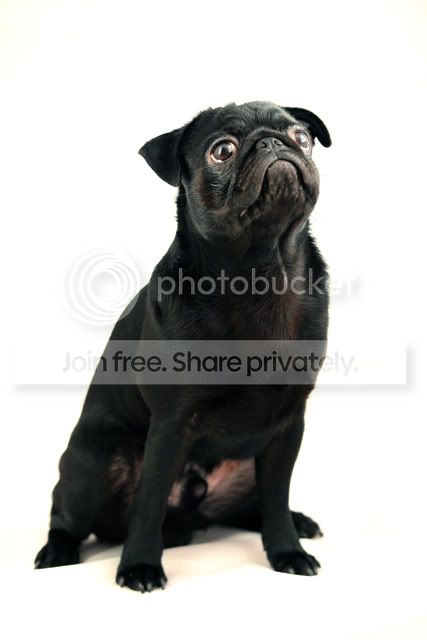
We have 2 small black Pugs, i have been trying to get a good picture of them both.

But i cant seem to get the dog Jet Black, i keep getting more brown than black.

Any advice for shooting black dogs on a white background.

Thanks
 
An examples shots?

Exposure compensation seems the obvious answer..
 
TinaC said:
Technically, if you look closely, you will probably find the dogs are actually a dark brown...

Alternatively, get some brown dogs...

:nuts:

Thanks, don't think the wife would be to happy
 
Technically, if you look closely, you will probably find the dogs are actually a dark brown...

Kiwi black boot polish.. .. problem solved.. (and a nice shiny coat)..
 
tiya.jpg


Sorry for the delay
 
i would be very interested in the reply's yet to come for this thread as i myself have a black dog but i don't seem to get the problem of him looking brown i get the problem of it not being sharp as unable to focus against the black if that makes sence
 
i would be very interested in the reply's yet to come for this thread as i myself have a black dog but i don't seem to get the problem of him looking brown i get the problem of it not being sharp as unable to focus against the black if that makes sence

In good light, focus on the eyes. Two reasons, they're contrasty so the camera has a good chance of grabbing focus and the other reason is that it's the one thing that you really do want to be sharp when shooting animals.

In terms of exposure, I think it's a case of using a bit of negative exposure compensation. The black colour of the dog is fooling the camera's meter into think the scene is darker than it actually is and so is over exposing the image. Worth experimenting with 1/3 of a stop increments until things look just right.

I first learnt about this when trying to photograph snow scenes and everything coming out a bit dark. The opposite effect is happening in that the camera is thinking that the scene is brighter than it is because of all the white snow and so the image ends up underexposed.

For what it's worth, I have a black cat and a grey cat. I have hundreds of decent shots of the grey cat but very few of the black cat and even those that I have got, nearly all of them have had the exposure tweaked afterwards to get things right. It's quite a balancing act trying to keep things looking black without loosing all the detail to shadow.
 
Last edited:
tiya.jpg


Sorry for the delay

It's kind of hard to make judgements about an image when it's already been edited and we have no idea what has been done and by how much. The dog is perhaps a little overexposed and perhaps the WB is a little off. Either problem could be corrected in camera or with a little post processing.

What was the lighting for this? I see a couple of catchlights in the eye, and the EXIF says no flash, but I'm curious to know what the lighting was. Having to go to 6400 ISO doesn't seem optimum for a "portrait". You also used shutter priority with evaluative metering, but no sign of exposure compensation that I can see - yet you're shooting a (near) black subject against a background of God only knows what shade, since you've edited it to pure white. Odds are, IMHO, that your exposure is relying, at least a little, on a wing and a prayer to get it right, more or less, and it's not quite worked. Personally I'd be using manual exposure, possibly chimping a test shot or two, and locking the exposure once correct, so that small adjustments to subject stance or framing did not affect the exposure further.

As for WB you appear to have left it in Auto mode. Again, without seeing the true colours of the surrounding scene, or knowing what the lighting was, I wouldn't like to guess what the WB setting should be, but it's no certainty that Auto would get it right. My approach, personally, would be to shoot in raw and simply adjust the WB in post until I achieved the desired appearance, which might not necessarily be a completely neutral balance. Others might well prefer to set a custom WB prior to shooting, and that's cool too, but Auto? Might work. Might not.

I've had a little tinker with your photo in Lightroom, and I think I've got it looking roughly as one might hope, but as you have image editing disabled I won't repost it here without your permission.

There's another "black dog" thread here - http://photography-on-the.net/forum/showthread.php?t=664494 - which is not about shooting against white, but might give you some points to consider.

 
tdodd said:
It's kind of hard to make judgements about an image when it's already been edited and we have no idea what has been done and by how much. The dog is perhaps a little overexposed and perhaps the WB is a little off. Either problem could be corrected in camera or with a little post processing.

What was the lighting for this? I see a couple of catchlights in the eye, and the EXIF says no flash, but I'm curious to know what the lighting was. Having to go to 6400 ISO doesn't seem optimum for a "portrait". You also used shutter priority with evaluative metering, but no sign of exposure compensation that I can see - yet you're shooting a (near) black subject against a background of God only knows what shade, since you've edited it to pure white. Odds are, IMHO, that your exposure is relying, at least a little, on a wing and a prayer to get it right, more or less, and it's not quite worked. Personally I'd be using manual exposure, possibly chimping a test shot or two, and locking the exposure once correct, so that small adjustments to subject stance or framing did not affect the exposure further.

As for WB you appear to have left it in Auto mode. Again, without seeing the true colours of the surrounding scene, or knowing what the lighting was, I wouldn't like to guess what the WB setting should be, but it's no certainty that Auto would get it right. My approach, personally, would be to shoot in raw and simply adjust the WB in post until I achieved the desired appearance, which might not necessarily be a completely neutral balance. Others might well prefer to set a custom WB prior to shooting, and that's cool too, but Auto? Might work. Might not.

I've had a little tinker with your photo in Lightroom, and I think I've got it looking roughly as one might hope, but as you have image editing disabled I won't repost it here without your permission.

There's another "black dog" thread here - http://photography-on-the.net/forum/showthread.php?t=664494 - which is not about shooting against white, but might give you some points to consider.


Thanks for the info..

This image hasn't been edited, it was just resized so as I could upload

The dog was in a white photo tent.

I used my 430ex ii flash
 
Sorry, my bad about the editing. It's just that I'm intrigued to understand how you managed to blow out the background and the floor in front of the dog so effectively with just a single flash and also why the dog has lost part of a foot. As the EXIF says "no flash" I can only assume you were using the flash off camera in manual mode which raises the question, again, as to why you were shooting in shutter priority mode rather than manual, since the camera knew nothing of the contribution from the flash in terms of light quantity or temperature.

It appears to me that in your efforts to force a blown background and foreground in camera you've caused the dog to become overexposed. I'm not sure it's going to be easy to achieve what you want perfectly in camera with just a single flash. Maybe others will have some ideas. Good luck. :)
 
Yes, I understand that now, but only since the introduction of further information. Originally we were presented with just an image and no further clues to how it was shot. A light tent is not the first option which springs to my mind for shooting dogs. I had assumed the dog was in a more conventional environment and that a dodgy edit had lost the foot. That'll teach me to assume anything. :D

Mind you, I have a light tent (cube) and I've never had an issue with the bottom rucking up. Maybe that's because I've never stuck a live animal inside it. :banana:
 
tiya.jpg


Sorry for the delay

I just looked at this in Photoshop. It's overexposed, open levels or curves and you will see this. Adjusting the curves brings it closer to how it should look. Next the white balance is out, a few tweaks in Lightroom or Photoshop would get the dog back to black.
 
To be fair, despite all the questionable input about your apparent lack of knowledge, I don't think that's a bad effort at all. So the ISO and Shutter-priority mode aren't ideal, but the end result isn't far from the result you wanted, and is very easily editable as the above shows.
 
Let's summarize, set the camera in manual, set white balance to flash. Use the histogram to get the exposure, you want the background to be blinking but only just. With one light you will need to tidy the background in software later so concentrate on exposing the dog. If you have a flash meter this will be easier, if not use trial and error.
Above all enjoy yourself!
 
Al Brum said:
Let's summarize, set the camera in manual, set white balance to flash. Use the histogram to get the exposure, you want the background to be blinking but only just. With one light you will need to tidy the background in software later so concentrate on exposing the dog. If you have a flash meter this will be easier, if not use trial and error.
Above all enjoy yourself!

Many Thanks, ill give it ago

And i agree, its all about enjoying yourself
 
Technically, if you look closely, you will probably find the dogs are actually a dark brown...

Alternatively, get some brown dogs...

:nuts:

and JR's at that...you are a card Tina

what i would say to the op poster is that you take a grey card reading (or the palm of your hand in daylight) and use that...
then maybe your dogs will come out black
you can always pp them blacker with burning but dont lose the texture of the coat
 
Back
Top