I recently bought a UPS which is working fine. But I am having a nightmare getting the monitoring software to talk to the UPS.
The software was written in China. Some of it has been translated, some of it has not. The manual is also a half-hearted attempt at translation. The manual entirely skips over using a USB connection, despite the UPS being shipped with a USB cable only.
I have contacted the vendor, but perhaps not surprisingly, they weren't much help. To be fair, they are reaching out to the distributor, so may come back with something, but I'm not holding my breath.
The UPS is a "Vida Armour 1500VA". I think they may also be sold as "East" in some parts of the world. The monitoring software is by IDBK, it is called upsSmartView (not very Smart in my opinion!), and may well be used by other UPS manufacturers.
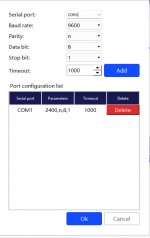
There are two configuration pages; one for Device and one for Port. I did read somewhere that the Port configuration is not used if connecting by USB cable.
The Device config looks like this:
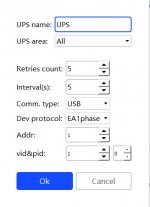
And the Port config looks like this:
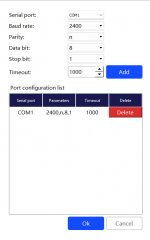
Over the past two days I have tried what feels to be every combination of values, but all I ever get is the message "UPS-Communication fault with the agent" (I am growing rather sick of that message now). I have uninstalled and re-installed the software. Rebooted many times. I have also deleted and re-added the USB device in Windows Device Manager. I have tried a different cable. I have tried several different USB ports.
I have also looked through the folder to see if there is any log file which gives more information. I have found log files, but no clue as to what is wrong.
To put it in perspective, I recognise that I have 95% of the useful value of the UPS - I have a protected power supply - but I would like to be able to get the monitoring software to run.
Does anyone have any helpful information, or even just an informed guess as to what else to try?
The software was written in China. Some of it has been translated, some of it has not. The manual is also a half-hearted attempt at translation. The manual entirely skips over using a USB connection, despite the UPS being shipped with a USB cable only.
I have contacted the vendor, but perhaps not surprisingly, they weren't much help. To be fair, they are reaching out to the distributor, so may come back with something, but I'm not holding my breath.
The UPS is a "Vida Armour 1500VA". I think they may also be sold as "East" in some parts of the world. The monitoring software is by IDBK, it is called upsSmartView (not very Smart in my opinion!), and may well be used by other UPS manufacturers.
There are two configuration pages; one for Device and one for Port. I did read somewhere that the Port configuration is not used if connecting by USB cable.
The Device config looks like this:
And the Port config looks like this:
Over the past two days I have tried what feels to be every combination of values, but all I ever get is the message "UPS-Communication fault with the agent" (I am growing rather sick of that message now). I have uninstalled and re-installed the software. Rebooted many times. I have also deleted and re-added the USB device in Windows Device Manager. I have tried a different cable. I have tried several different USB ports.
I have also looked through the folder to see if there is any log file which gives more information. I have found log files, but no clue as to what is wrong.
To put it in perspective, I recognise that I have 95% of the useful value of the UPS - I have a protected power supply - but I would like to be able to get the monitoring software to run.
Does anyone have any helpful information, or even just an informed guess as to what else to try?