Scart adapter

stevetiler

Suspended / Banned
Messages
1,475
Name
Steve
Edit My Images
Yes
Hi all,
bought a new tv and I want to plug a security cam into it but this has a scart connection and there are no scart sockets on tv- just hdmi and composite.
Been looking round for an adapter but find the choice a bit confusing!
Has anyone else had this issue and found a decent adapter?

Thanks
 
So I bought a scart adapter and some a/v leads plugged it all into the new tv and all I got was a horrific buzzing noise and a choppy picture! Any help out there would be appreciated!!
The tv has a yellow and blue socket for component or a/v input-supplied with the tv are some fly leads with plugs for av/ and/or component- I'm only using a scart to av adapter so do you think I need a full five lead component for this security camera??
 
Hi

Make and model of TV and cam may help others suggest a better option.

Thanks
 
Hi

Make and model of TV and cam may help others suggest a better option.

Thanks

Yes thats a good point ! Its a Samsung UE49KU6400 and the camera just had a scart lead for connection.
 
You may have to change a setting on the TV to let it know that you're using the input for composite video rather than component.
 
You may have to change a setting on the TV to let it know that you're using the input for composite video rather than component.

I've just been through all the setting and can't find anything!
 
Component and A/V are not the same thing. Fortunately they agree on colours. Red/white are the audio inputs. Yellow is an a/v video signal. Red/green/blue are component video signal elements. Yellow should be a complete signal, without any other video input needed.
 
Component and A/V are not the same thing. Fortunately they agree on colours. Red/white are the audio inputs. Yellow is an a/v video signal. Red/green/blue are component video signal elements. Yellow should be a complete signal, without any other video input needed.
Some tv's use one of the component colours for the composite av signal and the menu is used to select composite/av. The tv may not support composite video though the op does mention a yellow input
 
Last edited:
So I bought a scart adapter and some a/v leads plugged it all into the new tv and all I got was a horrific buzzing noise and a choppy picture! Any help out there would be appreciated!!
The tv has a yellow and blue socket for component or a/v input-supplied with the tv are some fly leads with plugs for av/ and/or component- I'm only using a scart to av adapter so do you think I need a full five lead component for this security camera??
All you should need is to plug the male scart from the camera into the female scart socket on the adapter. Then run a lead from the yellow socket on the adapter to the yellow socket on the TV. That should give you a picture when you select av input on the TV
You then connect red to red and white to white for audio.
 
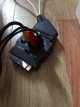
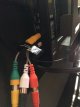
Here's a couple of pics of the set up- there is kind of a picture on the tv, I'm wondering if the scart adapter is dodgy!!

IMG_2411.JPG

IMG_2412.JPG
 
That looks correct. Try Changing the input selector switch to output. When you select that input, check that there aren't 2 options, eg component/av. I had a previous TV where the first time you selected the input it was component, and the second time you selected it, it was composite video which is what you need.
 
Last edited:
That looks correct. Try Changing the input selector switch to output. When you select that input, check that there aren't 2 options, eg component/av. I had a previous TV where the first time you selected the input it was component, and the second time you selected it, it was composite video which is what you need.

Thanks for all your help Bob! All it says is "to use a/v take out the blue connector". I'm leaning towards a dodgy scart adapter- it was only £1.50! I can't seem to find a "quality" one!
 
Seems I've solved this! Ripped off the scart plug and re-wired to a couple of RCA plugs and hey presto it worked! Bit Heath Robinson but as long as it works!!
Thanks to all who contributed.
 
Back
Top