Saving RAW to JPG in bulk

I use Photoshop with the RAW pluin to process my images, which then open into Photoshop.

Currently I save them to JPG then using the File, Save command

Is there anyway of automating this for all the files open in Photoshop as it is tedious having to save each individually
I have read of folk who will process batches using the same settings including those to save.

However, for me each image needs it's individual pp'ing including the JPEG saving, as that later step and it's settings is integral to the intended purpose of the final file.

I'll look forward to hearing what others have say on your question?
 
I would make an action to save as jpg, incorporating any settings I wanted, and save it. Then I'd invoke a batch operation, choosing that action.

Things like that are handy for all sorts of repeat operations, but as far as image processing goes I tend to treat every image individually ...
 
I have read of folk who will process batches using the same settings including those to save.

However, for me each image needs it's individual pp'ing including the JPEG saving, as that later step and it's settings is integral to the intended purpose of the final file.

I'll look forward to hearing what others have say on your question?

Yes I treat every image I take also as an individual for processing, usually do batches of 7 or 8 then open in PS to save them as JPGs, its this latter bit Im trying to solve,
 
Yes I treat every image I take also as an individual for processing, usually do batches of 7 or 8 then open in PS to save them as JPGs, its this latter bit Im trying to solve,
Working in ACR?
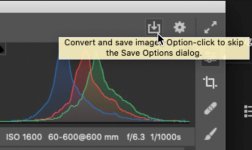
Use the built-in convert and save option and skip PS entirely You can even just option-click and it will use the settings you last used w/o asking.

Screen-Shot-2021-10-16-at-2.11.33-PM.jpg
 
Last edited:
Yes - select all the raw files in Explorer. Drag them to the title bar of Photoshop and they’ll all open in ACR. You can then edit individually or apply the same adjustments and save all as JPG.
This link is for creating time lapses in Photoshop but, in essence, the first bit around creating the JPEGS from the RAW files is the kind of thing you’re after here.....
View: https://youtu.be/U-dNhMzzjok
 
Last edited:
Thanks all for the input - the solution was there all the time and between you I got to the solution

Edited the photos in the RAW plugin, and opened them out to PS

Then File, Scripts, Image Processor > Run did the trick

It would be good if I could create a shortcut on the PS toolbar for this to run, but cannot see an easy solution to that one
 
Back
Top