Saving after 'Select Object'

FiestaRed

Suspended / Banned
Messages
1,452
Name
Mike
Edit My Images
Yes
Working in the latest version of Photoshop, I'm trying to save an object that I've cut out of an image using 'Save Subject', I want to be able to use what I've cut out with different backgrounds. Is there any way I can save what I've cut out at all so I can use it with any other background I choose please?

Any help or advice would be greatly appreciated.
 
Last edited:
Working in the latest version of Photoshop, I'm trying to save an object that I've cut out of an image using 'Save Subject', I want to be able to use what I've cut out with different backgrounds. Is there any way I can save what I've cut out at all so I can use it with any other background I choose please?

Any help or advice would be greatly appreciated.

Copy the object onto a NEW transparent document and then save as a PNG file.
 
Copy the object onto a NEW transparent document and then save as a PNG file.
Thanks for the reply. Any chance you could possibly expand a little please? Apologies for being a bit on the thick side but I'm not really sure what you mean by a 'transparent' document.
 
Thanks for the reply. Any chance you could possibly expand a little please? Apologies for being a bit on the thick side but I'm not really sure what you mean by a 'transparent' document.

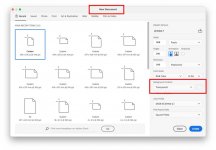
From the MENU’s select FILE > NEW.

When the window opens change the BACKGROUND CONTENTS to TRANSPARENT.

If you copy the object before you open the new document, then the new document will already be the correct size (highlighted in BLUE top lefthand corner).


Screenshot-2024-06-14-at-07.39.23.jpg
 
From the MENU’s select FILE > NEW.

When the window opens change the BACKGROUND CONTENTS to TRANSPARENT.

If you copy the object before you open the new document, then the new document will already be the correct size (highlighted in BLUE top lefthand corner).


View attachment 425807
Thanks again for all the help. Really appreciated.
 
In PS, go to File - New
In the drop down menu on the middle right, you can choose Transparent from there (y)
Thanks for the help Mike.
 
Back
Top