

Rooting and updating an Android version

ziggy©

Suspended / Banned
Messages
1,939
Name
Dini
Edit My Images
Yes
Does any one know of a step by step guide of how to install the latest version of Android on an HTC Desire S?

There is plenty of information on Google but i cant find a detailed guide that includes how to root the phone first. The HTC Desire S i have is currently running Android 2.3.5.

A couple of questions:

- Does the Android version depend on the spec of the phone? (i.e. does the phone have to have a specific amount of memory or specs for me to be able to install the latest version on the Desire S)

- Does the phone have to be rooted first before i can install

- If i do root and install the latest version, will i be able to revert it back to its original factory settings?

- What does "installing a custom ROM" mean? Is this the same as installing a different distribution of Linux or a modified version of XP?

- What is the relationship between installing a custom ROM and updating the Android version? Is it the same thing?

- And finally, are these custom ROMS safe? Do i have to install a custom ROM to be update the Android version and if so, how do you ensure that when you update to the latest Android version, you are not installing a version that has modifications to record personal information e.g. your email or paypal logons?


Thanks.
 
Last edited:
For a step by step guide the best place you can go to is XDA Developers

XDA

Android software isn't necessarily phone spec dependant. In the case of the Desire S, a port of Jellybean 4.2 is available. It won't be as snappy as it is on Dual/Quad core devices but it will work.

9/10 root happens as part of installing custom recovery software (this software is important to then being able to flash a custom ROM but to also backup and restore other ROMS.

As long as you do whats called a nandroid backup of your current system before you flash anything custom, then you will always be able to revert back to stock factory OS.

Installing a custom ROM means writing over the factory default OS and replacing it with a version of android that has been tweaked/enhanced by developers. (good way of taking away bloatware loaded by carriers)

The relationship between a custom ROM and updating the factory version is roughly the same, however HTC will only support the Desire S officially up to Ice Cream Sandwich (4.0)
Developers of custom ROMS happily find a way of taking stock android software and porting it to an unsupported device.
This means that if you fancied trying Jellybean, HTC don't support it but developers of custom ROMS do (within the parameters of working on the phone in the first place).

Most custom ROMS are safe. The safest and most developed out there is probably Cyanogenmod. Just look for ROMS that are well supported by both the developer and the end user.

If you have any other questions feel free to ask me or drop me a PM.
 
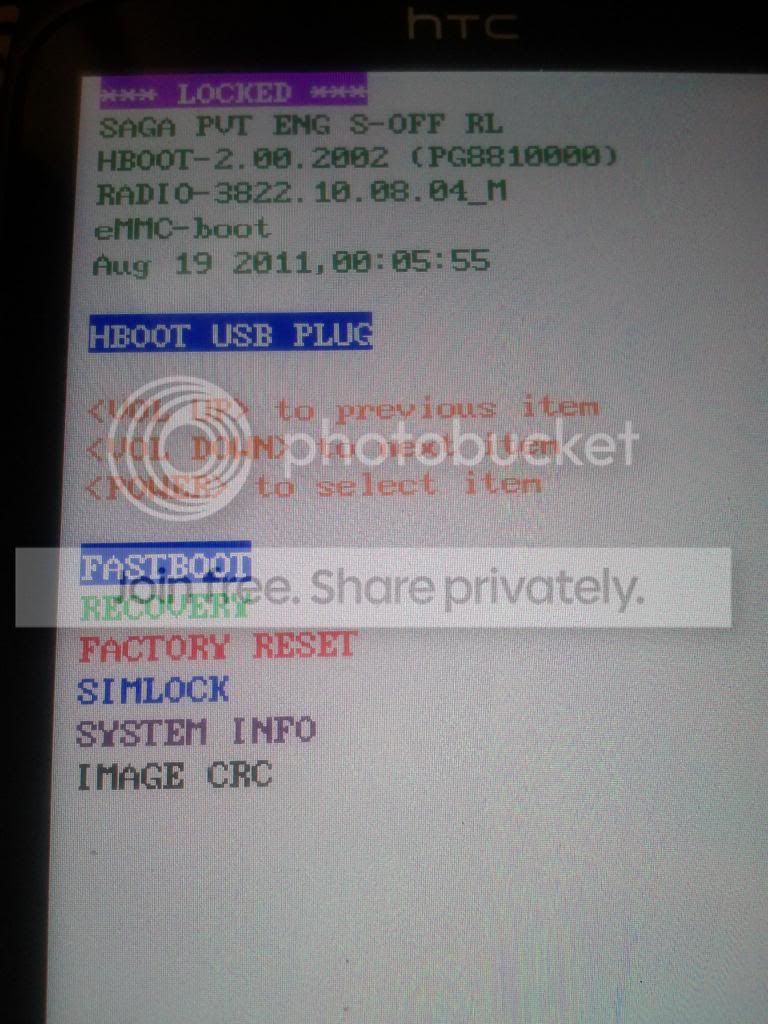
One thing that is still confusing me is the issue of the HBOOT version. Do i need to downgrade it if the version on my phone is 2.00

The instructions on cyanogenmod website (http://wiki.cyanogenmod.org/w/Install_CM_for_saga) says that i have to have S-OFF and i have to use a tool called "Revolutionary". The problem is that this tool will only support versions 0.98.0000, 0.98.0002 but my version is different (see attached image).

IMG_20131020_124710_zpsfb5a879d.jpg


Also, do you know the difference in the two versions listed in the downloads sections - http://download.cyanogenmod.org/?type=stable&device=saga ?
 
You will need to downgrade the HBOOT if you want to obtain root and custom recovery using the "revolutionary" method.

See the link below on how to get HBOOT to 0.98

http://androidforums.com/desire-s-all-things-root/730501-how-downgrade-desire-s-hboot-98-a.html

After that revolutionary will install clockwordmod recovery and you will be able to do a nandroid back up before you flash a custom ROM.

As for the cyanogenmod versions, the differences will be minimal tweaks.
Worth noting that Cyanogenmod 7.2 is just a custom version of Gingerbread. If you want ICS or above you will have to look at the offerings from other developers on XDA.
 
If any of the above seems to complicated you could always download the official HTC ice cream sandwich RUU and install that.
Instructions are a wee bit more straight forward.
 
Yeah, our lass wanted me to custom rom her HTC, whilst my galaxy s seemed fairly easy the HTC looked a much more complicated root, so I left it at that.
Note on the rom to install, although a full bells and whistles version of JB is available for the galaxy s and Desire, they are knocking on a bit, as already mentioned JB was designed for newer/quicker hardware.
There are lightweight versions that may run better on older phones, SlimBean hasn't given me a seconds trouble since I installed it on my Galaxy S1.
 
Of all the phone/tablet brands I have fettled with from past to present HTC have always been do able but awkward.
All the others have been a doddle.
 
ziggy©;5907600 said:
Thanks for your help guys. I managed to update it using the instructions from here http://believeinmiraclesx.wordpress.com/2013/03/26/install-cyanogenmod-10-on-htc-desire-s-hboot-2-02/

Please can you let me know if you find any improvement after the upgrade. I have a desire s which I would like to try it on, but having messed about with custom roms on my advent vega I would leave it as it is as the Android experience has been bad with custom roms.

Thanks
 
Back
Top