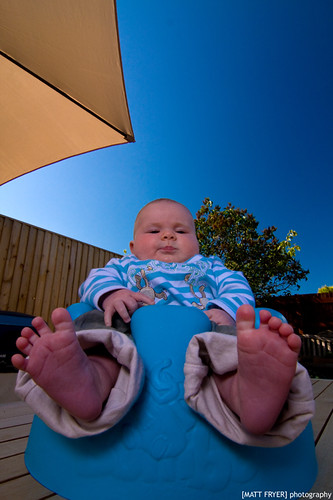
rich blue/colour

no-clue

Suspended / Banned
Messages
5
Edit My Images
Yes
I think in the RAW FILE, you can really arse about with the colours in Photoshop. You drag the blue slider down in the colour mixer, I think on the luminosity channel possibly...this would result in a darker deeper blue, if I remember correctly.

No doubt someone in the know will have a better answer in a sec I guess.

Gary.
 
I don't think there is a general setting in 'a' camera to do this. Your camera may have a setting that will give similar results but you don't say what you have. Most likely these shots are post processed to increase blue saturation.
 
Oh sorry, I have a Canon 350D
 
Circular Polariser will boost blue skies.

Or you could use a blue grad, but this will tint everything above the graduation line blue

You could also boost the blue saturation in photoshop
 
Circular Polariser will boost blue skies.

...and green foliage.
But the trade-off is that a CP plays havoc on any reds in the image, and it is very unflattering on human skin/complexion.
 
Cool thanks guys. Much appreciated.
Are there standards of CP's? I am leaning towards a Hoya?
 
Buy the best you can afford is about the only advice I think.
 
My best advice is to firstly use a decent cir-pol filter, that will help with the blues, but also and more importantly take great care when shooting the image, your position in relation to the sun will be a major factor, it's always best to and will produce the best results if your back is directly to the sun when taking the shot.

Look at one of my shots for example:-

2558799167_a4800158b3.jpg


I was not stood with the sun completely behind me, it was more off to one side hence the slight whitening on the left of the image. So it will pay to research the location of the image before shooting, then you can work out which way to face at what time of the day to get the best colouration in the sky, also a slight hint of cloud in the sky also naturally brings out the blues too I find.

Oh and of course use your trusty raw converter to increase saturation and luminosity of the blue channel if you are shooting in RAW, but be careful, too much and it will be come grainy and pixelated. A little adjustment often goes a long way.

Hope that helps.
 
2558799167_a4800158b3.jpg


I was not stood with the sun completely behind me, it was more off to one side hence the slight whitening on the left of the image. So it will pay to research the location of the image before shooting, then you can work out which way to face at what time of the day to get the best colouration in the sky, also a slight hint of cloud in the sky also naturally brings out the blues too I find.

Oh and of course use your trusty raw converter to increase saturation and luminosity of the blue channel if you are shooting in RAW, but be careful, too much and it will be come grainy and pixelated. A little adjustment often goes a long way.

As wingnut says: pay a lot of attention to your position relative to the sun. Keep your shoulder pointing at it.

The lighter blue in the top left corner demonstrates the influence of the angle to the sun. It also demonstrates that wide angle lenses are not useful for polarising. The wider the lens angle/Field of View, the more blotchy the sky will be. And conversely: the narrower the lens angle/Field of View is (telephoto), the more evenly/uniform blue the sky will be.
 
Back
Top