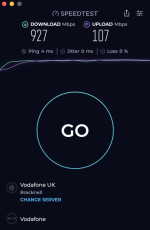
RESOLVED Wi-Fi speeds.

gramps

Suspended / Banned
Messages
44,805
Name
'Gramps'
Edit My Images
No
I've been with Vodafone for a few years now and no real problems.
A couple of years ago I got Full Fibre and a 500 download speed package, it's worked well with wi-fi speeds of 450-550 download and 50-70 upload on average.
Last week I got an upgrade offer of Full Fibre 910 for £1 less than I am paying now - no-brainer 910 download and 105 upload for £1 less.
Now it's installed and configured I'm getting wi-fi speeds of 350-550 download and 107 upload!
Spent time on chat and got fobbed off with the fact that anything can interfere with my wi-fi signal (even though it's 12 feet away through a flimsy internal door and nothing has changed between the upgrade). Added to that as I'm mostly getting the "guaranteed minimum" of 455 download that's okay!!

Now using a wired connection I get over 900 download, so my package is working, but I am puzzled as to why I can't get anywhere near the 910 download on wi-fi.
I am using my iMac M1, a Macbook Air and two iphones to test the wireless signal and as each of these show roughly the same, I can only assume that the Vodafone router is incapable of dealing with a wireless signal of much above 500 - is this likely?

I don't really want to run an Ethernet link, but is there anything else that I can do? TIA
 
Can your router handle the speed? Might be time to upgrade? I am clutching at straws.
 
Can your router handle the speed? Might be time to upgrade? I am clutching at straws.
This is my question, AFAIK I am on the latest router.

# or maybe not, looks like different packages have different routers and different wi-fi e.g 6 or 7.
So maybe the router is the log-jam? :thinking:
 
Last edited:
I've been with Vodafone for a few years now and no real problems.
A couple of years ago I got Full Fibre and a 500 download speed package, it's worked well with wi-fi speeds of 450-550 download and 50-70 upload on average.
Last week I got an upgrade offer of Full Fibre 910 for £1 less than I am paying now - no-brainer 910 download and 105 upload for £1 less.
Now it's installed and configured I'm getting wi-fi speeds of 350-550 download and 107 upload!
Spent time on chat and got fobbed off with the fact that anything can interfere with my wi-fi signal (even though it's 12 feet away through a flimsy internal door and nothing has changed between the upgrade). Added to that as I'm mostly getting the "guaranteed minimum" of 455 download that's okay!!

Now using a wired connection I get over 900 download, so my package is working, but I am puzzled as to why I can't get anywhere near the 910 download on wi-fi.
I am using my iMac M1, a Macbook Air and two iphones to test the wireless signal and as each of these show roughly the same, I can only assume that the Vodafone router is incapable of dealing with a wireless signal of much above 500 - is this likely?

I don't really want to run an Ethernet link, but is there anything else that I can do? TIA
Wi-Fi will invariably be slower than you can get via a wired like (assuming both are current specs), but there are also a multitude of Wi-Fi standards, and you need both ends to support the fastest options to actually achieve that.
Google suggests Vodafone Full Fibre used a Wi-Fi 6 capable router - but not all Wi-Fi routers are equal, so you might be better using a 3rd party device to handle Wi-Fi (IE a better Wi-Fi 6 or Wi-Fi 7 router/mesh access point) - the latest general standard is Wi-Fi 7 - and a Wi-Fi 7 system should be significantly faster - provided your devices are Wi-Fi 7 compatible.
Unfortunately there's a lot of variables involved, so it's difficult to give a precise recommendation.
I'm assuming you have their 'PowerHub' rather than the Ultra Hub 7, which comes with their premium service.
 
I'm assuming you have their 'PowerHub' rather than the Ultra Hub 7, which comes with their premium service.
That is correct and I don't think I can replace it with something else.
Can I connect something to an available ethernet port to increase the speed available?
Seems iMac M1 is wifi 6.
 
Last edited:
Almost certainly a limitation of your router.

Companies will only ever guarantee a minimum speed depending on your connection type. If you're getting that you can't argue with them. If you speak nicely to them they may do things free of charge to increase your probability of getting better speeds like giving you the latest routers and mesh devices. But again, unlikely if you're getting the minimum guaranteed speed.

My guaranteed speed is 16mb. BT still don't meet it. Sometimes it is as low as 0.09mbs. it averages about 10mb. I work from home for a tech company and still manage most things with 10mbs. Yeah, streaming and uploading are painful at times, but everything still works.

If I complain to them about not meeting their speed, they say I can leave without penalty, but it is pointless because all the other providers would be the same. It is a limitation of the place I live. I am in the process of switching to Starlink because of it, that will give me 200mb ish.

Can I ask what you need more than 455mbs for? Even at 150, you can usually watch HD films without buffering.
 
That is correct and I don't think I can replace it with something else.
Can I connect something to an available ethernet port to increase the speed available?
Seems iMac M1 is wifi 6.

You could backhaul an Orbi or TP Link Deco mesh which will give you faster wi-fi out of your router.
 
Can I ask what you need more than 455mbs for? Even at 150, you can usually watch HD films without buffering.
The truthful answer is that I don't, it's just the fact that my contract says, ie "guaranteed 455 download but normally 910 download and 107 upload".
 
That is correct and I don't think I can replace it with something else.
Can I connect something to an available ethernet port to increase the speed available?
Seems iMac M1 is wifi 6.
As Richard said, yes, you can just plug something else into an Ethernet port on the router, and turn off the routers Wi-Fi - this will require a bit of playing with settings on the router, and on whatever Wi-Fi device you use to keep your wired and wireless networks acting as one network.

Depending on how Vodafone set things up, you can sometimes go a step further and entirely replace the Vodafone router with one of your own.
I'm with Toob, who fit a box on the wall which in turn connects to their supplied router - and I've simply disconnected the Toob supplied router, and plugged my mesh system in instead.

RE: Contract speeds - in the fine print will be the words 'to the router'...
 
You need a network guy!

For me, I use the provided router in modem only, and connect via Ethernet cable, an ASUS mesh Wi-Fi router to that.

I do not use the Wi-Fi from the original router, that is turned off.
 
As Richard said, yes, you can just plug something else into an Ethernet port on the router, and turn off the routers Wi-Fi
Is it possible to leave the router's wifi on and simply introduce another via the new 'gadget' plugged into an ethernet socker, or can you only have one?
RE: Contract speeds - in the fine print will be the words 'to the router'...
Yes a fact that I had forgotten. :)
 
You need a network guy!

For me, I use the provided router in modem only, and connect via Ethernet cable, an ASUS mesh Wi-Fi router to that.

I do not use the Wi-Fi from the original router, that is turned off.
Whilst I have had that facility with other isp's in the past, I don't think that's an option with Vodafone's router.
 
Is it possible to leave the router's wifi on and simply introduce another via the new 'gadget' plugged into an ethernet socker, or can you only have one?

Yes a fact that I had forgotten. :)
No, you need to turn the router Wi-Fi off, otherwise the two networks will fight for channels, etc, and slow each other down.
 
You're getting pretty good speeds over wireless and I wouldn't expect to get anywhere near the full speed over wifi. I've always found the theoretical wireless network performance claims to be quite distant from actual speeds in practice, on my current wifi6 network with devices sitting near an access point they're usually only pulling around 300-400Mb/s.
 
You're getting pretty good speeds over wireless and I wouldn't expect to get anywhere near the full speed over wifi. I've always found the theoretical wireless network performance claims to be quite distant from actual speeds in practice, on my current wifi6 network with devices sitting near an access point they're usually only pulling around 300-400Mb/s.
Yes, I use a mesh system to give consistent Wi-Fi around the house (3 floors) rather than to improve speeds in the vicinity of the router.
 
Sorry for my glib terminology. Modem-only and no Wi-Fi is the same for me at my pay grade.

Mesh will help cover a better area, but if that isn't required, check out a Wi-Fi 6+ or 6E router, maybe? The 6+ support up to 1gig Wi-Fi.

I connect to my office router with an Ethernet cable, and that in turn connects to the main living room router using Wi-Fi. I pay for 220meg, and I get a speed of 205meg in the office.

I couldn't help but want the 900meg if I was offered it, regardless if I needed it or not!
 
Ah yes, I can do that, I was thinking 'modem-only' mode was something quite different.
But from above, maybe adding mesh would not increase my speed anyway?
A mesh system is primarily to provide fast Wi-Fi over an extended area, with automatic handover for devices between mesh access points as you move so you are always connected to the strongest signal.
The added benefit for you is you could get a mesh system where the individual nodes are faster than your Vodafone Routers Wi-Fi (though mesh with good WiFi 6 or 7 is not cheap).
You want to then turn off the Wi-Fi on the Vodafone router as otherwise it will generate a competing Wi-Fi network which will effectively slow down the Mesh Wi-Fi (so it might still be faster, but not as fast as it could be).

Edit: Modem Only Mode
The router Vodafone provided does three things.
1) Connects you to the Internet - in modem only mode this is the only thing it does
2) Provides a DHCP service which creates a Local Areas network of all devices, local IP Addresses, etc. - if you only turn off Wi-Fi you need to configure your Mesh system to accept the Vodafone Router to handle DCHP / IP Allocation
2) Provides a Wi-Fi Network as part of your Local Area Network.
 
Last edited:
A mesh system is primarily to provide fast Wi-Fi over an extended area, with automatic handover for devices between mesh access points as you move so you are always connected to the strongest signal.
The added benefit for you is you could get a mesh system where the individual nodes are faster than your Vodafone Routers Wi-Fi (though mesh with good WiFi 6 or 7 is not cheap).
You want to then turn off the Wi-Fi on the Vodafone router as otherwise it will generate a competing Wi-Fi network which will effectively slow down the Mesh Wi-Fi (so it might still be faster, but not as fast as it could be).

Edit: Modem Only Mode
The router Vodafone provided does three things.
1) Connects you to the Internet - in modem only mode this is the only thing it does
2) Provides a DHCP service which creates a Local Areas network of all devices, local IP Addresses, etc. - if you only turn off Wi-Fi you need to configure your Mesh system to accept the Vodafone Router to handle DCHP / IP Allocation
2) Provides a Wi-Fi Network as part of your Local Area Network.
Thank you for the explanation, a cable is looking more attractive! :LOL:
 
The truthful answer is that I don't, it's just the fact that my contract says, ie "guaranteed 455 download but normally 910 download and 107 upload".

Take screen shots of the speed tests showing it is routinely less that the 'normal' speed. Then see if to bring you up to the advertised speed they are willing to provide you with their latest router.
 
Take screen shots of the speed tests showing it is routinely less that the 'normal' speed. Then see if to bring you up to the advertised speed they are willing to provide you with their latest router.
As above I think they would point out 'to the router'. :(
 
Thank you for the explanation, a cable is looking more attractive! :LOL:
I would say it's easier than it sounds, but that's only true if you've done it several times before and are used to messing around with router settings - and even then the first time you use a new manufacturers kit there's an element of trying to figure out why they've made it impossible to do something that was easy before! :LOL:
 
Almost certainly a limitation of your router.

Companies will only ever guarantee a minimum speed depending on your connection type. If you're getting that you can't argue with them. If you speak nicely to them they may do things free of charge to increase your probability of getting better speeds like giving you the latest routers and mesh devices. But again, unlikely if you're getting the minimum guaranteed speed.

My guaranteed speed is 16mb. BT still don't meet it. Sometimes it is as low as 0.09mbs. it averages about 10mb. I work from home for a tech company and still manage most things with 10mbs. Yeah, streaming and uploading are painful at times, but everything still works.

If I complain to them about not meeting their speed, they say I can leave without penalty, but it is pointless because all the other providers would be the same. It is a limitation of the place I live. I am in the process of switching to Starlink because of it, that will give me 200mb ish.

Can I ask what you need more than 455mbs for? Even at 150, you can usually watch HD films without buffering.
It's not, it's a limitation to WiFi. Your not going to get 900mb via WiFi.
 
You won't ever get that speed via WiFi, only with a cable connected to router. Tbh it would make no practical difference to you either really unless you are routinely downloading massive files (and even then we're not talking a massive difference in time)
 
It's not, it's a limitation to WiFi. Your not going to get 900mb via WiFi.


You won't ever get that speed via WiFi, only with a cable connected to router. Tbh it would make no practical difference to you either really unless you are routinely downloading massive files (and even then we're not talking a massive difference in time)

Just as an example:


"2402 Mbps" - that's a fair bit more than 900.

Other WiFi systems are available, most have a version capable of these speeds. The limitation is the router which must be able to provide it. Only other way to test it is within the local network, but that assumes you have devices capable of those transfer speeds too.
 
Just as an example:


"2402 Mbps" - that's a fair bit more than 900.

Other WiFi systems are available, most have a version capable of these speeds. The limitation is the router which must be able to provide it. Only other way to test it is within the local network, but that assumes you have devices capable of those transfer speeds too.
Theoretical speeds only, not real world. Usually total throughput as well not per device, no mention of the capability of the client either.

"The XE75 Pro turned in respectable results in our throughput performance tests. The router node’s score of 853Mbps on the 5GHz close-proximity (same room) test" and that's in a perfect environment.
 
Last edited:
Theoretical speeds only, not real world. Usually total throughput as well not per device, no mention of the capability of the client either.

"The XE75 Pro turned in respectable results in our throughput performance tests. The router node’s score of 853Mbps on the 5GHz close-proximity (same room) test" and that's in a perfect environment.

Theoretical max for wifi 6 is 9 Gbs ish. WiFi 7 is faster still. Combine 7, 6 and 5 and then your're talking 50+ Gbs theoretically. WiFi certainly isn't the limitation.

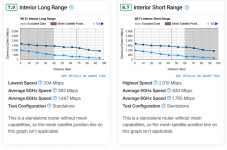
If you want real world results check here:


Rtings also do some fairly comprehensive camera reviews.
 
Theoretical max for wifi 6 is 9 Gbs ish. WiFi 7 is faster still. Combine 7, 6 and 5 and then your're talking 50+ Gbs theoretically. WiFi certainly isn't the limitation.

If you want real world results check here:


Rtings also do some fairly comprehensive camera reviews.
And yet the results disagree with you. Hardwired he's getting full speed.

Hardly real world testing, I don't know about your house but I have walls, foil backed insulation, countless other wireless devices, neighbours with their own devices all crossing over the spectrum of the channels I use.
 
Last edited:
I keep coming back to the point that in reality it'll make little difference unless you are routinely downloading or uploading massive files.
 
I keep coming back to the point that in reality it'll make little difference unless you are routinely downloading or uploading massive files.
It makes a difference whether I am getting all or 50% of what is contracted. If I go to a restaurant for a three course meal I expect to get starter, main & dessert. :)
 
It makes a difference whether I am getting all or 50% of what is contracted. If I go to a restaurant for a three course meal I expect to get starter, main & dessert. :)
Dried bread
Roasted Rat, with a mould mousse
Ice block from the roof (winter only)
 
My point was simply that you could get a new router and maybe increase your WiFi speed but I wonder if it would make any noticeable difference to you day to day
 
My point was simply that you could get a new router and maybe increase your WiFi speed but I wonder if it would make any noticeable difference to you day to day
Best way to improve WiFi is to optimise the position of the access points and the channels used.
I use two access points one on the landing ceiling and another next to the TV in the living room power settings are adjusted so upstairs reaches everywhere on 2.4ghz, 5ghz pretty much only upstairs.
The AP downstairs only uses 5ghz for downstairs at 160mhz width, also I use the DFS channels that a lot of consumer equipment avoids do I have clear channels compared to my neighbours.
 
And yet the results disagree with you. Hardwired he's getting full speed.

I don't know which review you read, but it doesn't disagree with me at all. Your point was:

It's not, it's a limitation to WiFi. Your not going to get 900mb via WiFi.

The real world result is:

1759923084766.png
WiFi at well over 900Mbs at distances of over 95 feet for 6Ghz. Up to 20ft for 5Ghz.
 
Back
Top