When you use picture controls and set to Monochrome, the image shown on the display after taking a photo is in Mono. Anyone know how that monochrome setting can then be replicated in software when the images are transferred for post processing?

and help to keep the site free for all
You are using an out of date browser. It may not display this or other websites correctly.
You should upgrade or use an alternative browser.
You should upgrade or use an alternative browser.
Replicating Nikon Monochrome Picture Controls in Software
- Thread starter jamesev
- Start date
When you use picture controls and set to Monochrome, the image shown on the display after taking a photo is in Mono. Anyone know how that monochrome setting can then be replicated in software when the images are transferred for post processing?
https://digital-photography-school.com/using-camera-color-profiles-lightroom/
superb - thank you very much

gad-westy
Suspended / Banned
- Messages
- 6,527
- Name
- Graham
- Edit My Images
- No
What software are you using for handling the raw files? I've not used it in some time but I think Nikon's own software would actually recognise the picture control settings on import.
If you do use lightroom, I think the link above is out of date now. There was quite a significant change to the way profiles worked in one of the more recent updates.
If you do use lightroom, I think the link above is out of date now. There was quite a significant change to the way profiles worked in one of the more recent updates.
Having scored the web it's quite surprising that this question has cropped up frequently, no one has made such a LR preset.What software are you using for handling the raw files? I've not used it in some time but I think Nikon's own software would actually recognise the picture control settings on import.
If you do use lightroom, I think the link above is out of date now. There was quite a significant change to the way profiles worked in one of the more recent updates.
gad-westy
Suspended / Banned
- Messages
- 6,527
- Name
- Graham
- Edit My Images
- No
Having scored the web it's quite surprising that this question has cropped up frequently, no one has made such a LR preset.
It's something I noticed recently switching back to Nikon from Fuji. In most recent versions of LR, you could select new and improved Fuji simulations from a whole new panel towards the top of the development side bar, instead of a cursory drop down at the bottom as it used to be. Now that I'm back with Nikon, it doesn't seem to have anything other than Adobe's standard stuff. In all honesty, I was never a huge fan of Nikon picture profiles anyway but still surprising.
I wouldn't imagine its that difficult for a LR expert to do a mimicIt's something I noticed recently switching back to Nikon from Fuji. In most recent versions of LR, you could select new and improved Fuji simulations from a whole new panel towards the top of the development side bar, instead of a cursory drop down at the bottom as it used to be. Now that I'm back with Nikon, it doesn't seem to have anything other than Adobe's standard stuff. In all honesty, I was never a huge fan of Nikon picture profiles anyway but still surprising.
I wouldn't imagine its that difficult for a LR expert to do a mimic
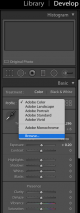
It's something I noticed recently switching back to Nikon from Fuji. In most recent versions of LR, you could select new and improved Fuji simulations from a whole new panel towards the top of the development side bar, instead of a cursory drop down at the bottom as it used to be. Now that I'm back with Nikon, it doesn't seem to have anything other than Adobe's standard stuff. In all honesty, I was never a huge fan of Nikon picture profiles anyway but still surprising.
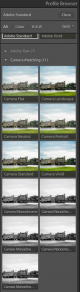
It does still have camera profiles, you need to click browse or the 4 squares and scroll down.
Couldn’t see them last time I checked but must I didn’t dwell on it. Will take another look later.
Look for a drop down box that says camera matching in the list of all the presets.