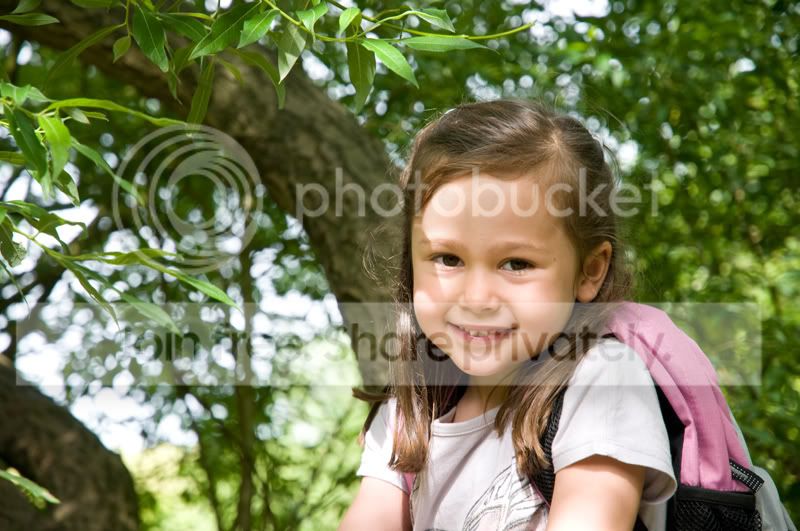
Removing shadows.

Johnny Thunder

Suspended / Banned
Messages
698
Name
John
Edit My Images
Yes
Hi everyone.

Could you please tell me how you go about removing a small shadow cast across the cheek of the subject.
I've taken a photo of my niece in a tree and there is a shadow from a branch across her face.

Thank you.
 
step one.. tell us what software you have?: )
 
I'm thinking possibly the healing brush in Photoshop ? great tool for removing dust spots in blue skies :)
 
Here you go guys.

I would like to know how to remove the shadows on the face and liven it up too.


shadowremove.jpg


Cheers.
 
Sorry can't help with the shadows.
And on my monitor it needs no "Livening up" great shot.


Gary
 
Picture looks fine on my monitor, and I don't find the shadow objectionable.

If you need to subdue the shadow, open the image in ACR and use the local adjustment tool to gently remove density.

Alternatively, and this may take you some time. Copy the right eye area , and using Free Transform flip it horizontally and place it over the left one . Now use the healing tool to copy tone from the right cheek to the left. You'll probably have to go around the area and clean it up with the clone tool to "soften" any edges. I prefer to clone rather than use the "smudge" tool as it tend to lose detail and make the result unnatural
 
You might also want to try the healing brush to to soften the edges. It sometimes works better than the cloning tool. Other times the cloning tool is the better option
 
I had a go at this one I used the patch tool to select the edge of the shadow then I dragged that to a smooth area of skin such as the forehead. That sorted out the harshness of the shadow I then tidied up a few bits with the clone stamp tool on a reduced opacity ie 30%.

kjQ4g.jpg
 
Just remember not to go too far :thumbs:

I would just selectively sharpen the eyes a bit too (with a nice soft edged selection)
 
I would duplicate and flip the 'good' side of the face as a starting point. Then do some masking, cloning etc. to make it blend in with the original.

There's no right/wrong way. Most people would approach the challenge in different ways.
 
I have been looking at the suggestions to copy and flip the good side of the face, and maybe I am being stupid here, but surely that will give the young lady eyes that look in opposite directions?

I think someone needs to be considerably more skilled to be copying and flipping face sections than to use the patch or clone tools to lessen the shadow.

....but I am willing to listen and learn!
 
I have been looking at the suggestions to copy and flip the good side of the face, and maybe I am being stupid here, but surely that will give the young lady eyes that look in opposite directions?

I would never copy and flip a whole side of the face. As you suggest, this would look very odd!

For this image, I'd just copy and flip the cheek area. I find this to be a useful starting point for cloning/masking etc.
 
Quote: Copy the right eye area , and using Free Transform flip it horizontally and place it over the left one . Unquote.

It was Chappers' post I was referring to, and again I am not saying it is impossible, just seems like a lot of work.
 
I struggled with that one too.
My best results were with the clone tool, but to be honest they were crap.
 
Back
Top