
Removing EXIF data.....

Slimbert

Suspended / Banned
Messages
6,914
Name
Damien
Edit My Images
Yes
Is there a way to remove all the EXIF in large batches?! :thinking:

I know I can do it one image at a time, by saving for web, but I'm struggling to see any option for doing this for larger folders......ideally I'd like to remove everything bar the Copyright info, but I doubt that's possible!?!

Software wise, I have Lightroom 3 and 4 and Elements 9.

Thanks in advance for any help!! :thumbs:
 
When you export from lightroom, you can select what EXIF info gets exported with the image.
 
When you export from lightroom, you can select what EXIF info gets exported with the image.

Which is exactly what I'll start doing from now on.....genuine thanks for that!! :clap:

Any way of doing it with old folders in batches?! :thinking:
 
Any way of doing it with old folders in batches?! :thinking:
Not as batch processes in Lightroom unless you re-export with a new preset. Elements may give you enough leeway to rework existing images, but I'm not familiar enough with it to know.

A google will probably lead you to another tool that is quite capable of doing what you want...
 
Take a look at EXIFTool GUI. It does batches. You can select which EXIF IPTC, XMP, ICC JFIF and Photoshop data to exclude or modify.
 
Have a look at exiftool
If I remember correctly it can be included as an external editor in the export options of lightroom.
Alternatively, place the exiftool exe in a directory, create a batch file to go with it and then drag and drop all the images onto the batch file. You might have to read a bit as I'm not sure my explanation is that good, but exiftool works well.

This is the exiftool batch file I use (I called it removeJunk.bat):

exiftool -overwrite_original ^
-XMP:All= ^
-Software= ^
-XResolution= ^
-YResolution= ^
-ResolutionUnit= ^
-DateTimeDigitized= ^
-SubSecTimeOriginal= ^
-SubSecTimeDigitized= ^
-FocalPlaneXResolution= ^
-FocalPlaneYResolution= ^
-CustomRendered= ^
-FocalPlaneResolutionUnit= ^
-ShutterSpeedValue= ^
-ApertureValue= ^
-ExposureBiasValue= ^
-MaxApertureValue= ^
-SceneCaptureType= ^
-IPTC:Keywords= ^
-ThumbnailImage= ^
-ICC_Profile= ^
%*


Also, I've just spotted a link to "metadata wrangler" a plugin for lightroom, though I've never used it myself.
 
Can I ask, why you would want to remove the exif data? Is it believed to be private, i.e. not for sharing, I only ask as I find it useful when looking at a pic to see how it was created.
 
Can I ask, why you would want to remove the exif data? Is it believed to be private, i.e. not for sharing, I only ask as I find it useful when looking at a pic to see how it was created.

I want to remove it from JPEG's that I supply to my customers.....there's no need for them to know which aperture, shutter speed I used etc!! :thumbs:
 
can you batch save for web in photoshop?
 
Which is exactly what I'll start doing from now on.....genuine thanks for that!! :clap:

Any way of doing it with old folders in batches?! :thinking:


open a file save for web check that it removes exif, and then make it into an action, then when you run batch manager make sure you have selected your action :thumbs: well thats how its PS so should be similar :thumbs::

Can I just ask why you want to remove all exif
 

Urm I did see that, but whats the harm in leaving it , doesnt make the file size any different or not much, its like your saying you disown the image :lol: I always add IPTC Extension on as well so if any printer gets the file they will see the copyright and conditions of use for anyone I give an image too, I should really run a script to add it to every image, also it helps when looking for stolen images, unless they strip it
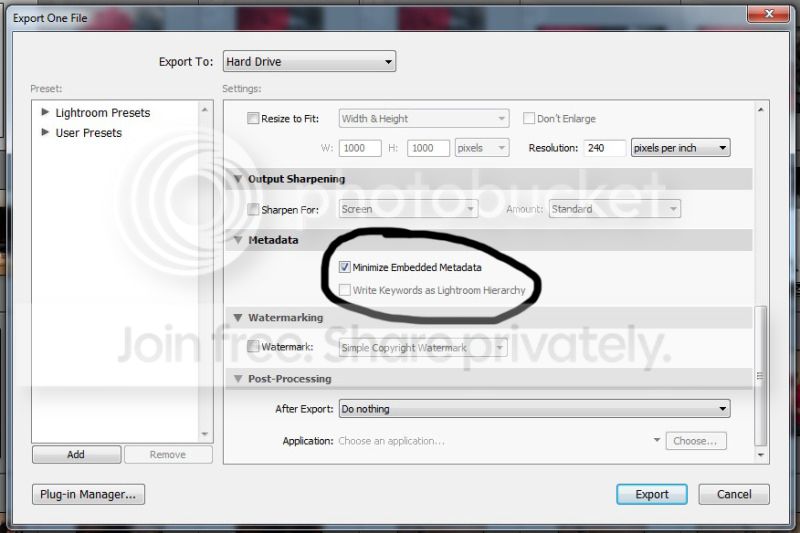
 
I leave the copyright info in the file, which shows up should they upload to Facebook or have them printed etc, but I want remove pretty much everything else. I supply a lot of JPEG's to my customers, and there's no need for them to have any of the info and I'd rather clean up the details/EXIF before I let them loose in to the world.....it serves no purpose at all by leaving it in there, and now I've sorted it in Lightroom, it's no extra effort to remove it!! :thumbs:
 
did you use the method I described in #12 or how did you do it please for future reference, I dont use LR just PS

Sorry, Dave.....I use Lightroom, so my method won't be of any use to you!! :shake:

I simply ticked the box (below) during export in Lightroom, and it did everything I wanted it to, without changing anything else....not looked to see if it can be done in PS!! :shrug:

EXIF.jpg
 
Back
Top