Relinking folders in LR from pc to mac

Welshy74

Suspended / Banned
Messages
172
Name
Richard
Edit My Images
Yes
Ive just set up my Mac and I previously had a windows pc. Ive saved my photos, LR Cat and previews to a hard drive. When I open up the LR Cat all my Albums have the "!" logo. How to I resync my albums as its not giving me the option!!!!! Is it something to do with how I saved on PC to how I'm looking at in on a Mac. I have no idea and I'm rubbish with computers
 
Normally it's right click on ! folder -> find folder.

If you've just got the mac you might need to enable right click from the options (or hold control whilst you click).

That said, you've probably got the external HD formatted as NFTS which the Mac will read but won't write to very well so you might want to copy all the photos to the Mac and reformat the external HD into Mac format.
 
Normally it's right click on ! folder -> find folder.

If you've just got the mac you might need to enable right click from the options (or hold control whilst you click).

That said, you've probably got the external HD formatted as NFTS which the Mac will read but won't write to very well so you might want to copy all the photos to the Mac and reformat the external HD into Mac format.

I've copied the files to my mac so they are now in a folder. How do I format the the HD and what would I need to do then? I've also bought a WD drive ready for Mac
 
Where are the images now stored ? Are they on an external hard drive?If so is it mac ( HFS) formatted or normal PC formatted ? Normal hard drives bought over the counter are FAT32 formatted, which both Macs and PC can read and write. If however the drive is NTFS formatted , Macs can read , but not write to it.

If the drive is NTFS where the images are you can get a piece of software that will sort things out .Its from Paragon. Here's a link https://www.paragon-software.com/ufsdhome/ntfs-mac/ I've used it and it works fine.

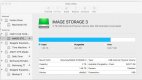
Disk utility grab.jpeg

Here you see that myy drive labeled Image Storage 3 is formatted to Mac OS This way you can find out if the disk storing the images is of a "compatible " format
 
I've copied the files to my mac so they are now in a folder. How do I format the the HD and what would I need to do then? I've also bought a WD drive ready for Mac

If you've copied the catalogue, raw images and preview folder onto the mac then you just need to relink LR to them.
 
Back
Top