RAW processing request

RobertP

TPer Emeritus
Suspended / Banned
Messages
11,726
Name
Robert
Edit My Images
Yes
I recently bought a bigger CF card and have been shooting RAW more often. I'm not that comfortable with the processing and often wonder if I am getting the best out of the image.

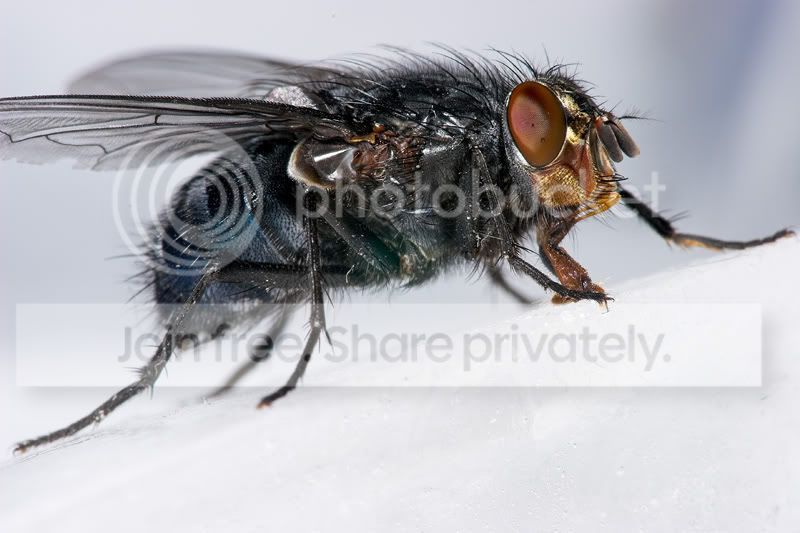
The fly macro I posted today I had a couple of goes at trying to make it stand out a bit.

I've seen some great macros and am still wondering if its all in the equipment used or if some of it is the skill in the processing.

I have uploaded the RAW file to yousendit as I'm not sure how much webspace I have free. It can be downloaded 25 times and will be there for up to a week. If more than 25 people want a picture of a fly I can always upload it again :)

http://www.yousendit.com/transfer.php?action=download&ufid=6137725344D0A530

I'd be interested to know what other macro shooters make of the image - would you expect sharper detail before processing? I'm not sure how good it should be....I always expect better!

Over to you :)
 
Using RSP, I've adjusted the WB from the ice, and then the levels and curves (s curve), added a bit of saturation, then upped the vibrance a slight amount.

In PS I've applied USM sharpening to the full size 16 bit TIFF, then after reducing to 800px i've added more sharpenening, set at amount 100, radius 0.2, threshold 0.
This was done in the lightness channel in labcolour, then converted back to rgb.

Here's the before and after

coldfly.jpg


rp_fly.jpg


I don't think there is a problem with your kit Robert, it may be down to the way your processing the image.
It probably doesn't help being partially colour blind. HTH
 
Much appreciated :)

It's all subjective and it is nice to get other views, especially as I don't trust mine :)
 
He beat me to it and did a better job. Thought I would post it anyway.
I simply adjusted WB (from blown out bit just below wing) and levels in RSP (using Matts tutorial). Converted to 8bit TIFF. Resized using bicubic (not sharper) to 750px. Re-adjusted levels in PS (a bit too far now I see it here) and then sharpened using USM at 125, 0.3, 0. Added frame.

As Matt says. it looks pretty good.

robertp-fly.jpg
 
....and mfwild has beaten me to it. In RSP I upped the Colour Temp a bit. reduced Exposure to try to bring out the ice texture, a bit of Fill Light and Highlight and a small amout of sharpening in CS2. Not a lot different.

fly.jpg


As you say, Robert, it's all subjective when post-processing.

regards
 
Thanks again.

I'm obviously making things too light but thats only part of the reason I'm not getting the finest detail clear....like the fine hairs.

Gave the sensor a single swipe this morning. Got rid of the big spot but gained a new little one or three. Looks like Matt cloned 'em out :)
 
A lot of flies :)

Bit disappointed P-E got a result so close to the others...takes away my colour blindness excuse ;)

Looking closely I can see the differences in each one and they are variations on a theme - a theme that shows I was a bit off course :)
Also realised I was concentrating so hard on detail in the fly I forgot about showing the ice properly.

Been very helpful. Thanks again.
 
RobertP said:
A lot of flies :)

Bit disappointed P-E got a result so close to the others...takes away my colour blindness excuse ;)

Yes but I waited until oher people had posted their efforts;)

You know what though you mentioned making your picture too light........thats what I tend to do and they look right to me.

It is not until someone points out it lacks contrast and colour than I then start to see things differently:thinking:
 
I found it only needed very minor adjustment. It helped you got it right in camera well done..
IMG_2242-01.jpg
 
I like that version Tommy.....but then I tend to go for a lighter appearance.

Maybe your fly with Matts ice might be the way :)

Anyway came back to this thread to review actions taken as i have some more to process. Will post when they are ready ;)
 
Above processed in RSE - auto exposure, then saved out at -2, -1, 0, +1, +2 ev and loaded into photomatix and processed in there, most settings very low to avoid plastic hdr look (hopefully?)

Into CS2 and then copied image to new layer,

inverted and de-saturated,

overlayed and gaussian blur @ 250px to produce a contrast mask,

opacity adjusted to 35% to reduce effect.

Image flattened.

Final adjusment layers of selective colour and levels just to balance some over-saturation in blue and red.

Sharpened at 20% & 30px

Resized bicubic sharper

Matte added

Saved for web!


Phew! Glad I don't have to do that for everything (well actually, alot of those steps go into some of my images but I have the whole process saved as an action!)
 
Robert,

I'm tagging this onto your thread rather than hijack Hackers. Here's a 100% crop from your fly shot:

crop1.jpg


and here's 100% crops from a couple of my shots:

crop2.jpg

crop3.jpg


I processed all 3 images in RSP with the sharpening at 0. RSP still does a bit of sharpening at 0 but not much and as all 3 got the same treatment we can ignore it.

From the crops I think it's clear you did miss the sweet spot with the focus, I suspect you focused in front of the fly and the sharpness is coming from the DoF. You also shot at f/13 which is where diffraction effects start to kick in with the Sigma although it doesn't get really bad until f/22.

But I wouldn't worry too much, you weren't far off, it's nothing that can't be sorted with a bit of post work and at print size probably wouldn't show at all.

Here's a good way to practice, find a paint brush rest it on something and try to take some shots end on at f/2.8 with just the very tips in focus. Use the same stance, etc. you'd use for shooting bugs. Unless you're using a rock solid tripod you won't be able to lock the focus, instead you'll need to time releasing the shutter just as the bristles come into focus. Just remember to relax and take your time. ;)
 
Appreciate the technique tips :)

The shot above was with a cheap telecon on the lens so may not be the best comparison thinking about it now.

Ignoring the eye and just looking for small detail that is in focus I think yours have an edge over anything I have seen in my unsharpened shots. Its not much but I can see it.

My current ability level is a bigger limiting factor but I'm soaking up advice and slowly learning :)
 
Back
Top