
PS Smart objects

Graham

Suspended / Banned
Messages
7,448
Name
Graham
Edit My Images
Yes
Hi all,
I am new to Photoshop.
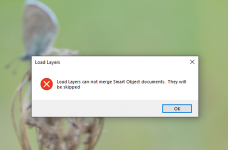
2 Days ago I didn`t have a problem with PS, Today I find that when I try to stack some photos it comes up with the Photo below, I got no idea why, nothing has changed (as far as I know)
My photos are all NEF files.
Any pointers please would be helpful.
Thanks
 

Attachments

  • image_2022-05-13_112157720.png
    image_2022-05-13_112157720.png
    123.9 KB · Views: 22
Hi all,
I am new to Photoshop.
2 Days ago I didn`t have a problem with PS, Today I find that when I try to stack some photos it comes up with the Photo below, I got no idea why, nothing has changed (as far as I know)
My photos are all NEF files.
Any pointers please would be helpful.
Thanks
How are you stacking the images?
 
Do the layers have to be rasterized for this to work ?
I only use cs6 and rarely use smart objects. That said the layers that are smart objects have an icon on the layers pallete. Off memory right click on the layer and choose rasterize.


Gaz
 
Last edited:
How are you stacking the images?
HI, Sorry I was going to include that bit but obviously that bit went right outa the window :banghead:
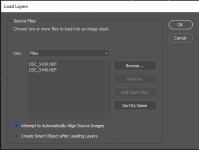
So I go via "File, scripts and load files into stack.
No problem 2 days ago so why the change now, baffles me this does.
I don`t think I have changed anything, I did try reset all back to the start but still no change.
 
HI, Sorry I was going to include that bit but obviously that bit went right outa the window :banghead:
So I go via "File, scripts and load files into stack.
No problem 2 days ago so why the change now, baffles me this does.
I don`t think I have changed anything, I did try reset all back to the start but still no change.
LOAD FILES gives you two options: BROWSE where you navigate to the files that you want to open, or ADD OPEN FILES where it will select all the open images. Which method are you using?
 
LOAD FILES gives you two options: BROWSE where you navigate to the files that you want to open, or ADD OPEN FILES where it will select all the open images. Which method are you using?
Browse is the only option, the other is greyed out.
I followed a 5 min vid on YT a few days ago, no problem then.
 

Attachments

  • image_2022-05-13_171304853.png
    image_2022-05-13_171304853.png
    13.3 KB · Views: 1
Browse is the only option, the other is greyed out.
I followed a 5 min vid on YT a few days ago, no problem then.
At what point are you converting the layers to SMART OBJECTS? And do you have a link to the video?
 
At what point are you converting the layers to SMART OBJECTS? And do you have a link to the video?
I am NOT loading any photos as smart objects (as far as I know)
I select my NEF files and follow the video that I have linked here, when I click OK after selecting the files it then does it`s thinking then comes up with the image that I had loaded earlier.

View: https://www.youtube.com/watch?v=H9nB8QG0gEo&t=1s


Again, as far as I know I have not changed anything from Wednesday and all was ok, yesterday I was not here and today I get that box when I want to load my stacked images in PS.
 
I am NOT loading any photos as smart objects (as far as I know)
I select my NEF files and follow the video that I have linked here, when I click OK after selecting the files it then does it`s thinking then comes up with the image that I had loaded earlier.

View: https://www.youtube.com/watch?v=H9nB8QG0gEo&t=1s


Again, as far as I know I have not changed anything from Wednesday and all was ok, yesterday I was not here and today I get that box when I want to load my stacked images in PS.
Unfortunately I have not been able to replicate your problem. I have tried stacking using RAW files, PSD files, JPEG files and SMART OBJECTS and they all stacked. Even using a combination of all four file types stacked. I don’t get any error messages.
 
Unfortunately I have not been able to replicate your problem. I have tried stacking using RAW files, PSD files, JPEG files and SMART OBJECTS and they all stacked. Even using a combination of all four file types stacked. I don’t get any error messages.
Thanks for trying to help and giving it a practical shot.
Maybe a uninstall will be the best option and reinstall.
 
Back
Top