Processing RAW

  • Thread starter Thread starter DTS
  • Start date Start date

DTS

Suspended / Banned
Messages
726
Name
Dan
Edit My Images
No
I'm going to start shooting in RAW and processing myself in photoshop.

I've done a couple of tutorials but what I want to know is when altering the positions of the sliders in camera raw how do I know the image looks right? How do I know I haven't made everything much worse?

Cheers
 
I've done a couple of tutorials but what I want to know is when altering the positions of the sliders in camera raw how do I know the image looks right? How do I know I haven't made everything much worse?

Do you think the image looks better? If it doesn't then you've made it worse!
 
Do you think the image looks better? If it doesn't then you've made it worse!

However comical it is, I can't think of a better answer than this :lol: It's just trial and error, just spend some time and have a play! :thumbs:
 
lol we need a like button on here
 
I'm going to start shooting in RAW and processing myself in photoshop.

I've done a couple of tutorials but what I want to know is when altering the positions of the sliders in camera raw how do I know the image looks right? How do I know I haven't made everything much worse?

Cheers

The image actually changes as you make the adjustments so you see what is happening in front of you.

Al
 
Il give you that one! It made me chuckle too! Suppose i asked for that!
 
Just be aware though... that while a great deal of things you can do with RAW files are subjective and down to personal taste, exposure is not one of them! If you constantly have to change the exposure slider to get things looking right you are not correctly exposing your images. While they can be "corrected" there's no such thing as a free lunch.

hYHLI.jpg

Qzut4.jpg

dqtIP.jpg

0qeg3.jpg


Exposure is the one thing you need to get right, all the time.
 
I understand that it's best to take the shot right first time. I'm not really wanting to shoot raw to make more editing possible. I'm just after the quality and better detail that comes from it. I just want my shots to be the best quality possible (regardless of the fact I'm a crap shot! Lol)
 
If everything is correct then raw won't really give you anything more, you'll only have to save it as a jpeg anyway.
 
If everything is correct then raw won't really give you anything more, you'll only have to save it as a jpeg anyway.

You can save it in any format you like.
I usually save as a Tiff. But some save the original some use lightroom and save the original and corrections.
There are any number of ways to save files and back ups.

A Jpeg is just the minimum data you can save, and the least useful.
 
If everything is correct then raw won't really give you anything more, you'll only have to save it as a jpeg anyway.

Why will you HAVE to save it as a JPEG? I don't save work as a JPEG unless I'm putting it online, and then I will save a JPEG version of it. When it's edited, I save it as a TIFF for print/archiving as it's lossless. JPEG is a lossy format, so I wouldn't ever save my work as JPEG before I've already saved it in TIFF.

RAW will give you more. It's not being processed in the camera in any way, and even if the exposure is perfect, there are still massive advantages to RAW. White balance can be adjusted post shoot with all the same facility as you could in camera for example. As your camera screen is essentially an un-calibrated piece of crap compared to a decent, calibrated monitor, I would always prefer to do this at home in controlled lighting conditions... as the alternative is doing so outside, often in very bright light when I can't make accurate judgements.

Sharpness can be set afterwards also, because again, you CAN'T judge this in camera by looking at the screen. You are aware aren't you that even if you shoot RAW, the image on your camera screen is generated from a JPEG compressed preview?

The whole point of RAW is that the camera makes no changes to the data, and you can make decisions on white balance, sharpness, noise reduction etc... at home, on a decent screen, in decent lighting and decent magnification settings.

Shooting JPEG will permanently embed things like white balance, sharpness and noise reduction into the bitmapped JPEG. Once done, you can't change easily... or at all with some things, such as NR and sharpness.

 
Last edited:
Why will you HAVE to save it as a JPEG? I don't save work as a JPEG unless I'm putting it online, and then I will save a JPEG version of it. When it's edited, I save it as a TIFF for print/archiving as it's lossless. JPEG is a lossy format, so I wouldn't ever save my work as JPEG before I've already saved it in TIFF.

RAW will give you more. It's not being processed in the camera in any way, and even if the exposure is perfect, there are still massive advantages to RAW. White balance can be adjusted post shoot with all the same facility as you could in camera for example. As your camera screen is essentially an un-calibrated piece of crap compared to a decent, calibrated monitor, I would always prefer to do this at home in controlled lighting conditions... as the alternative is doing so outside, often in very bright light when I can't make accurate judgements.

Sharpness can be set afterwards also, because again, you CAN'T judge this in camera by looking at the screen. You are aware aren't you that even if you shoot RAW, the image on your camera screen is generated from a JPEG compressed preview?

The whole point of RAW is that the camera makes no changes to the data, and you can make decisions on white balance, sharpness, noise reduction etc... at home, on a decent screen, in decent lighting and decent magnification settings.

Shooting JPEG will permanently embed things like white balance, sharpness and noise reduction into the bitmapped JPEG. Once done, you can't change easily... or at all with some things, such as NR and sharpness.


That's a brilliant breakdown and very helpful thank you :)
 
Just remember... the one exception: Exposure.. this has to be right :) There's more tolerance when correcting in RAW than there is with a JPEG, but you're still degrading the image when making exposure adjustments.

Practice exposure and metering technique until you actually no longer have a need to adjust exposure afterwards.
 
Just remember... the one exception: Exposure.. this has to be right :) There's more tolerance when correcting in RAW than there is with a JPEG, but you're still degrading the image when making exposure adjustments.

Your example showed this to be the case when the image is grossly underexposed and an attempt is made to recover in post-processing. Is the same true if you overexpose then reduce exposure in post-processing, assuming that none of the colour channels are blown.
 
Your example showed this to be the case when the image is grossly underexposed and an attempt is made to recover in post-processing. Is the same true if you overexpose then reduce exposure in post-processing, assuming that none of the colour channels are blown.


Yes. except the results look different. You will lose highlight detail and light areas will just become solid blocks of white, and when you pull back the exposure these just become grey with on detail or texture. Also, digital cameras are usually less tolerant of over exposure than they are over-exposure.

If there is detail still present, then you will notice less degradation, as noise isn't an issue, but tonal compression can occur and subtle colour graduations will be lost with over exposure.
 
Last edited:
Your example showed this to be the case when the image is grossly underexposed and an attempt is made to recover in post-processing. Is the same true if you overexpose then reduce exposure in post-processing, assuming that none of the colour channels are blown.

Surely if none of the colour channels are blown it's not overexposed?:thinking:
 
Phil V said:
Surely if none of the colour channels are blown it's not overexposed?:thinking:

Quite. Though it does depend on your exposure methodology how you define 'over exposed'.

If you're using Expose To The Right technique, you will be constantly adjusting the exposure downward in RAW processing, though it probably would have been over-exposed (in all senses) if you were to have been producing an OOC JPEG.

I certainly notice that I have much better noise control using ETTR, especially with Micro 4/3 (noise is less of an issue on my FF 5D). In that case, departing from a classically 'correct' exposure value has a positive rather than negative impact on image quality.
 
To be honest if your altering exposure by 1/2 a stop in lightroom either way your pretty safe if your having to alter by 1stop or more in lightroom then that in my opinion is where you should spend a bit more time metering in camera.
 
I shoot with enough cameras and lenses which only adjust in 1 stop increments that that is my baseline for accuracy. Anything closer is a bonus.
 
Surely if none of the colour channels are blown it's not overexposed?:thinking:
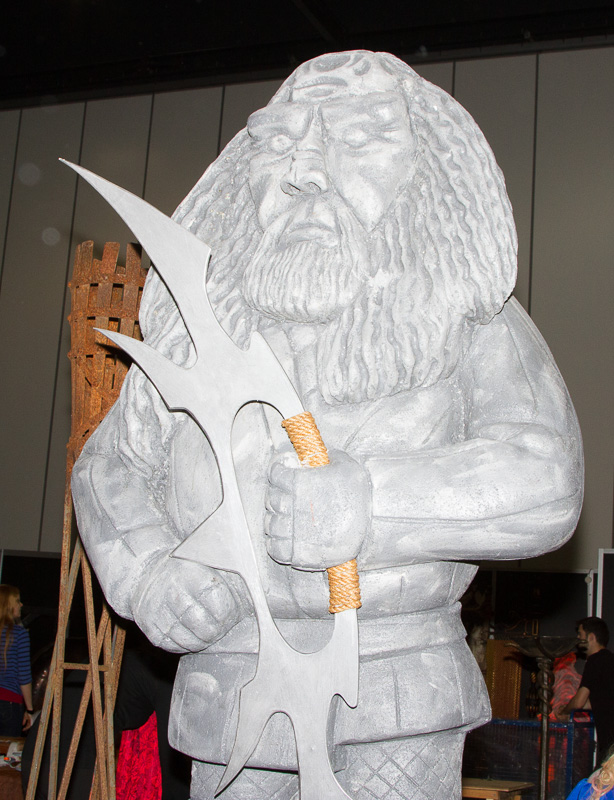
Overexposed image, but no red blinkies in LR.

Kahless_20121021_001.jpg


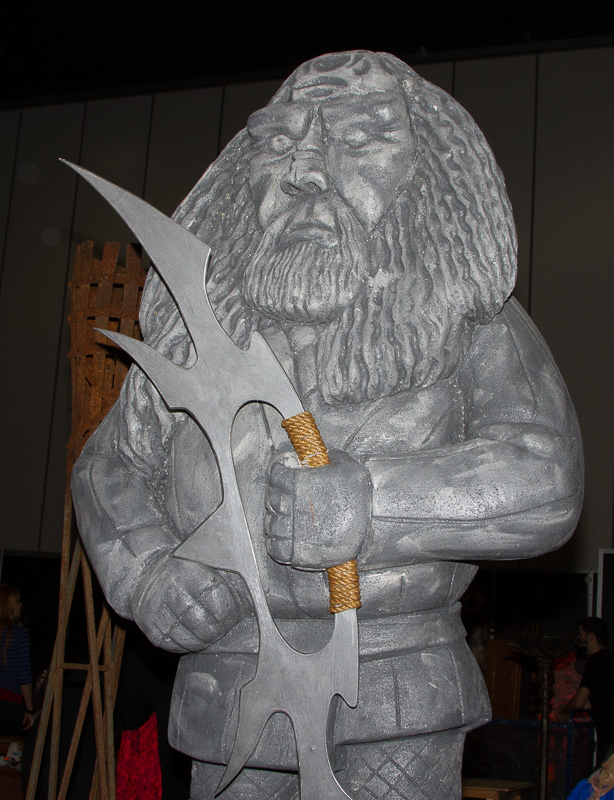
Exposure dropped by 1.5 stops in LR. Much more detail on the surface of the Bat'leth and other bits.

Kahless_20121021_002.jpg
 
umm, ETTR, anyone?


Point taken, but that's not deliberately getting it WRONG... it's making use of the headroom available in the histogram. However... ETTR is something that shouldn't really be discussed prior to being able to expose correctly conventionally.

Anyway... shoot a scene that has sufficient contrast to FILL your histogram and you CAN'T shoot ETTR.
 
Last edited:
correct exposure is a choice not a measure.
You chose the exposure that gives the effect you require.
The same subject lit by the same lighting can give very differen final results each of them with different exposures, and all equally correct.
To capture the widest tonal range with out loss in the Hilights or shadows is only one choice.
 
correct exposure is a choice not a measure.
You chose the exposure that gives the effect you require.
The same subject lit by the same lighting can give very differen final results each of them with different exposures, and all equally correct.
To capture the widest tonal range with out loss in the Hilights or shadows is only one choice.


These are things you do once you are armed with knowledge of how to correctly expose however, and not in defence of someone getting it wrong... and yes, I know that's not what you meant :)
 
Back
Top