
Processing in Lightroom

oli

Suspended / Banned
Messages
553
Edit My Images
No
well I'm pretty new to Lightroom and wanted to know if there were any good tutorial sites which go through the basics.

The look I'm trying to achieve is a cross processed look and wondered if anyone could show me any info or even tell me :)

This is an example of what I'm looking for
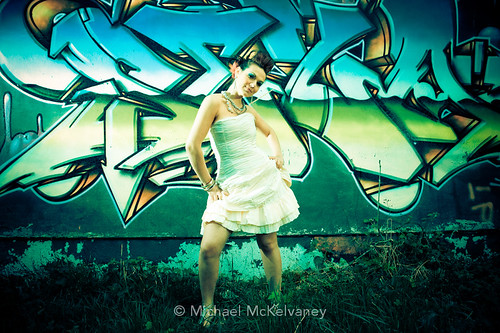
3455423668_a4fddaaaa3.jpg


I think its a great shot and works well:bonk:
 
This is an example of what I'm looking for

3455423668_a4fddaaaa3.jpg

Check Martin Evening's LR book - there is a section there on cross processing and even the similar look to this one.
 
Dalex - i'll have a look in Borders on the weekend! cheers

incapete - google is indeed my friend...I've checked google and everywhere its preset downloads which will help, but I wanted to know the manual way of going about it :)
 
Dalex - i'll have a look in Borders on the weekend! cheers

incapete - google is indeed my friend...I've checked google and everywhere its preset downloads which will help, but I wanted to know the manual way of going about it :)


Once you apply a preset you can view the settings so see what it's altered - I'm tweaking my B&W filters like this.
 
Heres one I have used in the past. split toning palette try around 30-40 highlight hue with saturation around 50 and shadow hue 120-150 ish saturation 50-60 ish.
You may need a slight S curve as well(tone curve palette)
Thats a rough starting point.
Wayne
 
hi thanks for al your suggestions. I've downloaded a few presets but find for the images I have (lots ofcolour and high contrast) that they come out ott - although I am liking the processed looks as of late)

so I apply one preset and try and tone it down.

I'll try that split toning as you mentioned and come up with tailored presets.

THanks!
 
Back
Top