
prints comming out far to dark

philbyuk

Suspended / Banned
Messages
56
Edit My Images
Yes
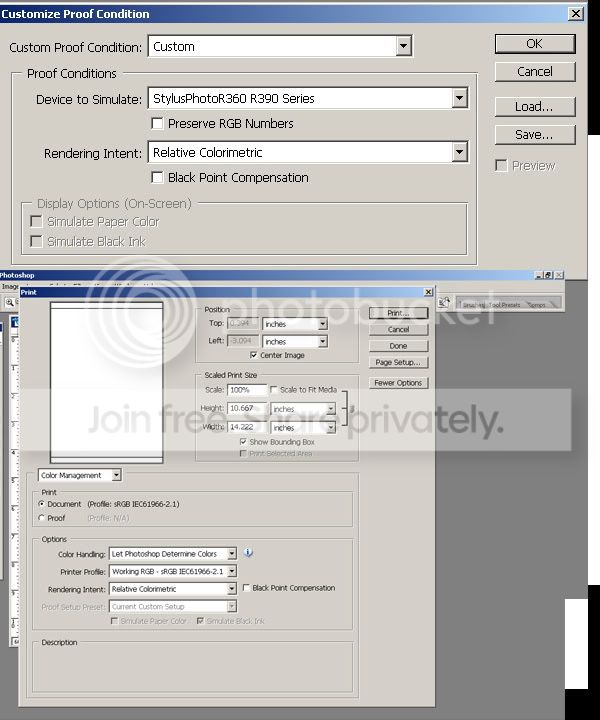
ok well ive got an epson 360 and when i print from p/s cs2 the prints are comming out far too dk ive played with the settings and wasted ink/paper and still cant get anywhere near i would like to ask you lot on here to have a look at my settings and see if you can say where they are wrong ive also tried let printer determine colours and let p/shop determine colours also with colour management both on and off. the moniter is callibrated so its gotta be one of the settings? hope someone can shed some light on this thanks phil
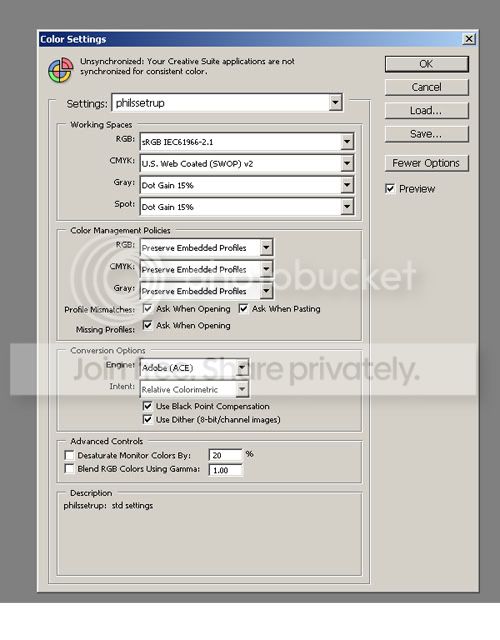
setup.jpg


proofnprint.jpg
 
Well I dont have an epson but a canon....but I dont let photoshop determined colours...i let printer determined it and set the print settings to the right paper.

make sure you have epson genuine paper and epson genuine ink too! :thumbs:
 
k janice orig paper and ink still dk when i let printer determine colour do u set icm on or off?
 
I have the R320 Epson, My settings are the same as yours, but you need to ensure the printer settings are correct.

They need to be changed to Photo setting and photo paper
 
only if you are letting the printer handle the settings, but he has "let photoshop handle settings"
 
i still change the printer settings aswell, regardless of photoshop or printer handling the settings

Just to be sure
 
yeah always best to be sure! :thumbs:
 
I use an R360 and let photoshop manage the colours, and choose paper etc in the printer settings. The only time I have had bad results (dark muddy colours) is when I used the photo enhance option, so I avoid this now and the results have been good.
 
Epsons print dark for fun

but looking at your screen grabs i see you have the printer profile set as working RGB, that should be the profile for the paper/ink combo your using.

I always had dark prints from my 950 until i bought a screen calibration device and then had a profile made by www.pureprofiles.com
 
k digital never saw that myself till u mentioned it ill have a look at thet tomm
 
One problem I had was that PS was deciding the colour settings and then the printer was autosmatically doing the same. ... 2x too much ink...

Had to create a different profile on the printer and turn OFF its adjustments.
 
Back
Top