Printing with borders and paper sizes

smr

Suspended / Banned
Messages
2,047
Name
Joel
Edit My Images
No
Hi

I realise this has been asked before but I still cannot really understand all of it so hopefully I can try and explain what I am trying to understand with the aid of some pictures.

I've got some prints which are being sold in my sister's shop as of last week and they are borderless. I much prefer the look of prints with a white border around them, preferably a uniform border all the way around.

I don't print from home at the moment and use an online print lab who have various paper sizes to choose from.

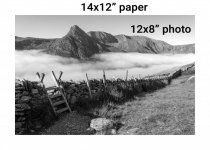
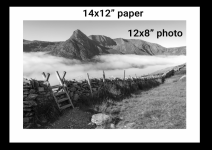
If I want to sell this photo which has a 3:2 aspect ratio and want to sell it at, let's say, 12x8" is this an accepted way to print - so the photo itself is 12x8 and as a border is necessary I would need to order the next paper size up from 12x8, to include a border, which as you can see is 14x10.
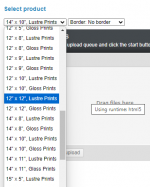
1731856112393.png


1731856257733.png

If the customer now wants to frame in a 12x8 frame, the border would need trimming off, which they can do or a framer can do etc. so that's fine.

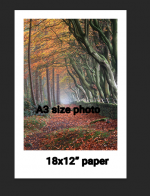
If I sold an A3 photo, so the dimensions of the photo are A3 (11.7 in x 16.5 in) and as I want a border around this photo I would need to buy the next size paper up from A3 which is 18x12 inch paper

The result looks like this. There's a huge difference between the border widths. Is this normal and common practice?

The thing is whenever I see photos of people's prints at their exhibitions they always seem to have a more or less uniform border all the way around and this is what I am struggling to understand.

And also if I sell my photos on my website do I say the photo is A3 and expect them to know that the photo is indeed A3 size so the paper size must be bigger than A3 or do I say, this is an 18x12" print
1731856725823.png
 

Attachments

  • Untitled-3.jpg
    Untitled-3.jpg
    153.5 KB · Views: 0
Why go up a paper size. Just make the print a bit smaller. A border is required if the customer is going to be framing the image anyway.

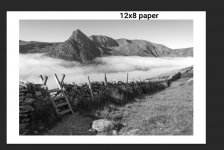
Like this? Then the paper is 12x8 and the photo is resized... how will a customer know what size the actual photo is as I've now had to resize it to be smaller than 12x8 or does it matter?

If I do that and want to sell the print on my website do I say the actual print is 12x8"?

1731860100173.png
 
The thing is whenever I see photos of people's prints at their exhibitions they always seem to have a more or less uniform border all the way around and this is what I am struggling to understand.

Probably because the aspect ratio of the image is the same ratio as the frame. They also probably have a mount too rather than a white border on the print.
 
Like this? Then the paper is 12x8 and the photo is resized... how will a customer know what size the actual photo is as I've now had to resize it to be smaller than 12x8 or does it matter?

If I do that and want to sell the print on my website do I say the actual print is 12x8"?

View attachment 438934

This seems to be the norm. The paper size is the standard not the print size. If you order a 6x4 from Boots with a border you get a 6x4 bit of paper with a print and border.

I quite like how Simon Baxter does it.

A3 (Print Area 37cm x 25cm)

There's nothing wrong with a bigger border at the bottom. It's just down to the aspect ratio and can be trimmed for framing.
 
Last edited:
  • Like
Reactions: smr
This seems to be the norm. The paper size is the standard not the print size. If you order a 6x4 from Boots with a border you get a 6x4 bit of paper with a print and border.

I quite like how Simon Baxter does it.

A3 (Print Area 37cm x 25cm)

There's nothing wrong with a bigger border at the bottom. It's just down to the aspect ratio and can be trimmed for framing.

Thanks for explaining that. I'm starting to understand more now I think - I've always thought that when I see prints for sale and the sizes available that they are the size of the actual photo and this is what's been confusing me.

I've just sold my 50th print on Etsy yesterday and have sold them all completely borderless, edge to edge and at various paper sizes. Never had any complaints about this which is fine but as I'm selling in a shop I want to sell with what looks like a border so they look more like art prints and less like posters. I don't want to mount them as I feel that the customer will want to choose their own mount and frame.

So I could do what Simon does - I like the way he does that too, so A3 paper makes for a nice border with 3:2 ratio. I guess I'd just have to find the relevant paper size for each aspect - so if the photo is A3 size I'd have to find the relevant paper for that. I don't mind if the border is bigger one side than the others though, as you say people will trim it if necessary.

I'd rather sell my prints online with a border as well I think so that they are easier for mounting / framing and also being able to sign some would be something I am interested in.

I don't want to put a photo up for sale on my website and say its A3 size and then when they receive it they were expecting the photo to be A3 size, not the actual paper, if that makes sense. And this is probably why I am confusing myself - I've sold prints and stated the exact size and that's what they have received, so that's why I'm unsure.
 
When I print for others I always state the paper eg. A3 etc. so far no one has complained about the border I leave as the image may be panoramic or square etc. - this allows them to decide if they want a white border to show when mounted and framed or they cut the mount to the size of the image, when advertising you can always say printed on A3 - image size = YY x ZZ then there is no worry :)
 
  • Like
Reactions: smr
When I print for others I always state the paper eg. A3 etc. so far no one has complained about the border I leave as the image may be panoramic or square etc. - this allows them to decide if they want a white border to show when mounted and framed or they cut the mount to the size of the image, when advertising you can always say printed on A3 - image size = YY x ZZ then there is no worry :)

Excellent. This does look the best way to do it. I'll do the same thing. I may buy my own A3 Printer so I can do my own prints rather than rely on a lab for everything, although I will have to use them for larger than A3 prints.

Thanks for the answers. Definitely the best way to do it, paper size is A4/A3/A2 and then state the size of the actual printed dimensions within.
 
Excellent. This does look the best way to do it. I'll do the same thing. I may buy my own A3 Printer so I can do my own prints rather than rely on a lab for everything, although I will have to use them for larger than A3 prints.

Thanks for the answers. Definitely the best way to do it, paper size is A4/A3/A2 and then state the size of the actual printed dimensions within.
Don't forget A3+
 
Add the print border to the image in Photoshop- ensuring that the aspect ratio of the TOTAL image plus border matches the chosen paper size. This way you have control of the outcome.
 
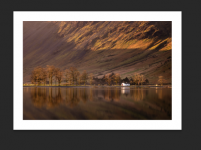
So I'm going to get a few prints done for the shop. for my 3:2 ratio images they fit nicely on A3 paper and look like this with a nice width border.


1732022256655.png

I have some grey A3 backing board which is exactly A3 size so it means that the paper may even overlap the board by a mm or two. Does this matter do you think? Or do you know a better way of doing this?

Also I could sign the print in the bottom right corner. Is this customary and people wouldn't mind there being a signature ?

Also, lastly, do you think it is worth typing the location of the image and if so what's the best way of doing that?
 
As for signed copies, i would just mention that that is an option for the customer. For them to choose.
 
In this case I suggest this is the job of the mounts. You can get double, or even triple mounts in various configurations. The choice is yours, or maybe rather your customer's
 
Back
Top