
Printing paper profile

MiqsPix

Suspended / Banned
Messages
165
Name
Roger
Edit My Images
No
When I print a colour patch file for a supplier to produce a paper profile from my Canon Pixma Pro 10 this warning appears. I have been printing for years but never had this before. I am printing from the Adobe Color Printer Utility app on my iMac running Ventura OS. As far as I know I am using the current Canon driver. It prints ok but how do I know it is colour correct? Anyone help please?
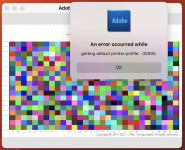
Screenshot 2023-01-24 at 14.06.46.png
 
I cannot speak for using with a Mac but IIRC on Windows the instructions said to turn off Colour Management in the printer driver. What I cannot recall was whether I did (or needed to) that from within the Adobe Utility or before I launched the utility.

PS this was to get profiles made for my Epson ET-8550....but the make & model should not matter!
 
Thanks yes there should be no colour correction. By using this utility I would assume that it has been done. Therefore the "default printer profile" is with no correction and would indicate that the image is basic and untouched. It's just that I have never had this warning before.
 
I don't know which paper supplier you are sending this to but when I have done this in the past it has been a requirement that you use the "Adobe Colour Print Utility" rather than your normal editing/printing application.

Of course this may not be the case for your supplier :)

Sorry if this is a red herring.
 
Thanks yes there should be no colour correction. By using this utility I would assume that it has been done. Therefore the "default printer profile" is with no correction and would indicate that the image is basic and untouched. It's just that I have never had this warning before.
Two thoughts

1) just check before you launch/start the ACPU that the driver setting has indeed been set to "no colour management" NB AFAIK the ACPU is a dumb utility and though it has to print via the driver it has no control over the driver settings.

2) a Mac issue I keep reading about is to avoid like the plague Apple Airprint, which I understand is a cut down driver created by Apple. So something to check that you don't have that installed (possibly by default by a Mac OS update (to Ventura???)
 
Thanks. I don't use the Apple AirPrint for printing except when printing non critical images such as from iPhone etc. All major printing is done using the Canon CUPS driver for the pro 10.
 
Back
Top