
Printing images

Graham

Suspended / Banned
Messages
7,448
Name
Graham
Edit My Images
Yes
Hi all,
Sorry if this has been asked before.
I have always understood that my monitor is brighter than it should be and that itself brings errors.
I am wanting to have some of my bug shots printed but if I upload to a printing website my return shot will be "dull" compared to what I see.
I don`t go in for all this extra techy stuff for calibrating my monitor as I don`t as yet have the money but do I really need it?
So the question is, how do I know when my shot is "right" for uploading to a site for printing, I mean, if you wanted a printed shot would you want a return darker/less colourful than what you expected?
Heres a image I recently sent for mounting but it came back darker and the orangy/yellow on the wings was also a different shade. What would you do to make sure you got the same/near enough same image back.
Do I need to brighten my shot by much to get the same return?
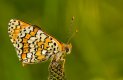
Glanville Fritillary (Melitaea cinxia) 3.JPG
Thanks
Graham
 
I'm going through the same dilemma (and not for the first time) over in the Printing forum.
 
Colour correction: I have a professional (not photo) printer friend who has never calibrated his monitor. He uses the colour controls on his monitor to match the colour to a test print - and has done for >20 years. If you've had a print done of this, you could just adjust your monitor settings to match the print. That way, your adjustments will look the same. It's cheaper than buying a calibrator, and for me, that works fine.

Brightness: Images change their appearance depending on the paper you're using. If you're sticking with the same printer & paper, you can adjust your monitor to look like your print as above and you should be good to go.

Contrast: This can vary quite significantly depending on paper, and some papers need a boost to the contrast to print like the screen looks - especially with retina displays and especially on matt papers. Soft Proofing tools (Lightroom has one, but I don't know what software you're using) are especially helpful in dealing with this.

Changing your printer, or your paper will result in different results though so it's not perfect. The best way is with a proper tool, but like you, I don't have the cash for that, so I eyeball it. But home printing means I get to experiment to get it right. I'm at a point now where what I see on the screen is what comes out of the printer. I have no idea what those prints would look like from DSCL, or Ilford, but as I'm getting consistent results, that's fine by me.
 
I'm going through the same dilemma (and not for the first time) over in the Printing forum.
There's a printing forum?
 
Colour correction: I have a professional (not photo) printer friend who has never calibrated his monitor. He uses the colour controls on his monitor to match the colour to a test print - and has done for >20 years. If you've had a print done of this, you could just adjust your monitor settings to match the print. That way, your adjustments will look the same. It's cheaper than buying a calibrator, and for me, that works fine.

Brightness: Images change their appearance depending on the paper you're using. If you're sticking with the same printer & paper, you can adjust your monitor to look like your print as above and you should be good to go.

Contrast: This can vary quite significantly depending on paper, and some papers need a boost to the contrast to print like the screen looks - especially with retina displays and especially on matt papers. Soft Proofing tools (Lightroom has one, but I don't know what software you're using) are especially helpful in dealing with this.

Changing your printer, or your paper will result in different results though so it's not perfect. The best way is with a proper tool, but like you, I don't have the cash for that, so I eyeball it. But home printing means I get to experiment to get it right. I'm at a point now where what I see on the screen is what comes out of the printer. I have no idea what those prints would look like from DSCL, or Ilford, but as I'm getting consistent results, that's fine by me.
Thanks for your input, I'm not using a home printer, as stated above I'm thinking of uploading to a printing company online.
Your comment about adjusting my monitor to the print I have had done is a good idea though but I do understand that all prints are dependent on paper and their software.
 
Yep, but if you stick to the same printer (printing company) and the same paper, you should be ok as they're likely to do the same thing with all your photos.

Should being the operative word :)
 
Yep, but if you stick to the same printer (printing company) and the same paper, you should be ok as they're likely to do the same thing with all your photos.

Should being the operative word :)
Gotcha
 
Back
Top